How to Repost your Stream Clips on Instagram

As a content creator or live streamer, you no doubt already have an Instagram account, along with Twitter and Facebook. While it is likely true that you are already posting in a bid to get noticed among the never-ending feeds of content, are you posting the right type of content?

While it is a good practice to tell your audience when you are going live, did you know that according to a recent study by Mention, Video posts receive 38% more engagement than image posts? There is a reason more, and more creators are leveraging video on Instagram as part of their strategy to drive viewers back to their channel.

To get ahead of the competition, here are a few clever hacks you can use to help you make the most of your Instagram, even when you are not streaming. It’s all about cleverly recycling your content, and posting it meaningfully to grow your channel. Here are a few simple hacks to help you make the most of your content, and easily repost clips on to Instagram.

Finding the right type of content

If you are going to go to the trouble of reposting your stream clips to Instagram, it’s vital to ensure that what you are posting is engaging. First and foremost, targeting is everything. One good example could be putting together a short thirty-second moment, of something funny that happened on stream. For gamers, maybe you are playing a survival horror, and something jumped out at you, causing you to react. A moment like this can be instantly enjoyable to new viewers, giving them a taste of both the type of games you play and your personality. For non-gaming content such as a webinar or vlogging, clipping together a segment that is both short and succinct, can prove to be alluring to viewers, wanting to go back and watch your archive, video or subscribe to be notified the next time you go live.

Outside of simply posting to Instagram, stories can also be a great way to drive viewers to your channels, as they provide a more immediate and engaging way for you to showcase your content to viewers. Selecting a few choice clips, and posting them as a story can be a great way to inform audiences of the type of content you are making.

Picking the right tools for the job

Selecting the right tools for the job is everything, and when it comes to creating highlights of key moments from our stream there are a few ways you can do it. If you are streaming with OBS one of the best practices you can do is to start writing down time stamps, using a pen and paper while you are streaming. This way, you can easily make a note when something cool happens on stream, and then go back to it. If you have viewers, and stream on Twitch, you can also ask viewers to clip the moment, for you, so you have a healthy amount of content to review.

Alternatively, if you use XSplit Broadcaster or XSplit Gamecaster, you can assign a hotkey to insert cue points into your broadcast. Cue points can be a handy way to identify critical moments during post-production.

Speaking of post-production, and selecting the right tools, it’s worth downloading a video editor so you can easily import your recordings and clip them. There are a few different choices out there, most notably Adobe Premiere, which is an industry-standard for professional non-linear editing software. Alternatively, you can also check out XSplit Express Video Editor, a free and quick solution for editing clips in seconds.

Once you have selected your software and captured your recordings, its time to start editing, a good rule of thumb when reviewing your footage to post to socials is to try and find two or three key moments, and then experiment with regards to the duration and of course, the caption.

Picking the right tools for the job is everything, so make sure you choose an editor that allows for easy clipping and exporting.

A quick guide to aspect ratios

When dealing with multiple platforms, and mixed media, complications can arise along the way, especially when it comes to aspect ratios of your content. If you are uploading gameplay footage, there is a good chance that it is captured in 16:9, meaning that when you upload it to Instagram, you will have to either sacrifice screen real estate (by uploading the clip with borders) or zooming in on a portion of the clip. Keep this in mind when uploading your content. A good rule of thumb would be to always show the clip in its original aspect ratio unless there is something specific you want to zoom in and focus the viewers’ attention to.

Creating a PC to Mobile Workflow

When saving your clips, and trying to upload to Instagram from a desktop, you may find the experience limiting. This is because Instagram does not offer a proper way to upload content from your PC easily. While there are workarounds in the form of a few third-party apps, its generally recommended to instead upload your clip to Instagram via a phone or tablet.

The reason for this is simple; native mobile Instagram apps are far superior, offering the full suite of filters, badges, and captions. So how can you quickly transfer your finished clip from PC to your mobile device? While using a 3rd party messenger service can be convenient such as What’s App, or Facebook Messenger. Quite often, the clip will be highly compressed, sacrificing quality in favor of file size.

A more convenient alternative would be to upload your clips to a cloud storage solution such as Google Drive, or Dropbox. Both offer space for free, with their mobile apps downloaded, it can be a convenient way to organize and upload clips from your phone easily.

When posting, timing is everything

So you have your finished clip, and you are ready to repost it to Instagram! Before doing so, consider that timing is everything. According to Sprout’s recent 2019 study of the best times to post on Instagram, daily on weekdays (Tuesday to Friday) between 10 am – 3 pm generally nets the best positive results.

This pocket of high engagement can prove to be a great testbed for trying out different clips to measure what has the best results. So consider initially testing 2-3 clips across the week, and utilizing hashtags. Choosing hashtags is important for ensuring your content is targeted towards the right audience, for a list of some popular hashtags take a look at this handy study from earlier this year by Oberlo. Incidentally, the most popular hashtag on Instagram is #love!

Building an audience is a long-term goal

The purpose of reposting your stream clips to Instagram is really about maximizing your channels, your brand, while also having an opportunity to recycle footage already shot. Despite these tips, though, it would be unrealistic to assume that you can build an audience overnight. Like live streaming and content creation in general, consistency is key, and by regularly uploading your content to other channels off of Twitch or YouTube, you stand the best possible chance of attracting new viewers and raising your profile. So if you are already streaming or uploading YouTube videos, why not give it a try?

TL;DR List of Tips and Tricks

  • Add cue points to your live streams to find the best moments to highlight
  • download an editor to easily cut together your clips, start with some initial 30-second segments.
  • When you have exported your clip, use Google Drive or Dropbox to easily access and post to Instagram from your mobile or tablet device.
  • Timing is everything, weekdays between 10 am – 3 pm generally gives the best results.
  • Building an audience takes time, post consistently, and don’t give up! Experiment and find out what works for you.
8 Ways to Make Money on Twitch

Twitch.tv is one of the best ways to make money if you’re looking to create live content revolving around gaming, art, traveling and much more! This article will cover a variety of ways on how to make money on Twitch.

Direct Donations

The easiest way to start making money on Twitch is to set up a donation button. All you need to do is set up a PayPal account. Once you have set up a PayPal account, you just need to create a PayPal link and add it to your Twitch profile. Your Twitch profile allows you to add panels that have links to external sites. One way to attract attention to your donation button to put an attention-grabbing graphic. 

Paypal donation button

Donation Alerts

Most streamers display an alert on their broadcast to incentivize Twitch donations. You will need to sign up for a service like Streamlabs or Stream Elements to be able to display these alerts. Once you have created an account, look for an alert box widget. Alert boxes allow for unlimited creativity as you can add various graphics, sounds, gifs, and memes to display your viewer’s donations. One recommendation is to not make the alerts too obnoxious as this will dissuade your viewers from donating. Please note that some of the services may charge a fee for processing the Twitch donation.

Donation alerts

There are a variety of ways to incentivize Twitch donations. You can set up donation goals to get a new piece of streaming equipment or allow song requests to be made via donations. These can all be displayed on your stream as a call to action for your viewers.

Donation goals

Twitch Partnership and Affiliates

The next best way to make money on Twitch is to become a partner or affiliate. Becoming a Twitch affiliate has lower requirements and allows you to receive Twitch bits and subscribers. Twitch bits are currency your viewers can buy from Twitch and donate to you through your chat or Twitch extensions. You can further incentivize Twitch bits by displaying them on your stream alerts. Subscriptions are monthly recurring payments your viewers can opt into. These can allow access to ad-free viewing, custom emotes and special icons in your chat. You can offer additional perks like access to a private discord chat. Subscriptions are the most consistent way to make money on Twitch and the product you promote the most through alerts on your stream and your channel page. Twitch also allows people who have an Amazon Prime account to subscribe to your channel at Twitch’s expense, but these subscriptions do not automatically renew so be sure to remind your audience to renew their free subscriptions. Other viewers can also gift subscriptions to your audience as well. Finally, there are multiple tiers of Twitch subscriptions, so viewers can give you more money per month.

Twitch subscriptions

If you can reach the level where you can become a partner on Twitch, then you receive access to additional revenue streams. The best way a partner can make money through Twitch is via ads. When you are a partner, you can make money off the Twitch Ads your viewers see. In your Twitch dashboard, you will see a button where you can trigger ads for your viewers to see. Make sure not to spam your viewers with too many ads, it’s better to chunk them into a few minutes per hour.

Twitch ad breaks

Twitch also offers bounty boards to their partners. These bounties are partnerships Twitch has entered with various companies that allow streamers to earn cash from promoting specific products. This can vary from running a trailer for a movie during your stream or playing a specific game.

Affiliate Sales

Another way to earn income from your Twitch stream is through affiliate sales. Affiliate sales are when someone buys an item from a link you post and you earn a percentage from that sale. Since Twitch is owned by Amazon, it has directly integrated its own Amazon Associates affiliate program into Twitch. Once you sign up for Amazon associates you can enable the Amazon Blacksmith extension, where you can list all the different items you use for your stream.

Twitch affiliates

Patreon

An additional method to make money on Twitch is through Patreon. Patreon works like a Twitch subscription, but you don’t need to meet any specific requirements to create a Patreon account. Patreon allows you to offer various tiers for a sponsorship that can offer different incentives such as access to a private Discord and special shoutouts on stream. You can also display new Patreon subscribers on your stream via web-based alerts as well.

Merch

After you’ve built up a community and viewer base, a great way to make money from your Twitch content is by selling merch. One of the most common merch items is T-shirts with your logo. There are a variety of sites that will allow you to sell merch such as Teespring or Design by Humans. Merch sales can also be displayed on your stream via web alerts and your channel page.

Sponsorship

Finally, one of the most lucrative ways you can make money on Twitch is by doing sponsored streams. After you have spent some time building a dedicated viewer base, you should start marketing yourself to sponsor. A sponsor can be anything, from a soft drink to a keyboard manufacturer. Some of the most lucrative sponsorships are companies that pay you to play their games on stream. You can earn large amounts of money per the number of viewers watching and how long you stream the game.

Archives/Highlights

Finally, it is good to archive or create highlights of your streams for YouTube. Once you gain enough viewers on YouTube, you can apply for their partner program to make money from ads. This will also allow you to claim ad revenue from other channels that may be uploading your content. It is a great form of passive income that can build up over time.


That wraps up the various ways you can make money from Twitch. While it may take a while to earn enough to quit your day job, never stop finding ways to promote and monetize your content. If you have any questions, don’t hesitate to ask them in the comment section below or through our social media channels.

How to be a Successful Twitch Streamer?

Now that you’ve set the perfect Twitch overlays, figured out your Twitch settings and have been streaming for a while, you’re probably wondering how to become a top Twitch streamer. It is no secret that for the highest-paid Twitch streamers, most of their income comes from having a large and dedicated community, which creates additional income opportunities. If you’ve been wondering how to become a successful Twitch streamer, then this article will cover the variety of ways you can make a living from it.

Growing an audience

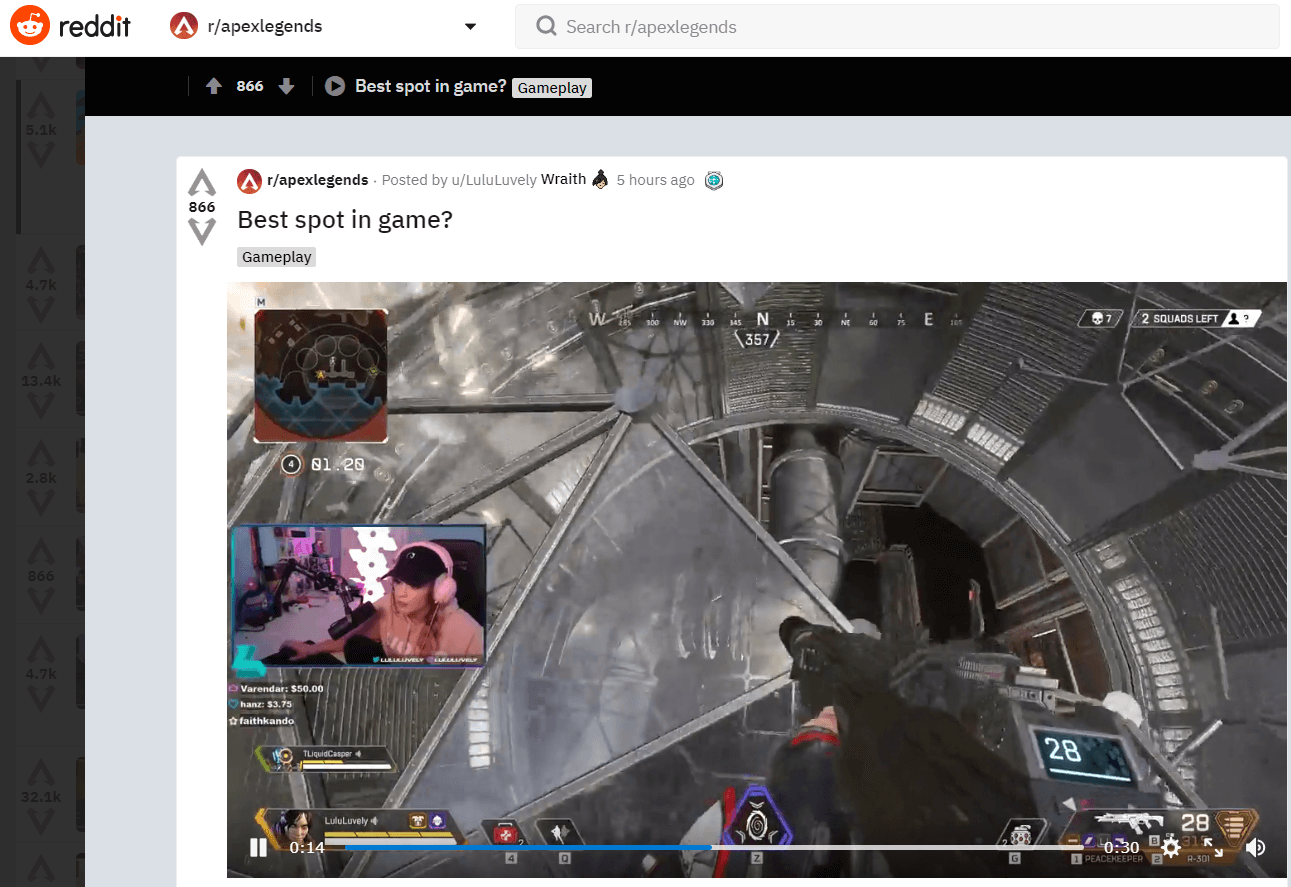
The first and most important goal of your Twitch career is growing an audience or community. You need to find ways to get people to watch your streams. First, post your upcoming and live streams across all your social media channels. Your first viewers will likely be friends and family. In order to gain new viewers, you will need to figure out what audience would be best suited to your content. For example, if your favorite game to stream is Apex Legends, create clips of your best moments on stream and share them on the Apex Legends Reddit and community forums. Make sure your clip includes the link to your stream and your stream schedule.

Reddit thread stream clip

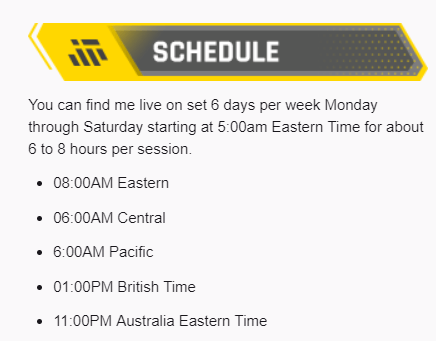
Speaking of stream schedules, it is very important to set and maintain a streaming schedule. It will be easier for people to find and return to your stream if they know exactly when it is live. Try to be conservative with your stream schedule in the beginning and be sure to update your community in case you have to cancel a stream.

Stream schedule

If you have the budget, you can also pay to boost your posts on a variety of social media sites. When you first start out, you may not have a large following outside your circle of friends, so you can use the advertising platforms of various social media sites to boost the visibility of your live stream to specific demographics. Just be sure to put your advertising dollars towards audiences that will have an interest in the content you produce.

Another way of gaining an audience is by tapping into the audience of another content creator. To do this you will need to network with other content creators. You can network in a variety of ways, such as being an active member of their community or by meeting fellow content creators at gaming events. Once the connection is made, you can ask them to host your channel or play with them on stream. Twitch has introduced a new feature known as squad streaming to help with co-promotion. Many of the top twitch streamers got the first boost in their career by being hosted by another popular Twitch streamer.

Twitch hosting

Finally, another way to gain viewers is by doing giveaways. You can set follower or viewer goals to giveaway prizes. The only issue with this method is that viewers usually will only stay around for the giveaway. If you plan to do a giveaway or other paid methods to gain traffic, make sure you are showcasing your most engaging content in order to get viewers to stick around.

Monetizing your Audience

Once you have built up a stable and hopefully growing viewership, you can start to monetize your viewership. If you’ve been wondering how much Twitch streamers make, then this section will cover the variety of ways they can make money from their content.

Twitch offers both Partner and Affiliate programs for those who wish to monetize their content. Becoming a Twitch partner allows you to run ads during your stream, which you earn revenue from based on the number of people who viewed the ad. Both Partner and Affiliates also gain access to subscriptions. Subscriptions are purchased by viewers to gain access to custom emotes and badges in your chat. There are three different subscription tiers and the revenue is split between you and Twitch. Additionally, partners may be given access to bounty boards where Twitch allows you to stream specific games and earn revenue from the number of viewers watching. Tier 1 subscriptions can also be purchased for free if the viewer has an Amazon Prime account and you will still receive at least \$2.50 per subscription.

Twitch subscriptions

Subscriptions and ad revenues generate most of the income for the top Twitch streamers. You want to se tup your stream in a way that incentivizes subscriptions. This can include setting up subscriber alerts, subscription goals and using Twitch extensions that remind viewers when to renew their free subscription. For viewers that aren’t subscribing, use a chatbot or ask on stream to disable adblockers while watching. The highest-paid Twitch streamers also get to ask for better revenue sharing agreements for subscriptions and ads.

stream tipping and donations

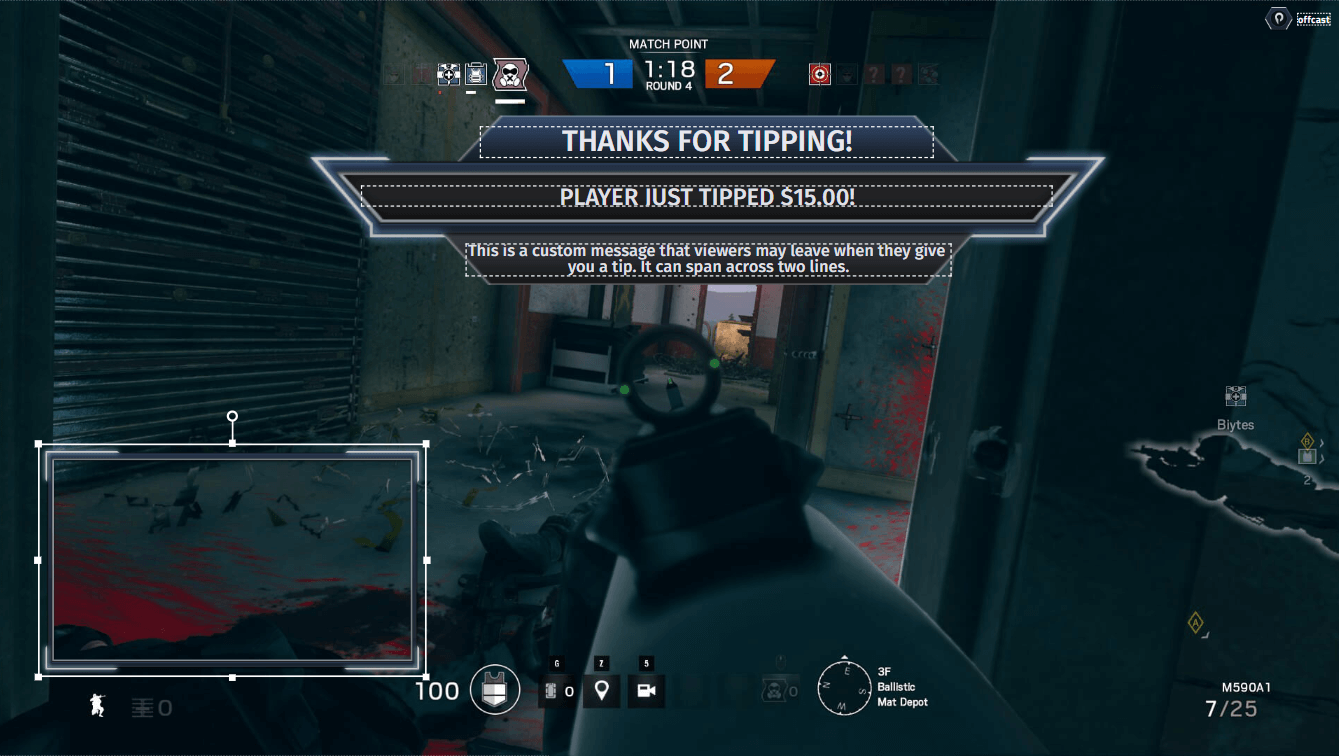
The next method that you can earn an income is through donations or tips from viewers. The most common method is putting a link to your PayPal account on your profile and ask viewers to tip you to support the stream. You can then use a variety of services to display these tips on your stream and further incentivize this by allowing viewers to add messages to the tips, trigger special alerts or allow viewer-submitted videos to be played. It is a good practice to read any messages your viewers send no matter the donation amount so that they will continue to support your stream. You never know who is viewing your stream, so you may end up on a viral video of someone donating a huge amount of money to your channel.

If you don’t qualify or don’t wish to join Twitch’s partner program, you can create a Patreon account. Patreon is similar to Twitch subscriptions in that your viewers can subscribe to you for a monthly amount to gain access to a variety of perks like access to a private Discord or shoutouts on your streams.

If you have a large enough community, you can begin to sell merch. The most common merch is T-shirts and these can be of your logo or anything that you feel your community will enjoy. Popular sites like Teespring and Spreadshirt are great places to start creating your own merchandise.

Eventually you’ll be able to procure sponsorships for your stream. Sponsorships can vary. A sponsor may pay to have their logo or advertisement on their stream. Some of the most lucrative sponsorships are those that pay you to play or promote a specific game. When you are looking for sponsorships, it is important to create a deck highlighting your stream viewership and content. Also, be careful on social media and on stream to not engage in any behavior that would drive away sponsors.

Building a Streaming Career is a Long Term Goal!

Being a top Twitch streamer won’t happen overnight. It can take months or years before you build a sizable enough audience to make streaming your full-time job. As long as you continue to network, promote your streams and maintain a consistent streaming schedule, you’ll eventually find success!

How to Live Stream on Facebook

Facebook allows you to live stream all kinds of content, from your daily life to creative artwork and even showing off your gaming skills. This article will show you how to go live on Facebook.

From your Mobile Device

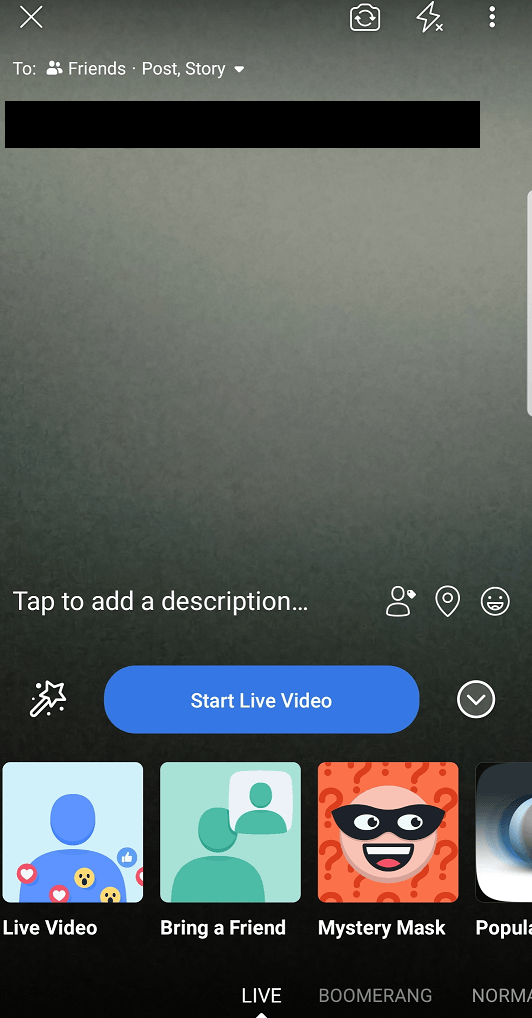
The simplest way to start a Facebook live stream is in the palm of your hand. You can go live directly from the Facebook app on your mobile device. When inside the app, click on the camera icon and then click on the live option. You will need to set where your live stream will be posted along with adding a description to your live stream.

Facebook live stream description

You can also add fun effects like masks for your face and different backgrounds. Once everything is configured to your liking, click on the start live video button. Live streaming on Facebook requires a lot of bandwidth, so it is recommended to connect your phone to wifi for streaming or you will use a lot of your mobile data.

From your Web Browser

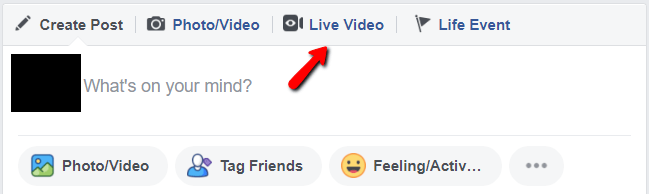
You can also live stream to Facebook directly from your web browser. Go to your Facebook profile and in the section where you can write a new post, you’ll see an option for live video.

Facebook live video

You will be prompted to allow Facebook to access your webcam and microphone. Once permission is given, you will be taken to a window where you can set the details for your live stream post. You can even share your desktop if you want to broadcast your gameplay or creative works. If you have a compatible browser like google chrome, you can install a plugin that will allow Facebook to broadcast your desktop.

Facebook screen sharing plugin

This is a great way to start sharing live stream content on Facebook, however, you will be limited in the amount of customization you’ll be able to add to your stream to make it stand out. If you plan to broadcast gameplay, the desktop capture won’t allow you to stream silky smooth 60 fps gameplay.

Creating professional or gaming streams on Facebook

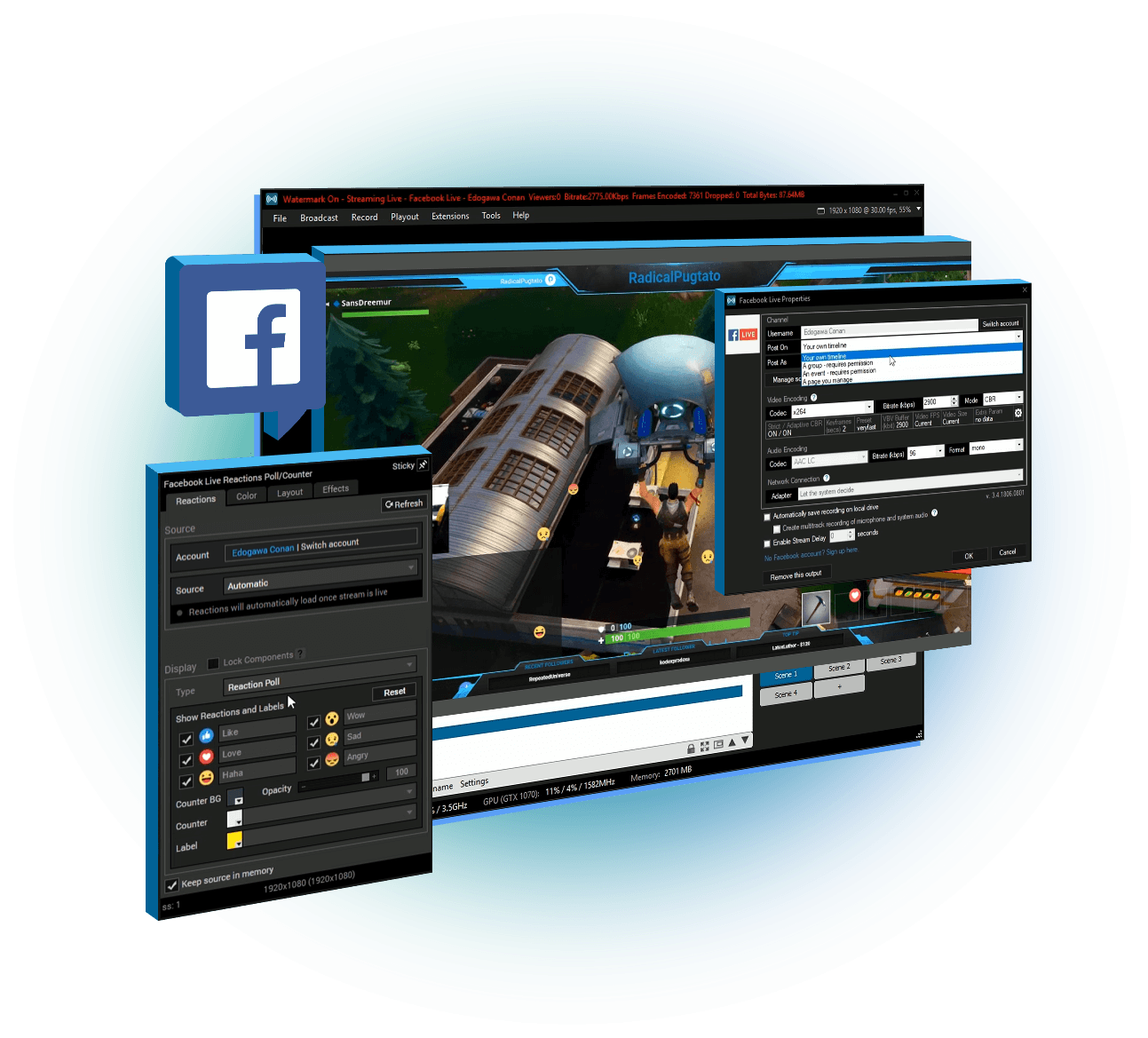
If you’re looking to start a streaming career on Facebook Gaming or just want to create professional Facebook streams, then you will need to use broadcasting software like XSplit Broadcaster. The XSplit team has worked closely with the Facebook live stream team to create the easiest method of producing high-quality live streams. XSplit Broadcaster allows you to capture your games in Full HD and with the highest frame rates. You can also add a variety of production elements to your broadcast, such as web-based overlays, capture cards connected to professional cameras and switch between different scenes.

Live stream on Facebook

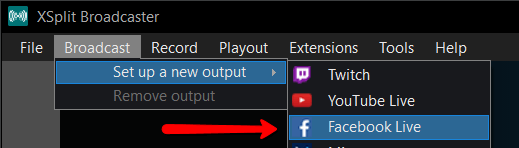
To set up a Facebook live stream with XSplit Broadcaster, click on the broadcast menu, set up a new output and click on Facebook Live.

Facebook Live channel plugin

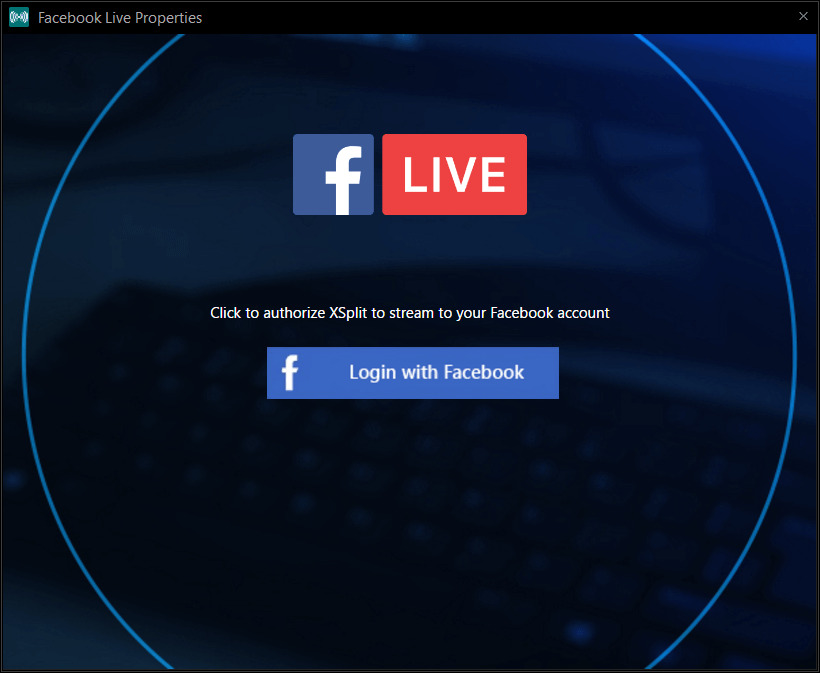
A window will pop up that will prompt you to log in to your Facebook account.

Facebook Live properties

While logging in, you may be asked which pages you wish to give XSplit permission to broadcast to on Facebook.

Once you have authorized XSplit to broadcast to Facebook, you will need to set the details for your stream. First, select if you wish to stream to your Timeline or a specific Facebook page. Next, select the resolution and frame rate for your stream. A recommended starting point for gaming streams is 720p at 60fps. Next, select the encoder for your broadcast, most streams use x264, but this will require a beefy CPU for a full HD high frame rate broadcast. If you have an NVIDIA or AMD GPU installed, it is recommended to use their respective hardware encoders namely VCE and NVENC. Finally set the bitrate, it is recommended to keep the bitrate in the green section so that your viewers won’t encounter any buffering while watching your stream.

Once you click start streaming, an additional window will pop up where you will input the details for your Facebook live stream post. If you plan to be visible on Facebook Gaming, make sure to set the title of the game you will be playing. If you plan to stream to Facebook Live for more than 4 hours, make sure to enable “continuous live”. Click on start broadcast and you will now be live streaming to Facebook!

While you are streaming to Facebook, XSplit Broadcaster will give you status updates on the health of your stream at the top of the program. The most important section to monitor is “dropped frames”.

Dropped Frames

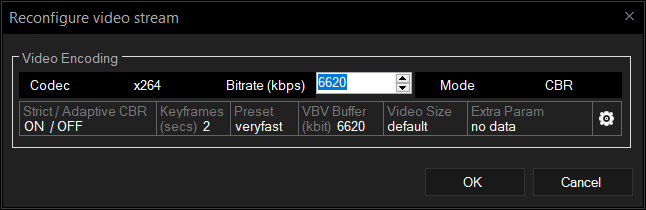
Dropped frames can occur for a variety of reasons, but the most common is that you set your bitrate too high and your internet doesn’t have enough upload bandwidth. To change your bitrate, click on the broadcast menu and right-click on your Facebook channel. This will open a window where you can adjust your bitrate.

Facebook Live stream settings

How do I let people know I am streaming on Facebook?

Now that you know how to live stream on Facebook, you are going to want to get people watching. First, make sure that your live stream post is set to public so it will appear on your timeline as well as others. If you are streaming to a Facebook page, it is recommended to share the live stream post on your personal timeline so that family, friends, and colleagues can tune in. Make sure to keep a consistent stream schedule so people will know when to drop by your page or profile. If you will be streaming games, make sure to set which game you will be playing so that people can easily find you when searching for whichever games they wish to watch. Finally, be sure to promote your Facebook live stream on all your social media channels.

Finding your Voice as a New Streamer

One of the hardest things to deal with when you start streaming is not having a chat to interact with. When you have zero viewers or even a few that aren’t chatting, it can be hard to keep up the motivation to be entertaining. It can be even harder to figure out how to be entertaining. We here at XSplit want to help you with your broadcasting career by offering some tips on how you can find your voice as a new streamer or a content creator!

Talk about the game

While this may seem obvious, this is really the cornerstone of broadcasting games. However, instead of just doing play by play, talk about various aspects or details about the game. If you’re playing a single-player game you can talk about where you think the storyline is going, who is your favorite character, or if it is a retro game, what you were doing when that game was released. If it is a multiplayer game, you talk about your strategies or get hype about impressive plays. While a bit risky, you can have some fun conversations using proximity chat or chatting with random players you end up in a party with.

Stream with your friends and/or family

When you start streaming, it is recommended to share your stream on all your social media, including personal accounts. Your first viewers will likely be people you know, but at least you will have people in chat you are comfortable talking to and can give you topics to bounce off of in chat. The same goes for having a group call running with your friends. Dead air can be filled with conversations between your friends.

Write down topics for each stream

Streaming is great in the sense that you can talk about whatever you want, whenever you want, but sometimes it helps to have a few jumping-off points. If you stumble upon an interesting story or have something funny happen to you, write it down on your phone and talk about it during the stream. This is a great way to coax people to participate in the chat since everybody has an opinion on something.

Ask your viewers questions

Prioritizing chat interactivity is great for retaining viewers and making them feel part of a community. You can spur interaction by asking your chat questions like their favorite food or anime. One of the best tactics is to ask your viewers what game you should play or what decision you should make in the game. You may get crickets the first few times, but eventually, someone won’t be able to resist the urge to be a backseat gamer.

Check your analytics

Many of the streaming platforms, such as Twitch, give you detailed analytics showing if and when you had chat activity. If you see a period with a lot of chat activity, check your archive and try to determine what you were doing to drive that activity.

Shout out the lurkers

Your first viewers may not be the chatty type for a number of reasons. However, it is always good to make them feel welcome and part of your growing community by giving them shoutouts every so often. They may even decide to chat after a time!

Be your best self

While being yourself is better than being someone you’re not, what you are aiming to do is to highlight and amplify the most entertaining aspects of your personality. While this is subjective and probably will take the longest time to figure out, usually your friends and family can tell you what they like about you.

If all else fails, play a scary game

People love watching other people get scared while playing video games. Many of the largest content creation empires have been built on this simple notion.

Developing your casting skills for gaming can be a long path, but always remember to try to have fun. If you’re starting your Twitch or YouTube channel as a hobby or new career, it’ll be hard to keep creating if you’re dreading starting a stream.

Do you have any tips on how to get comfortable with the microphone? Let us know in the comments below or on social media (XSplit on Twitter, Instagram, Facebook, and YouTube).

How to Improve your YouTube Search Ranking

Do you create content on YouTube and you want to improve your searchability ranking? You know, we can’t all keep track of all the algorithm changes when it happens – it’s totally out of our control, what we can do as creators is to make sure that our content can easily be searched and optimized for search engine results.

There are many factors that can affect your searchability ranking in this platform. With great content comes great responsibility, in making sure that you have enough information attached to the video that you’re uploading to the internets.

As a content creator, I also struggle with SEO aka “search engine optimization”. But, what does SEO have to do with YouTube? Whether if you’re creating content for fun or for educational purposes – getting more views and people to see it is our main goal. How do you get your content to more people without paying money to boost it? Simple, optimizing it for searchability. Your content has to possess certain words within the title, description and… and…

No need to feel overwhelmed, here are some things that we do to make sure that you can easily search and watch our content.

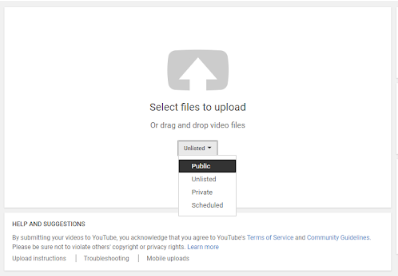
When you click the upload button, you can already set the visibility of your video – you can set it to public right away if you don’t have a set schedule or schedule it anyway if you have the timeline. You can also set it to private and change the visibility whenever you feel like it.

Youtube upload video in public

Okay, now for the good stuff.

Always check your title

The title has to have the essence of what your content is about – does not need to have too many words, it needs to be precise and concise with no bullsh*t nor clickbait-y words (if possible) that deter to the content of the video. It should clearly summarize what it is about and what the audience can expect from it.

Create an informative description

From the title, the audience has gathered more or less the essence of what the video will be about. Here is where you can do in-depth with your description, you can add your sources and references as well. You do know that on the internet that plagiarism is quite rampant and you don’t what to be that person who does not give credit when it is due, right?

Create a thumbnail

Let’s get visual. We all know that people don’t like reading stuff on the internet, they prefer to listen and see whatever is on the content. Here’s where the thumbnail comes into play. It has to be visually appealing, not overly decorated. It has to have an impact and an outlook on what your content is about. It needs to have something that will have people linger on the visual or take a second glance. The more people you get to stop and look at your thumbnail, the more likely are they to click and watch it, does that one make sense?

Don’t forget the tags

Tags are, to put simply, keywords whereby one searches on the engine to look for certain topics or content pertaining to the keyword.

Add it to the appropriate playlist

Adding your videos to a playlist is crucial when you want to segregate your content into categories. It makes it easier for your audience to watch more content of the same category at one go.

Optionals but good to have

The End screen

If you have more time to spare, add a few more elements at the end of the video to direct your audience to another video or playlist. This ensures that they get sucked into the youtube playlist-video loop rabbit hole, if you know what I mean.

Annotation cards

Ever wondered what the little “i” icon on the top right of the video means? We know it as annotations, where you can add a website link or video to direct your audience to another content – this is especially helpful for those who might not be interested in the current video they’re watching and might want to switch to a new one. This you can direct the audience to a video of your own, making them still stay on your channel for a period of time.

Closed captions

This feature brings in more possibilities for a wider audience. Yes, sure you have a dedicated audience that can understand your content with your native language but – someone else from another nationality could’ve been looking for the same content but they might not understand it due to the language barrier. Having closed captions or translated subtitles can be a hassle to work with for every video but it does pay ten-folds in the long run.

Call to action within the video

Use a call to action within the video, usually, content creators add it to their intros and video outros. Here’s an example:

Hey friends! Welcome to the channel if you’re new, hello I’m (insert name here) and I usually upload (what content you usually create on the platform and your schedule, if there’s any). If you’re a returning subscriber, welcome back! For today’s episode, you’ll be (insert a quick summary of content) and if you’re interested in these kinds of videos consider subscribing and click the bell button to get notified every time I upload.

I hope that this helps you a bit with improving your YouTube searchability ranking. If you have other tips not mentioned above, please let us know in the Disqus comments and in our socials.

Tips for Making More Money as an XSplit Affiliate

We created the XSplit Affiliate program to offer the ability to make money to a wider group of people. The requirements used to be much higher and as a result, only select users could participate in the program. With the new program, you can begin making money as an affiliate without needing to have a big viewership (having one does help though). You may only have 150 channel followers but if a good portion of them are interested in streaming, this affiliate program is for you!

We put together this blog post to help you maximize your revenue potential with our program by providing some easy to execute tips that you can implement right away. As you earn a commission on each sale and renewal, we all do well together!

Actually, all the tips mentioned in this blog post works with whatever affiliate product or program you’re in so you’re welcome!

Use the correct link

You’re not gonna believe this but we see a lot of people who represent a brand or product (XSplit included) as an affiliate but don’t use the correct link. Imagine people buying through your channel only to find out that the link you’re using is not the correct one!

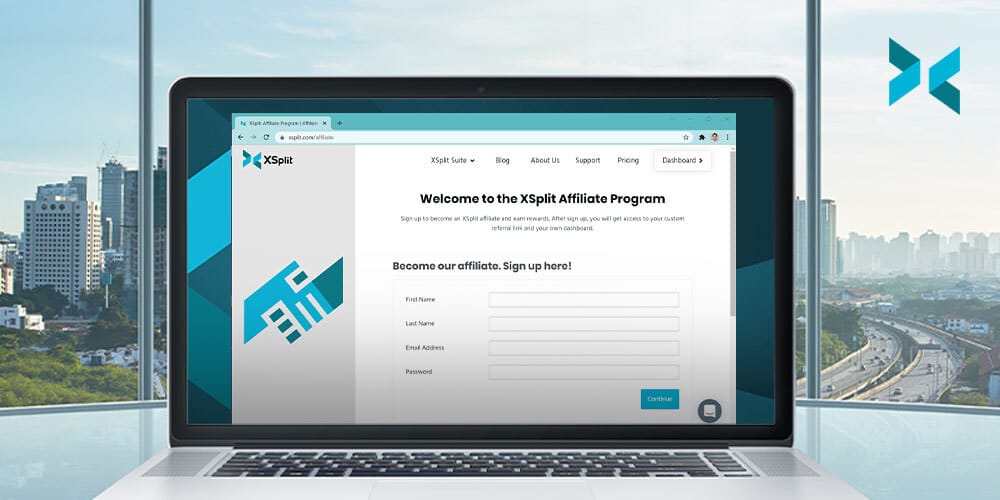
So make sure to go to your affiliate program page, in this case, XSplit Affiliate on your Dashboard, get the correct link from there right on the front page, and use that and ONLY that link. Upon sign up to the program, you will have been given this link.

An image of the XSplit Affiliate link from your dashboard.
This is what your link Affiliate Dashboard (your one will be longer with your personal code in it)

A quick real tip about affiliate links is they’re neither short nor do they link directly to a page without long-ass parameters. So if you’re just linking to xsplit.com, then you know you’re doing it wrong.

Make it visible without being spammy

A common problem for any affiliates is not making commissions and when you ask them where they’re putting the link, they’re gonna say a page or two, like socials or the bio on a streaming site like Twitch, both of which aren’t updated often.

The key is making it visible in as many places as possible. If you just have it on your channel profile page, then why not use a chatbot that auto-posts it in your chat or floats it in your actual stream content? The options here are limitless. Now it goes without saying, but you don’t want to be spammy. As long as the link is promoted naturally and as a part of your ongoing conversation with your viewers, you’re doing it right.

An image of a chat window with a bot posting the XSplit Affiliate link.

Oh and don’t forget other channels and social networks too, something we will go on to discuss here!

Provide value (aka great content)

Providing value, some great buzzwords if ever we heard them! While that may be true, it does hold some real meaning and tends to separate those who make thousands of dollars in commissions from those who make less than a hundred.

The word Value on a scrabble board, something you want to provide on the XSplit Affiliate program!

The key here is creating something beneficial to your viewers and then indirectly selling them whatever product it is you are an affiliate of. A common example is making a video on YouTube whether it’s about walking them through your streaming setup, or a guide about how you do your nifty-looking transitions. You help them learn about something new or solve their problems, and the selling part becomes easy. Put yourself in the viewer’s shoes. Would you rather buy a product from someone who is flat out just telling you to buy something or a person whose content is actually enjoyable and explains why they like to use the product? You be the judge.

An example of a great YouTube video that helps people interested in the product and provides the discount code.

Now before you tell us “I don’t have a YouTube channel, you don’t know me!”, let me tell you first that this exact same thing works for other social networks like Twitter, Facebook, TikTok, Discord (which isn’t a social network by the way), hell even forums! I can’t tell you how many XSplit licenses were sold from those channels with us just providing valuable content to our followers.

Offer discounts

Seasonal discounts are the best and most affiliate products and networks, the XSplit Affiliate Program included, provide that! It’s a no-brainer after all! Someone is in the market to buy a product and you essentially turn that from a prospective one to a sure thing by offering them a discount by using your affiliate link.

An example of a sale for Valentines Day, something you could offer with the XSplit Affiliate Program
This was a discount promo we ran in Valentine’s early this year

We will definitely be letting you know once we have some live discount offers for XSplit Affiliates, but it’s also good for you to just be aware of various shopping periods where people are more likely to spend money.

Bonus tip: Incentivize!

Incentivization is a trick experienced marketers have been using for a long time. It is essentially just offering an additional thing or two whether it’s in the form of a product, service, or entertainment in exchange for buying a product under their affiliate link.

If you are making stream overlays or graphics, you can bundle it when they buy a license using your affiliate link. Or if you have an enormous number of followers on your channels, you can offer to ‘host’ or promote the person on your channels by doing the same. Whatever incentives you think of to use your code (beyond the discount they get already) be sure to check with whatever content provider you’re using what sort of incentives you can and can’t offer!

Join the XSplit Affiliate Program

It’s been out for quite some time now but I just wanted to reiterate again in case you missed the initial announcement. The program is steadily growing with more than 500 happy affiliates inside. Here’s what the program is about in three totally non-pitchy bullet points:

  • You will get a personalized code of your choosing giving your audience 10% off any XSplit Premium subscription
  • For every purchase made using your code you will receive a 10% commission
  • You will get that 10% for each recurring purchase someone makes

Sign up today at xspl.it/affiliate and begin implementing the tips mentioned in this blog post.

Why Content Creators are Switching to Streaming

In recent years we’ve seen the popularity of streaming reach a record high, with the expansion of streaming platforms and the evolution of social websites into offering streaming services for their users.

Facebook Gaming, for one, has grown in popularity since June of 2018; a seemingly big challenge to streaming platforms like Twitch, Mixer, and YouTube – to offer the same platform with the ability to stream easily without leaving the comfort of the website. Recently, Twitch and Discord have announced the impending launch of their own streaming abilities to their followers.

From the front runners of streaming software, XSplit alongside OBS and many more – has sparked a debate of whether content gets uploaded online or you do a live broadcast. With the growing popularity and demand for visually appealing and accessible content – video more than anything has possessed the top ranking for the most likely candidate to entice viewers to linger more, consuming content more than the average image or status posts. Doing live broadcasts or streaming, in general, have its pros and cons. Here are some of the pros that might get you into streaming your content this 2019.

As a (low-key) content creator like myself, there is an existing struggle to create online content consistently as we fight against the algorithm – YouTube, Instagram, Facebook and etc. have ‘em and we have to be consistent in uploading content to make sure that our audiences see it. So, why choose streaming over the usual “plan, edit and upload” cycle.

It’s innovating and creative

Just like normal online video content, it takes a lot of innovating and creativity to make sure that your content is different from the rest. It’s a challenging endeavor but also a rewarding one when you formulate your own style and presentation. More than the visuals, it also takes a lot of personality and charisma to attract and maintain a following. That makes streaming so enticing, it’s so fascinating to see more than just characters on screen but seeing personalities IRL.

Engaging and interactive

I’m not saying that the usual upload content is not engaging nor interactive – depending on what kind of content you might have, live broadcasts are more interesting and entertaining than the usual video content. As you stream, a variety of emotions and reactions cannot be faked or recreated. At the same time, the kind of engagement and interaction varies because audiences can be different for every stream.

Time-sensitive

The hype dies down if you’re not in the moment yourself, the interaction is simply too interesting to pass out for a replay run of the stream. Someone might feel an instant FOMO (fear of missing out) when you miss the streaming session itself. It’s never the same emotions when you’re on a live broadcast and interacting with the audience and merely seeing their comments/ reactions and engaging after. Be there when it happens as it happens, exclusive content and experience on every stream.

It’s fun

No two streams are the same – which makes it more exciting and fun. You have a different mix of audiences every time you do your live broadcast which makes every session interesting. Some might be outspoken, some might be more technical on the way you stream, it can be any mix of personalities.

If there’s anything you want to share with us and the XSplit Community, don’t forget to join our official Discord server here: discord.gg/xsplit and follow us on our socials. For any technical and account related questions, chat with us at xsplit.com/support

Be an XSplit Affiliate and Start Making Money

We’re always working on ways to make using XSplit both beneficial and enjoyable to our users whether through new features and improvements based on your suggestions, further refining our support systems, or even holding occasional promos and giving out free Premium license keys to people wanting to try out our products. Today, it’s about giving you an easy way to make money with your content.

We are excited to introduce the XSplit Affiliate Program!

  • Get 10% incentive for every referral sale made through your referral link.
  • Easily track your referral juice in one glance, from your very own dashboard.
  • Cash in your referral juice anytime you wish.
  • Take advantage of exclusive seasonal discount promotions for your followers.

The opportunity to make referral sales were previously only available to Elites but we wanted to open this up to as many people as possible. With the XSplit Affiliate program, you don’t need a big following at all. All you need to do is sign up, login with your social accounts, and you’re good to go!

Inside the program, you can find your personal affiliate link that you can promote on your channels. You earn 10% of the amount for every sale made using your link. Tracking stats in real-time can also be easily done through a dashboard where you can find metrics such as clicks, commissions, and revenue over a specified period of time.

Join the program today at xspl.it/affiliate and start making money!

XSplit workshop with BrenPro x Playpark

Not very often would we write something local on the blog on the latest activities and community events within the Philippines, this one is an exception. XSplit has recently partnered with eSports team, BrenPro, and Next Talents PH; and local video game publisher – Playpark Philippines for their stream needs.

With eSports and video game tournaments proliferating in the local scene, we cannot deny the expansion of streaming not just abroad but also in the local market. The Philippines having over 108 million people and having named one of the top internet users worldwide staying online for more or less 10 hours a day is no bother. With 72 million who use social media – Filipinos are indeed a formidable opponent in making their online presence known. With the recent boom of mobile gaming and Facebook game streaming in the country – broadcasting softwares have become a need for seasoned and budding content creators. Facebook is the top platform of content sharing and communication to most Filipinos, it has also created a new avenue for gamers and other content creators to share the latest games that are trending in the country today.

Last July 20, the XSplit media team arranged a workshop for these talented local talents and shared their knowledge in setting up and optimizing their stream for better content. Offcasts and Digital Anomaly was there to clarify and answer more of the technical streaming questions.

XSplit continuously supports live streamers and content creators from here in the Philippines and abroad, no discrimination here! Be part of our growing community, follow our social accounts and the official Discord server to join the conversation. If you want to invite us for a workshop or event talk, don’t hesitate to let us know.

Here’s a glimpse of the workshop on the Xsplit Monthly Episode 2 at 0:52.

More photos on our Instagram: