‘합동방송’, 줄여서 ‘합방’이란 말이 있다. 일반적으로 사회에서 합방이라는 말을 사용할 시 방을 같이 쓴다는 뜻으로 해석되는데, 인터넷 방송에도 비슷하게 적용할 수 있는 것이 재미있다.
‘합동방송이란 방송을 누군가와 같이 진행한다는 것이다’라는 전제로 인터넷 방송을 살펴볼 때, 모든 방송은 일종의 합방일 수밖에 없다. 누군가 멀티플레이 게임에서 당신의 대전 상대가 되어주든, 당신의 방송에서 채팅창에 글을 작성해 당신이 그 채팅과 도네이션을 읽고 방송에 송출하여 주든, 당신이 시킨 음식을 배달해 주기 위해 초인종을 울려 그 소리가 스피커로 송출되게 하여 주든, 혼자서 진행하는 1인극으로 인터넷 방송 시간을 전부 메꾸지 않는 이상 결국 누군가는 당신의 방송에 어떤 식으로든 참여하게 되어 있다. 허나 일반적으로 사용하는 좁은 의미의 합동방송은 ‘게스트를 자신의 스튜디오로 초대해 같이 진행하는 방송’을 말하는 것이다.
게스트를 방송 스튜디오로 초대해서 방송을 진행하는 방법은 오래전부터 있었던 방법.
게스트의 종류는 다양하다. 시청자, 지인, 가족, 키우는 동물 등 누구나 게스트가 될 수 있고, 게스트의 초대는 말 몇 마디에 의해 우발적으로 이루어지기도 하고, 계약서를 작성하고 제작 스태프가 투입되어 몇 개월간에 걸친 장기 프로젝트 콘텐츠 합방으로 진행되기도 한다. 합동방송은 스트리머 1인이 제공할 수 있는 콘텐츠의 한계 또는 사물을 바라보는 개인의 제한된 관점에서 벗어나, 기존 시청자들에게는 신선함을 제공하며 신규 시청자들의 유입을 도모하며, 많은 경우 방송에 있어서 긍정적인 효과를 가져온다.
허나 합동방송이 가져올 수 있는 여러 긍정적인 면과 반대로, 제대로 준비되지 않은 상태에서 행하는 합동방송은 오히려 방송의 질을 떨어트리고 논란을 불러올 수 있다. ‘삶은 여행이다’라는 말이 있다. 과정을 즐기는 것 자체를 여행으로 볼 때, 삶은 일종의 여행과도 같다고 할 수 있다. 인터넷 방송도 마찬가지다. 매 방송 방송은 한 번의 여정과도 같다. 예상치 못한 사건 사고가 일어나고, 좋은 사람을 갑자기 만나서 도움을 받기도 한다. 만일 여행의 종류로 비유하여 볼 때 혼자서 진행하는 방송은 배낭여행과도 같다고 할 수 있다. 진행 인원이 나밖에 없으므로 중간에 맘대로 진로를 변경해도 상관없고, 예기치 못한 사태가 벌어져도 책임질 사람이 나뿐이므로 아무런 부담이 없다.
여럿이 하는 방송은 그렇지 않다. 마치 다 같이 간 여행에서 내가 제안한 코스를 친구들이 거부하여 마찰이 일어날 수 있는 것처럼, 내가 합동방송에서 준비한 콘텐츠를 게스트들이 진행하고 싶지 않아 해 속된 말로 방송이 ‘망하는’ 사태도 벌어진다. 합동방송 진행 시 어떤 것들을 하고, 하지 말아야 하는지 간략히 알아보자.
사공이 많으면 배가 산으로 간다.
속담
일단 준비는 아무리 많이 해도 절대로 부족하지 않다는 것을 기본 전제로 생각해 두어야 한다. 준비해 둔 계획이 제대로 동작하지 않을 때를 대비한 예비 계획도 마련되어 있어야 한다. 스튜디오에서 합방을 진행할 경우 참석하는 인물에 따라 카메라의 각도, 조명, 소도구 등이 전부 준비되어 있는지 확인을 거치고, 야외 장소에서 방송을 진행할 경우 반드시 해당 장소에 직접 방문해서(온라인 조사만으로는 충분치 않다) 준비해 둔 계획을 수행하는 데에 어려움이 없는지 확인하여야 한다.
준비가 완료되고 진행을 시작할 때에는 합동방송은 인터넷 방송에서 차지하는 가장 큰 리소스인 ‘인적 자원’을 활용할 기회이며, 이를 최대한 많이 이용해야 한다는 것을 인지하여야 한다. 속된 말로 최대한 많이 ‘분량을 뽑아’야 한다. 중간마다 비는 진행 시간을 최소화해야 하며, 혼자서는 할 수 없는 콘텐츠를 준비해야 하고, 참석 인원 중 준비된 콘텐츠에 참석할 수 없는, 소외되는 인원이 발생하면 안 된다. 만일 어떤 사유로 특정 인원이 소외되어야만 한다면, 해당 인원에게도 메인 콘텐츠 이외의 역할을 반드시 맡겨야 한다. 스트리머가 느끼는 소외감은 시청자들에게까지 전염된다.
참석 인원들 또한 주최자의 통제와 일정에 따르며, 준비된 콘텐츠에 있어서 최대한 적극적으로 참여해야 한다. 기껏 합동방송 자리에 참석하였는데 소극적으로 행동하는 것은 일단 방송 주최자에 대한 예의가 아닐뿐더러, 또한 해당 일정을 준비한 주최자의 의욕을 꺾을 수 있다. 참석 전 미리 자신이 하고 싶은 콘텐츠를 주최자에게 알리거나, 자신이 기피하는 요소를 미리 알려주는 것 또한 필수적이다.
카메라를 가리지 않는다거나, 상대의 말, 속된 말로 ‘오디오’를 끊지 않는 등 여러 기술적으로 주의해야 할 점을 제외하면, 합동방송 시 가장 피해야 할 것은 논란이 될 수 있는 ‘불편함’을 피하는 상황이다. 어떤 논란들은 원인을 예측할 수 없어서 대비할 수 없다. 불특정 시청자들이 방송을 보며 느끼는 불편함이 바로 그것이다. 하지만 스트리머 간의 논란은 그렇지 않다. 미리 방송 중 내가 어떤 행동을 하고 하지 말아야 할지를 생각해 보면 스트리머 간 논란은 최대한 피해갈 수 있다.
타 스트리머를 ‘디스’하는 것이 그런 요소 중 하나다. 이건 인터넷 방송에서 흔히 일어나는 일이라 굳이 하지 말아야 할 일로 언급하는 것이 의아하다고 생각할 수 있으나, 합동방송 시 해당 자리에 없는 특정 타 스트리머 1인을 디스하는 것은 최대한 피해야 한다. 그 자리에 참석한 누군가를 디스할 경우 그 스트리머에게 받아칠 기회가 주어지기 때문에 그렇게 큰 문제가 아니나, 자리에 없는 사람을 디스하는 것은 시청자에게 여러 명이 한 사람을 괴롭힌다는 인식을 준다. 자연스럽게 불쾌감이 심어지고 논란이 된다. 혼자서 디스를 진행하는 것과 2인 이상이 디스를 진행하는 것(그것도 자리에 없는 타 스트리머를)은 구도 자체가 다르다.
서로 협동하라고 했지 욕하라고는 안했다…
또한 잠깐 화제를 타기 위해, 상대방 스트리머가 민감하게 느낄 수 있는 주제를 언급하지 말아야 한다. 굳이 그런 것을 하지 않더라도 합동방송 시에는 충분히 진행할만한 콘텐츠가 많고(만약 그렇게 느껴지지 않는다면 기획을 덜 짜는 것이다), 해당 부분에서 논란이 일어날 경우 그 분량은 앞으로 영상 편집을 진행할 경우에도 전혀 사용할 수 없을 죽은 분량이다. 기껏 재료를 가져와 놓고 버리는 격이다. 물론 합동방송에 참석하는 스트리머는 미리 언급 받기 싫은 주제가 있다면, 상대 스트리머에게 시작 전 확실히 주의를 주어야 한다.
‘일기일회’란 말이 있다. 모든 만남은 단 한 번밖에 없는 기회라는 뜻이다. 사실 모든 인터넷 라이브 방송이 그렇다. 이미 한 번 송출해 버린 방송은 돌아오지 않는다. 하지만 합동방송 같은 경우 타인과 관계되어 있기에 훨씬 더 해당 측면의 면모가 크다고 할 수 있다.
합동방송은 그 어떤 인터넷 방송인이라 하여도 확실히 유용한 콘텐츠며, 자신의 한계를 뛰어넘을 기회이다. 이미 수많은 합동방송이 그것을 증명하고 있다. 좁다면 좁고, 넓다면 넓은 이곳에서 더욱더 많은 사람과의 만남을 시도해보자. 물론 마스크는 잊지 말고!
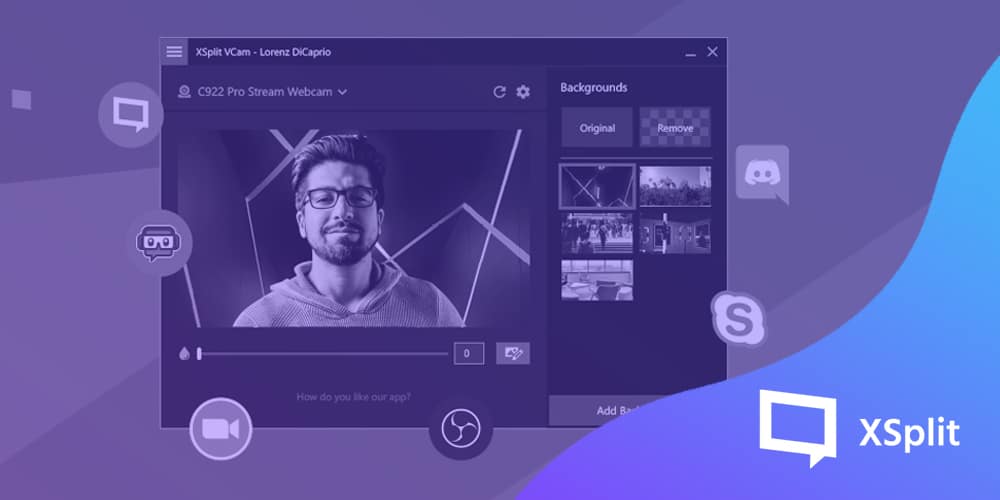
With the 2.0 update bringing a much better background removal detection and flexible background adjustment options, XSplit VCam takes the best background removal software and makes it even better. You can update through the app or download the installer from the VCam page while we elaborate more on these new features and what it means for you below.
Improved Background Removal
Before this update, XSplit VCam was already widely regarded as the industry-leading standard for background removal but it doesn’t mean there’s no room to get better. The key feature here is the adaptive filtering option that gives better segmentation of your hands, hair, and objects (e.g. headphones and microphones) as demonstrated in the video.
Background configuration
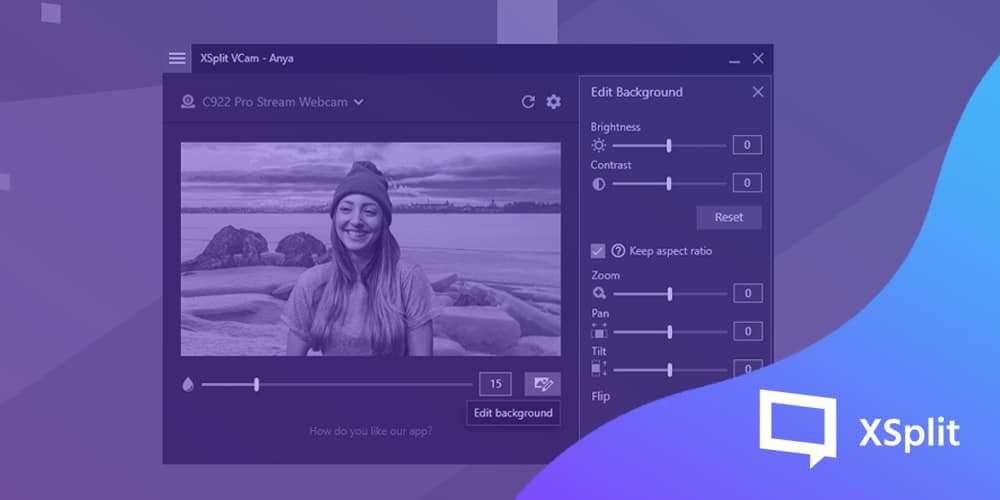
What’s the use of a funny background GIF or video if you’re not perfectly integrated into it? With the added flexibility to configure your background, you can now easily line up your images exactly as you want, zoom, pan left and right, up and down, flip it around and change the brightness or contrast. We have a separate blog post on these new background adjustment tools.
Calibration and Automatic Settings
We made improvements here by letting VCam select the best primary and secondary device for acceleration on your machine. This ensures you’re getting the best possible experience right out of the gate without the need to fidget through the settings!
Additionally, the option to select a secondary device for hardware acceleration helps VCam’s performance further by reducing its resource usage.
VCam hardware driver
When you update to version 2.0, it also includes a hardware driver for VCam which allows it to be used as a webcam for an even wider variety of software. The most notable would be Webex and Windows Store applications.
If you’re previously having problems with VCam not showing up in your conference or camera software, this driver should fix all of that.
I’m sure it goes without saying but there’s also a ton of bug fixes and usability improvements in this update that will make the overall experience better. Here are the full release notes for more details.
We’d love to hear your thoughts on this update so make sure to sound off on the comments section below.
Microphones are essential peripherals not just for content creation but also in our everyday lives. Whether you’re using it to conduct video conference calls for work, podcasts, or even just doing regular calls with your loved ones, there’s no denying how they’ve become a necessity for most of us.
The focus in this blog post, though, is content creation, which is a group that mostly includes streamers, YouTubers, podcasters, and so on. We’ll touch upon how you can determine which microphone is best for your needs as well as make some general recommendations on the best option for the various price brackets.
Determining the intended use case for the microphone helps in narrowing down your list. If you’re going to be moving a lot, then you need something small for better flexibility. Perhaps a lapel microphone clipped on your shirt would be ideal?
On the other hand, if your room doesn’t have the best soundproofing, you can settle for a dynamic microphone with a suitable polar pattern so you can block out some excess noise.
If you’re looking for the opposite and want to capture as many sound frequencies as possible, then a condenser microphone is your friend. Those are the things that you need to give some consideration to narrow down the list.
Once you’ve determined the specific application, the next step is figuring out how much you’re willing to spend on it.
Budget
A lot of people wanting to upgrade their microphone think they need to shell out hundreds of dollars to do that. That depends on what you’re starting with. If you’re just using your laptop’s onboard microphone or your webcam’s microphone, the cost to upgrade shouldn’t be much unless the aim is to go for the best of the best.
Otherwise, there’s just a lot of good options out there in the sub hundred dollar range, so you don’t need to spend that much.
Different types of microphones
We mentioned some types of microphones above, but in case they sound foreign to you, this is where we’ll be able to expound on them more. Do take note the categorization of microphones vary but for simplicity’s sake, we’re going to be classifying them in the most identifiable way.
Headset – This one probably needs no explanation, but this is the most practical option if you want to minimize the number of equipment that you’re buying. We’ve listed some of the best streaming headsets available today, so you may want to check that out.
Dynamic – Perhaps the most flexible option because you can pretty much use it for any applications, doesn’t need external power while being relatively inexpensive. They are also not as sensitive, which means it’s a good option if you don’t have soundproofing in your area.
Condenser – If you’ve been watching a lot of content creators, it’s highly likely they’re using a condenser microphone. This type of microphone is the opposite of dynamic microphones because it’s highly sensitive and often needs phantom power to work. Those minor ‘inconveniences’ are rewarded by a more precise recording that is perfect for vocals and acoustic instruments.
Ribbon – Ribbon mics are a type of dynamic microphone that utilizes a thin corrugated strip of metal between magnets as opposed to a diaphragm that is attached to a moving coil on a more traditional dynamic microphone.
Ribbon mics are even more sensitive than condenser mics, but in return, you get the most amount of detail without harshness or distortion. Not really recommended if you’re just starting, but if you obsess on having the best sound quality and have the money to spare, then definitely give this a careful consideration.
Lavalier/Lapel – This is the microphone if you require movements since you can easily clip it to your shirt. Its most significant advantage is the form factor because once you have it in a perfect position, you can just forget about it.
This type of microphone is most suitable in public speaking applications where some movements may be needed, and hands-free operation is a must.
Best microphones for content creation
Sub $100
Blue Snowball
This compact but robust USB microphone has everything you need to get into high-quality audio recording without spending a fortune. This small condenser microphone even includes a stand and works plug-and-play so you can get recording right away. Check out the Blue Snowball here.
Rode SmartLav+
This omnidirectional lavalier microphone easily plugs into devices that support a 3.5mm jack. This means it has the added flexibility of being used in mobile devices while still retaining support for computers. The best thing about these types of microphones is they are so tiny, making them perfect for recordings on-the-go. Check out the Rode SmartLav+ here.
$100 – $300
Blue Yeti X
Blue Yeti is arguably the most recommended microphone for content creators and a good reason. But we feel the more recent Yeti X packs more value by having more condensers, better bit depth, and sampling rate resulting in a fuller and better overall sound.
Even then, it’s hard to go wrong with either of them, so your budget will ultimately dictate which one is better. Check out the Blue Yeti X here.
Elgato Wave 3
Elgato has been making hardware for content creators since its inception, so it’s no surprise their latest microphone is a big hit. Aside from the high-quality microphone that sounds warm and full, the Wave 3 also has virtual mixing software that allows you to adjust your mix to up to eight additional audio channels. Check out the Elgato Wave 3 here.
Audio-Technica AT-2020
If you’re looking into an entry-level XLR microphone, the AT2020 is one of the popular options available and deservedly so. The AT2020 is built like a tank while still managing to have a small form-factor, and more importantly, the sound quality it produces is exceptional.
This type of microphone requires an audio interface that provides 48V of phantom power, so that’s something to keep in mind. Check out the Audio-Technica AT-2020 here.
$300 or more (Sky’s the limit)
The options at this price point are, without a doubt, an overkill, especially if you’re just getting started or don’t have a reason to upgrade. As mentioned, the cheaper options discussed above are perfect for most content creators, but if you’re looking for the next best option, you’re not going to go wrong with the microphones listed below.
Shure SM7B
The Shure SM7B is a wildly popular dynamic microphone that is often used in professional environments. It is highly regarded for its warm tone and full frequency response for accurate reproduction, making it perfect for various ranges of recording.
It’s also built to last thanks to its rugged construction that allows for its reliability over a long period. Check out the Shure SM7B here.
Electro-Voice RE20
The RE20 is a large-diaphragm dynamic microphone that utilizes a patented Variable D designed to control the mic’s proximity effect. What this means is unlike most mics, you can be very close to the source without having to worry about losing any clarity.
Aside from content creation and broadcasting, this microphone is also often used by sound engineers as an instrument microphone for mastering and mixing purposes. Check out the Electro-Voice RE20 here.
The best microphone for you
Choosing the best microphone for your needs as a content creator is an essential step, whether you’re starting from scratch or looking to upgrade what you currently have. It can be a daunting task, especially with so many options to choose from, but once you have determined your specific needs and preferences, the list should become more narrow.
Finally, XSplit Broadcaster has advanced microphone settings that can help enhance the experience and overall quality of the audio. Most microphones for streaming, even the ones not mentioned above, will work just fine and fit into whatever workflow you have for creating your content.
We hope this article helped you decide what microphone to get for your needs. If you’re already using one that you’re happy with and that is not on the list, we’d love to hear about it! Sound off in the comments section below!
홀로 모든 것을 해결할 수 없는 사람은 없다. 당신이 인터넷 방송을 진행할 때 또한 마찬가지다.
사람들이 보통 생각하는 매우 흔한 오해가 하나 있는데, 그것은 바로 인터넷 방송을 1인 사업이라고 착각하는 것이다. 물론 혼자서 모든 것을 진행하는 스트리머도 있긴 하지만 그런 경우는 매우 드물고, 웬만한 정도의 노력으로는 그렇게 되기도 힘들다. 내가 준비한 콘텐츠를 가지고 스트리밍을 진행하는 도중, 도네이션 후원 메시지에 일일이 감사 답변을 하면서 방송 외적, 내적 상황을 모두 관리하고 신경 쓰기란, 당신에게 손과 눈이 네 개씩 있기라도 하지 않은 이상 대단히 힘든 일이다.
이로 인해 일반적으로 많은 인터넷 방송 플랫폼에선, 스트리머가 직접 채팅창 관리자를 임명할 수 있는 권한을 갖게 한다. 채팅창 관리자들은 아프리카, 카카오TV에서는 매니저라고 불리고, 트위치의 채팅창 관리자 정식 명칭은 모더레이터(moderator, 줄여서 mod)이지만, 일반적으로 한국 트위치 문화에선 관리자들을 속칭 ‘진은검’이라고 부른다. 트위치에서는 관리자의 채팅창 아이콘 표시 모양이 검 모양을 하고 있어서이다.
하스스톤의 진은검.
일반적으로 인터넷 방송 관리자들은 시청자들의 원활한 스트리밍 감상에 방해가 될 수 있는 악성 이용자에게 경고를 하거나, 직접적으로 방송 플랫폼에 차단하는 역할을 한다. 가장 흔한 경우는 도배나 욕설 정도고, 지속해서 채팅창에서 분쟁을 일으키는 이용자에게 제재를 가하기도 한다. 어떤 관리자들은 스트리머에게 있어서 또 다른 방송 콘텐츠의 재료가 되기도 한다. 실제로 현재도 활발히 활동하고 있는 몇몇 스트리머들은, 타 스트리머의 채팅창에서 관리자 활동을 진행하던 것으로 인터넷 방송 경력을 시작한 경우가 많다.
그러나 관리자의 활용에 대해 잘못 생각하여 방송 진행에 어려움을 겪는 스트리머도 존재한다. 관리자의 활용에 있어서 몇 가지 원칙을 가지고 있으면 이런 사태를 미리 예방할 수 있다. 관리자 임명은 그 자체로 채팅창 분위기를 좌우할 수 있음으로, 스트리머는 미리 신중하게 고려하고 관리자 임명을 진행하여야 한다.
관리자 기용에 대하여 피해야 하는 타입 중 하나는 분쟁을 좋아하는 사람이다. 관리자는 분쟁을 최대한 방지하는 것이 목적이지, 분쟁의 규모를 키우거나 없던 분쟁을 만들어 선제적 채팅 필터 입장을 취해서는 안 된다. 이러한 운영이 지속해서 반복되면 여론이 점진적으로 악화하여 이후 커다란 갈등의 씨앗이 될 수 있다.
커뮤니티 게시판에 실제로 올라온 ‘진은검’ 관련 부당한 사례를 경험한 시청자.
스트리머 본인에게 과도하게 영향력을 행사할 수 있는 관계에 있는 사람도 관리자 임명에 있어서 재고해 보아야 한다. 예를 들어 스트리머의 방송 관리자가 스트리머의 본업 직장 상사나, 아버지 같은 웃어른 가족관계에 있는 사람이라고 쳐 보자. 관리자가 채팅창에서 아무 말이나 하고 아무나 퇴장시킨다고 하여도 스트리머가 그것을 제지하기는 대단히 어려울 것이다. 지인이라고 무작정 관리자 권한을 부여할 것이 아니라, 미리 신중하게 생각하고 결단하여야 한다. 일단 한 번 칼을 주었으면 다시 돌려받기 힘들다.
내 방송을 보고 있는 타 스트리머나 유명인에게 관리자 권한을 주는 경우도 있다. 이 경우 방송의 홍보에 단기적으로 도움이 되나, 장기적으로는 위험부담이 상당한 행위라는 것을 미리 인지하여야 한다. 보통 그런 경우 스트리머가 해당 관리자에 대해 뭔가를 강제할 권한이 없으며, 타 시청자와 해당 관리자 간 마찰이 빚어질 경우 스트리머가 대단히 곤란해지는 경우가 많기 때문이다. 만에 하나 스트리머와 관리자 간 마찰이 생길 경우는 더 설명할 필요도 없다. 해당 관리자는 업계 관계자거나 유명인이므로, 스트리머에게 피해가 배로 올 것이다.
누굴 관리자로 둘지를 결정하였다면, 관리자가 확실한 원칙을 가지고 방송 관리를 진행하는지 스트리머 본인 또한 확인을 다시 진행해야 한다. 스트리머의 기준과 관리자의 기준이 다를 수 있으며, 채팅 규정에 대한 해석도 각기 다를 수 있다. 미리 한 번 서로 간 의견 교환을 통해 생각하고 있는 기준선을 확정 시켜 놓아야 나중에 후회를 만들지 않는다. 관리자가 다수일 경우도 관리자마다 기준이 다를 수 있으므로, 관리자 인원은 최소한도 TO로 구성하는 것이 분쟁을 예방하는 데에 도움이 된다.
관리자는 채팅창 운영에 대해 최소한도로 개입하여야 하고, 어디까지나 스트리머가 정해 놓은 기준선을 기계적으로 지키는 선에서 운영을 진행해야 한다. 관리자 임의의 기준을 적용하여 시청자 제재를 진행할 경우, 그걸 보고 있던 시청자들은 인간이 본능적으로 선호하는 가치 중 하나인 ‘공평함’에 해를 입었다고 느껴, 해당 행동으로 인하여 방송 시청 자체에 대해 불쾌감을 느낄 수 있기 때문이다. 관리자가 얼마나 스트리머에게 충성하여 채팅창 숙청(?)을 진행하였든, 그것은 스트리머 본인에게 절대 도움이 되지 않는 행위라는 것을 스트리머가 관리자에게 직접 인식시켜야 한다.
똑같은 이모티콘이나 상형문자를 도배하거나 심지어 예술감각이 드러나는 도배까지 다양하다.
스트리밍 채팅방 운영 원칙은 최대한 간결하고 이해하기 쉬워야 하며, 이용자 간의 차등 없이 적용되어야 한다. 하지만 방송 시청자 간 차등을 두지 않기는 현실적으로 대단히 힘들다. 스트리머가 아무리 공정하게 운영 원칙을 적용하려고 하여도, 후원 금액이 커서 수익에 도움이 되는 특정 이용자 쪽으로 팔이 굽는 것은 어쩔 수 없는 부분이기 때문이다. 이에 대한 불만 의견이 나올 수 있으나 이는 어쩔 수 없는 부분이다. 냉정하게 생각해 보면 실제로 적용되지 않는 공평 원칙을 내세우는 것 보다, 차라리 후원 금액 내용에 따른 차등 적용을 공개적으로 솔직하게 고지하고 운영을 진행하는 것이 더 나은 결과를 가져올 수도 있다는 것을 생각해야 한다.
어떤 식으로 관리자 권한 부여와 운영을 진행하든 가장 중요한 것은, 관리자가 아닌 나머지 시청자 인원들이 소외감을 느끼지 않도록 하는 것이다. 전체 시청자 수에 비하면 관리자의 인원수는 대단히 적으며(인터넷 방송의 역사 속에서, 시청자 전원을 관리자로 임명하는 실험적 시도는 대부분 실패로 끝났다), 이 적은 인원이 채팅창 분위기를 주도해 갈 경우 시청자들이 방송에서 분리되었다는 생각을 가지며, 이는 방송 전체에 대한 무관심으로 다가온다. 스트리머 본인의 입장에서 어느 쪽이 무난한 선택인지 스스로 생각하여 조율을 진행하도록 해야 한다.
인터넷 방송을 하는 스트리머가 필연적으로 겪어야 하는 요소 중 하나가 있다. 바로 ‘훈수’다.
화면에 등장한 사람이 얼마나 전문가이건, 얼마나 어려운 일을 하든 관계 없이 모든 분야에서 발생할 수 있는 게 훈수다. 멀리 갈 것도 없이 우리 모두 월드컵 시즌마다 그것을 똑같이 느낀다. 게다가 인터넷 방송이 다루는 것은 보통 게임과 같은 대중문화이다 보니, 시청자 중 전문가가 너무나도 많아졌다. 게임 플레이를 하나 실수하기라도 하면 자연스럽게 ‘갈고리 수집’이라고 불리는 물음표 러시가 채팅창을 가득 메운다.
게임에서 실수할때 흔히 볼수있는 채팅창 반응
훈수는 본래 바둑이나 장기에서, 플레이어가 고민하고 있을 때 다음 수를 가르쳐 준다고 하는 뜻이었다. 현재는 의미가 확장되어 거의 모든 분야에서 훈수라는 말이 쓰이고 있다. 훈수의 역사는 깊다. 바둑을 좋아하는 사람이라면 ‘향혈’이라는 말을 알 것이다. 바둑판 뒷면의 사각뿔 모양의 조각을 부르는 말로, 바둑판에 착수를 진행할 때 울림소리 등의 타격감을 향상하기 위해 만들어졌다는 설이 있다. 하지만 이 향혈을 일본에서는 ‘혈류(血溜)’라고 부르고 있다. 직역하자면 ‘핏방울’로써, 훈수꾼의 혀를 잘라 피를 채우는 것이 그 기원이라는 으스스한 설화도 전해진다.
훈수가 스트리머에게 끼치는 부작용으로는 여러 가지가 있는데, 대표적으로 두 가지를 꼽고 싶다. 일단 훈수는 스트리머의 자존감에 영향을 준다. 일단 인터넷 스트리밍을 시작하는 것은 그 자체만으로도 커다란 용기가 필요하다. 자신의 외모와 목소리 등 여러 가지를 공개적으로 송출해야 하기 때문이다. 잘 걸어가던 사람도 갑자기 앞에 카메라를 들이대면 휘청거린다는 말도 있는데, 웹캠 하나 앞에 두고 오디오를 계속 채워가며 1인 진행을 해야 하는 것이 스트리머의 숙명인데, 훈수는 많은 경우 지금 하는 행동이 잘못되었다는 뜻을 담고 있다. 당연히 스트리머의 멘탈에 상처가 가지 않을 수가 없다.
훈수를 두기전에 제 자신의 위치를 먼저 파악하는게…
또한 훈수는 스트리머의 특정 행동을 지시함으로써 방송 콘텐츠에 영향을 직접 주므로, 스트리머의 방송 흐름을 방해한다. 또 다른 문제로는 스포일러가 있다. 훈수는 현재 방송 시점 이후의 콘텐츠 진행을 미리 숙지, 또는 예상한 상태에서 발생하므로 자연스럽게 스포일러를 동반하며, 이는 시청자 간의 마찰을 유발할 수 있다. 이외에도 소위 ‘훈수충’이라고 불리는 사람들은 많은 이유로 환영받지 못한다. 하지만 그들은 어디에나 존재한다. 이세돌이 바둑을 두든, 페이커가 미드 레인에 서든, 그들은 언제나 존재했고, 앞으로도 그럴 것이다. 이런 좋지 않은 훈수를 우리는 왜 굳이 하고 싶어 하는 것일까?
저 치열한 IT업계에서 고개를 돌려 잠깐 인류학을 바라보자. 현재 인류 사회 구성원 비율의 100%를 차지하는 종은 ‘호모 사피엔스’이다. 이 글을 작성한 나도, 이 글을 보고 있는 당신도 모두 같은 호모 사피엔스에 속한다. 우린 우리 이외의 인간 종이 없는 환경에 너무나도 익숙하여 우리도 모르는 새에, 인류는 계속 이렇게 살아왔을 것으로 생각하는 경향이 있으나 실제로는 전혀 그렇지 않았다.
과거에는 이십여 종이 넘는 사람족이 존재하였으나, 일만 년 정도 전에 호모 사피엔스를 제외한 모든 인간종은 멸종하였다. 하지만 이런 생존경쟁 과정에서, 호모 사피엔스가 가장 강인한 인간종이었기 때문에 살아남은 것은 아니다. 호모 에렉투스는 우리보다 월등한 달리기 능력을 갖추고 있었고, 네안데르탈은 훨씬 강력한 근력과 커다란 뇌 용량을 가지고 있었으나, 그들보다 훨씬 약하고 느린 호모 사피엔스들이 결국 살아남은 것이다. 어떻게 이런 일이 가능했을까?
많은 연구는 호모 사피엔스가 ‘집단의 힘’을 통해 자신보다 훨씬 강한 적들을 물리칠 수 있었다고 예상한다. 높은 사회성과 연대, 소통을 통해 현대까지 살아남아 많은 것을 이루어낸 우리 인간들이 가진 가장 강력한 무기는, 지능도 근력도 아닌 바로 곤경에 빠진 타인을 도우려는 마음, ‘동정심’이었던 것이다. 시간이 흘러 시대는 변하고 우리는 이제 인터넷과 키보드를 통해 소통하게 되었으나, 그들의 후예인 우리가 아직도 변함없이 훈수를 두는 것은 어찌 생각하면 인류 그 자체가 가진 본능인지도 모른다.
인터넷 시대로 진화해버린 인류?
동양의 철학자 맹자가 제창한 개념 중 ‘측은지심’이라는 말이 있다. 맹자는 인간은 기본적으로 선하다고 생각하였으며, 우물로 기어가는 아이를 보고 급히 구하려고 드는 것처럼, 곤경에 처한 타인을 도우려는 마음이 누구에게나 있다고 주장하였다. 인터넷 방송 스트리머가 감내해야 할 훈수들은 결국 (훈수하는 본인이 의식하건 아니건) 그런 종류의 어떤 본능적 마음에서 비롯되는 것이므로, 방송을 진행하며 겪는 훈수에 대해 조금만 더 마음을 유하게 가져 보도록 하자.
훈수에 대한 필자의 경험을 하나는. 예전에 어떤 게임을 하던 도중, 나는 다른 사람이 플레이하는 모습을 보고 방금 상황에선 어떤 식으로 플레이하는 것이 아까 시도한 기술보다 효율이 높다고 이야기하였었다 (물론 대부분의 훈수가 그렇게 행해지듯이, 그가 먼저 나에게 물어본 것은 아니었다). 그러나 나에게 돌아온 답변은 충격적이었다. 그가 한 말은 “저도 알고 있는데요?”였다.
그럼 그는 대체 왜 그런 플레이를 했을까? 그 사람은 효율이 좋은 플레이를 통해 승리를 원하는 것이 아니었다. 그냥 게임에서 특정 기술을 많이 사용해서 상대방에게 맞추는 것이 목표였다. 당시 나는 머리를 망치로 한 대 맞은 것 같은 느낌이 들었었다. 그것은 게임의 목적을 ‘승리’가 아닌 다른 것, 조작감이나 그래픽 감상 등에 둘 수 있다는 것을 너무 오래 잊어버린 나에게 가해진 일침이었다. 웹툰 미생 6화에서 주인공 장그래의 이런 대사가 있다. ‘내가 뭐라고, 나 따위가 감히 비루한 훈수 질이냐!’
함부로 훈수하지 말아야 하는 이유가 바로 여기에 있다고 생각한다. 아무리 타인의 플레이가 어리석어 보이더라도, 그 어리석은 플레이 자체, 답을 찾아가는 과정 자체가 그 사람의 게이밍, 또는 스트리밍의 목적일 수가 있다. 개인의 삶은 온전히 개인의 것이고, 삶의 주체는 그것을 낭비할 자유가 있다. 그것은 그들의 결정이고, 그것을 존중해야 한다. 나는 저 때 그 답변을 들은 뒤로 훈수를 잘 하지 않는다. 누구나 소중한 자신만의 게이밍을 가질 권리가 있음으로…
Tanya De Pass has been a shining light in the streaming and gaming world for a while now and we have gone from fans to working together on a few projects. In this interview, we got to sit down and talk with Tanya not long after her XSplit 101 stream, where she ran down how she uses XSplit Broadcaster and it’s benefits.
Hi Tanya! Tell us a little about yourself and how you started streaming!
I was born on a chilly spring night in Chicago. Seriously though, I’ve been a lifelong gamer, from D&D to arcades, pong and more to today. I started streaming because I wanted to share Dragon Age: Inquisition with friends and because I discovered I could stream directly of my PS4 without a fancy set up. So once the game came out, I set it all up and that was my first streaming experience! I found I enjoyed it (despite the trolls, harassers and then stalkers) and haven’t looked back.
Did anyone inspire you to start streaming?
I found SimplyUndrea (who no longer streams) and iambrandon (known as UGRGaming at the time) via someone hosting their streams. They were some of the first black streamers I’d seen on the platform, showed I wouldn’t be alone if I started streaming.
Tabletop seems to have been a big interest of yours for a while now, where did you first get introduced to it?
Funnily enough I was trying to remember my first D&D session and couldn’t. I played in my early teens onward, and had to hide my gaming from my mother, who fell to the Satanic Panic of the time. She thought it was demonic, and well it was easier just to not say exactly what I was doing with friends. I do remember it was friends that introduced me to it, and knowing how much I love storytelling and fantasy; I was hooked.
Rivals of Waterdeep, the Tabletop D&D show on the official Dungeons & Dragons Twitch channel has gone from success to success, how did it get started?
Rivals came about due to Greg Tito over at WotC. He had been following my work on I Need Diverse Games for a while, and had invited me on to Dragon Talk about inclusion in tabletop & my history with D&D and other RPG’s. We kept in touch, often chatting about our shared favorite game Dragon Age II. Earlier in 2018 he reached out and asked if I’d be interested and if I knew anyone who’d want to do an actual play D&D show. The reason for our show being put together was to show anyone can play learn to play D&D. We also are a unique show in that we have an all Black and POC cast, and we change up DM’s (Dungeon Master) every season.
Can you tell us about I Need Diverse Games?
INDG came about because I was mad about video games in October 2014. It was very much a lightning in a bottle moment of right time, right topic and the hashtag I was adding to tweets about my displeasure with aspects of the games I loved, #INeedDiverseGames being shared by folks in the industry.
Out of those conversations happening, a community slowly grew out of those. I got invited to podcasts, was interviewed and eventually INDG became it’s own entity. In December 2015 I was let go from my day job, so I decided to see if I could make INDG my main thing until unemployment ran out. So between freelance, Patreon and other small gigs here and there; I’ve been able to do this as my full time job ever since.
You’ve been using XSplit Broadcaster for a while now on your streams, why is that?
I found it pretty user friendly, easy to set up and get going without feeling like I needed an advanced CS degree to just get my stream added into it. It let me add a bunch of scenes, and more importantly profiles into one installation rather than having to have more than one instance installed if say, I wanted to stream on the I Need Diverse Games channel instead of my channel. Updates are clear and I can’t wait for what’s in the PTR client to come to the production version. So many quality of life improvements as a broadcaster are in the pipeline.
You recently ran an XSplit 101 stream, but what advice would you give to someone inspired by you looking to start streaming today?
Make sure you’re not in it to get rich immediately, or ever honestly. Stream whatever content you enjoy and don’t obsess over numbers. Also, make sure you like streaming before you go all in and buy a bunch of expensive equipment then it turns out you don’t actually like it. Try Gamecaster for free, then upgrade to Broadcaster if you continue to stream. Lastly, be patient. Building an audience and community will take time. There is no one game that will make you an overnight sensation in the streaming world.
Thank you for your time, Tanya, where can people find you on the internet?
You’re so welcome Chris! Thanks for chatting and for the chance to show off why I love using XSplit to my community! I can be found on the internet as cypheroftyr everywhere like; instagram, twitter, Patreon, Twitch, Facebook page and right here on cypheroftyr.com!
이 게임은 항아리 안에 들어 있는 사람이 손에 쥔 망치를 온갖 장애물의 턱에 걸어서 위로 점프를 진행하면서 정상까지 등반에 성공하는 것이 목적으로써, 마우스 방위를 사용하는 기묘한 조작방식과 영 좋지 않은 조작감, 불친절한 충돌 크기 판정 등으로 인하여 보통 공을 들이지 않고서는 클리어를 완수할 수 없게 제작되었다. 이 게임이 가지는 이런 무지막지한 난이도 그 자체가 곧바로 인터넷 방송계에서는 강점을 가진다. 게임에 숙달되고 클리어를 완료하기 위해서는 일정 시간 이상의 플레이 타임이 필요하므로, 역으로 스트리머에게는 그 진행 시간 동안의 콘텐츠 분량이 확보되는 것이다. 아무나 게임을 섣불리 플레이하지 않게 하기 위해 제작자가 일부러 설정한 난이도가 오히려 인터넷 방송계에선 장점이 된 셈이다.
단순히 어려운 것뿐만이 아니라, 게임이 가지는 몇 가지 특색 또한 스트리밍에 있어서 이상적인 장점이 되었다. ‘항아리 게임’은 진행 중 단 한 번의 실수로 인해 진행 처음으로 돌아갈 수 있는 것이 특징으로, 이로 인해 플레이어에게 극단적인 허무감과 분노를 유발하여, 스트리머가 해당 감정을 표출하는 장면을 시청자들에게 제공할 수 있다. 이른바 ‘진텐(진짜 텐션)’이라고 불리는, 스트리머의 날것 감정을 있는 그대로 전달받고 싶어 하는 인터넷 방송 시청자의 특색 상 이러한 요소는 시청자들에게 대단히 흥미를 유발할 수 있으며, 타 장르 게임보다 좀 더 적극적인 도네이션 유발 등의 긍정적인 효과를 기대할 수 있다. 또한 기본적으로 이런 게임들은 혼자서 진행하는 싱글 플레이 게임이기 때문에, 해당 게임을 소재로 인터넷 방송을 진행할 경우 주로 멀티플레이 게임에서 자주 발생하는 서버 문제나, 같이 게임을 진행할 수밖에 없는 타 플레이어 등 인터넷 방송 스트리머에게 치명적일 수 있는 방송사고 변수를 좀 더 안정적으로 차단하면서 콘텐츠를 창출할 수 있다는 장점이 있다.
‘다크 소울(2011)’이 ‘소울라이크(soul-like)’ 게임이라는 새로운 장르명을 개발해 낸 것처럼, ‘Getting Over It with Bennett Foddy’의 상업적, 문화적 히트는 또 다른 문화를 탄생시켰다. 나는 이 자리를 빌려 해당 장르를 ‘공업용 게임’이라고 부르고 싶다. 극도로 높게 설정된 난이도를 통해 게임 외적인 콘텐츠 창출을 위한 산업용 게임으로 보이기까지 하는 이런 게임들은, 게임의 일반적인 용도인 여가와 휴식을 위해 출시된 것처럼 보이지 않으며 특히 특정 직업, 인터넷 방송 스트리머들을 겨냥해 출시된 게임으로 보이기까지 하기 때문이다. 최근 발매되는 블록버스터 게임들은 구매 후 보통 난이도에서 열 시간 정도 플레이를 한다면 엔딩을 볼 수 있게 발매되는데, 이런 추세에 정면으로 역행하는 이런 ‘공업용 게임’들은 인터넷 방송 스트리머들에게 또 다른 과제가 됨과 동시에 시청자들에게 볼거리를 제공하고 있다.
‘Getting Over It with Bennett Foddy’ 히트 이후에 포스트 항아리 게임을 표방하며 발매된 게임은 ‘Golfing Over It with Alva Majo(2018)’, 통칭 ‘골프 게임’이었다. 이 게임의 주인공은 점프를 할 수 있는 골프공으로써, 역시 마찬가지로 산 정상에 올라가 홀에 공을 넣으면 승리하게 된다. 항아리 게임을 의식했는지 약간 순해진(?) 난이도를 가지고 있는 게임이었지만, 만만찮은 난이도를 가지고 있었다.
이후 공업용 게임은 다양한 시도를 진행하게 되는데, 스웨덴에서 2019년 발매된 ‘Jump King’은 여태까지의 공업용 게임과는 다른 노선을 선택해 차별화를 꾀했다. 매우 아름답고 세밀하게 처리된 픽셀 아트를 통한 그래픽과 이런 그래픽에 어울리는 고전 점프 플랫폼 게임을 방불케 하는 이동과 점프 입력 처리, 오래 듣고 있어도 질리지 않는 BGM을 통하여, 이용자의 향수를 자극하면서, 자연스럽게 플레이 시간이 길어질 수밖에 없는 해당 장르가 가지는 피로감을 덜어내, 상업적 성공을 거뒀다.
어떠한 난이도로 게임을 내도 결국 스트리머들이 등반에 성공하다 보니 아예 작정하고 클리어하지 말라는 듯한 뉘앙스를 가진 게임도 발매되었는데, 현재 해당 장르에서 가장 난도가 높기로 유명한 게임은 ‘Pogostuck: Rage With Your Friends(2019)’일 것이다. 이 게임은 스카이콩콩을 통해 등반을 진행하는데, 평소에 찾아보기조차 힘든 이동 방식을 채택한 이 게임의 난이도는 보통 어려운 것이 아니다. 최근 업데이트된 2번 맵은 항아리 게임과 점프 킹을 클리어한 여러 스트리머들이 포기할 정도로 악명이 높은 게임이다. 게다가 이 게임은 인터넷 방송 스트리머를 위한 다른 요소를 추가하였는데, 바로 멀티플레이 서버를 오픈하여, 타인, 즉 타 스트리머들의 진행 과정을 실시간으로 관찰할 수 있다는 점이다. 플레이어끼리는 서로 간 간섭이 불가능하고 소통도 감정 표현 정도로 제한되므로 진행 중 방송사고가 일어날 염려도 없다. 속칭 ‘동종업계 종사자’들이 스카이콩콩을 타고 서로 상승과 하락을 반복하는 모습은 보기만 해도 즐겁고 우습다.
현재 여러 공업용 게임이 여러 인터넷 방송에서 소재로 채택되고 있으나, 공업용 게임이 단순히 스트리머의 감정 표출을 보여주기 위한 모습으로만 방송용 소재로 인기를 끌고 있다고 생각하지는 않는다. 분명 자극적인 것을 좋아하는 시청자들도 많지만, 이러한 방송을 주로 보는 인터넷 방송의 시청자 대부분이 남이 고통받는 것을 보고자 하는 사디스트감성이 있어서 이런 장르의 게임이 인기를 끌고 있는 것은 아닐 것이다. 이런 게임을 소재로 선택한 스트리머라면, 궁극적으로 시청자들이 보고 싶어 하는 것은 스트리머의 고통받는 모습이 아니라(물론 해당 측면을 간과할 순 없다), 스트리머가 무엇인가에 맞서 도전하는 그 자체, 포기하지 않는 모습이라는 걸 알아야 한다. 다시 말하자면, 이런 장르의 게임에 도전했다가 클리어를 포기하는 선언은 시청자들의 허탈감을 유발하여 장기적으로 방송에 악영향을 끼칠 수 있다. 일단 시작하기 전에는 각오를 굳혀야 하고, 시작했으면 깨야 한다.
마치 공업용 게임을 진행하는 것처럼, 인터넷 방송을 진행하다 보면 스트리머는 수많은 난관을 겪게 된다. 곤경에 빠진 스트리머가 방송을 중지하게 되는 요소는 개인적 차이와 환경에 따라 너무나도 다양하여 다 설명하긴 힘들지만 자신 있게 얘기할 수 있는 것 하나가 있다. 성공한 방송의 공통점 중 하나는 스트리머가 절대 포기하지 않고, 자신이 설정한 목표나 시청자가 설정한 목표를 완수하였다는 것이다. 이러한 공업용 게임이 스트리머들에게 새로이 넘어가야 할 산, 넘어야 할 목표를 제공한 것은 수많은 방송 콘텐츠 도전 예시 중의 하나이다.
아직 우리는 정복해야 할 게임이 많고, 우리의 탐험은 끝나지 않았다. 그동안 세상엔 여러 좋지 않은 일이 있었으나, 우리가 해야 할 일은 아직도 엄청나게 많으며 이루어야 할 과업 또한 많다. 무슨 일이 있어도 포기하지 않고 아름답게 도전하는 당신의 방송이 성공하기를 바란다.
Having the right background is essential for looking great and making the right impression in a video call. It can set the tone and flow of the conversation. A messy or busy background can be distracting, while a plain backdrop can look dull. XSplit VCam helps address these issues by replacing the background with a virtual photo. You can change and customize your background by using personal or online photos to help you appear professional in business calls or make personal calls look fun and interesting.
You may, however, encounter some challenges in using a virtual background. These include the following:
Difference in brightness and contrast between you and the background Your face is darker than the background or vice versa. In contrast, the background does not match how you look.
Look disproportionate against the background Using photos with a wide-angle shot can be tricky because you may risk appearing uneven against it.
Covering and having too many objects or elements in the background Some interesting objects and elements are covered because they are in the middle of the photo. Having too many of these can make it look busy and can look visually distracting.
The great news is that XSplit VCam has background adjustment tools that address the above-mentioned challenges. You can adjust the background to compliment how you look.
Brightness and Contrast
Darken or lighten the background using the brightness tool to match the lighting on your face. Use the contrast tool to match the background with your look.
Zoom
Add symmetry by using the zoom tool. If the photo has a wide-angle shot, zoom in to get the right proportions and dimensions.
Pan and Tilt
The pan and tilt tools come in handy when you want to feature and show interesting objects or elements in the background. Having fewer objects and elements also helps the background look cleaner and focus the attention on you. The tilt tool helps you position the photo in the right angle.
Looking great in virtual backgrounds on video calls is made easy with XSplit VCam.
Until recently, content creation was regarded as a hobby. It was a past-time fun activity to while away time. Fast forward to today, digital content creation has become conventional. The likes of YouTubers, Instagram influencers, DIY bloggers, as well as podcasters, to mention a few, have an incredible chance of obtaining a good income from the content marketing industry pool value estimated to be over $40 billion. If you are wondering how content creators make money, then this is the article for you!
The content creation career has various business models that one can implement to generate some serious income. However, just like in any other industry, not everything is rosy within the content marketing industry. Some factors have a great effect on the level of income.
Regardless of the field that you are focusing on as a content creator, the major key to success is identifying the needs of your target market. It is the primary thing you should take into account before you venture into the industry. Understanding your target market’s trends, preferences, as well as characteristics will help you remain relevant, hence managing to reel in significant traffic.
For one to be successful in content marketing, several aspects need to be taken into consideration. This includes SEO, apart from the factor of constantly battling for the market’s attention. It is this factor that has contributed significantly to the rapid changes in content. The tight competition has spiked an increase in the level of innovation within the content marketing industry. That is the reason why, as an aspiring content marketer, you must stay updated with trends as well as progress within the arena. Pay close attention to some of the vital and latest statistics concerned with content marketing. With all this considered, you can come up with a robust strategy.
Use of Organic Traffic
Positive SEO results accompanied by organic traffic form the main scales of content marketing success. In a study by SEMrush, 76% of content marketers indicated that the key metric in measuring content success is organic traffic. This only testifies that even though there are other funnels for driving traffic, organic remains at the top of the list.
The second metric, however, is not concerned with the quality of organic traffic. Rather, 62% of the content marketers pointed out that the number of leads generated serves as an indication that the content is effective compared to the 60% that focuses on sessions as well as page views. 47% favored conversion rate as the key metric when measuring content success, with only 31% keen on using bounce rate.
It’s important to bear in mind that a well-ranked piece of content does not guarantee relevant traffic or quality leads. Understanding traffic quality that you’re reeling in via content marketing techniques as well as the number of visitors that eventually convert is one way of determining if your content marketing is on the right path and hitting its target.
Times Change, So Do the Techniques
Back in 2014, the average time invested in creating a blog post was about 2 hours and 24 minutes. You will initially expect the period to lessen considering the evolving digital environment that has seen the introduction of better content creating tools.
Source: Orbitmedia.com
As a result of the increased competition and influx in supply, it now takes more time to write a blog or create content than before. This means content creators are becoming more aware of the consumer needs, hence the need to react promptly with lengthy and quality content.
Upon surveying a target group in 2019, 19% of the writers indicated having spent up to 6 or more hours creating blogs whereas, in 2014, it was only 4.6% indicated having spent the same amount of time. This is caused by the increase in competition which translates to a demand for more informative and well-researched content. Therefore, most of the businesses are now more focused on quality compared to quantity.
Video Marketing
Video marketing has a stronghold in the content marketing industry. Out of the 26% of bloggers who include videos in their content, 41% indicate receiving good outcomes. With the market demanding content that is easy to digest, video marketing has become the answer to many content marketers.
SEO Marketing
SEO marketing is at the epicenter of content creation. Despite having other options to generate desirable results, SEO has proven to be the most used and most reliable content marketing technique. 67% of content marketers even claimed that search engine optimization is the most effective model. However, with Google’s organic search algorithm constantly changing, the use of SEO to its effectiveness will become more complex as it will need more than just encompassing SEO.
Factors That Affect Income Level
There are various platforms that content creators can utilize to generate income. In most cases, the income that they can gain depends on the platform they choose to go with. In the case of video-oriented content developers, opting for a YouTube platform will help reach a wider audience compared to other platforms.
Various platforms are used by businesses to outsource their tasks to content creators. Examples of these platforms include Fiverr, Freelancer, Upwork, and Guru. On these platforms, content creators, ranging from article developers to podcasters, can be found marketing their skills. However, this is just the entry-level platform for startup content creators.
Well-established content creators make a good amount out of blogging, vlogging, and podcasting. Below, we have listed down the names of some of the top bloggers, vloggers, and podcasters today.
Top Bloggers
Yaro Starak – He makes way over $40k per month. Yaro is a well-known blogger who delivers content aimed at assisting online entrepreneurs. Selling of digital products is his main source of income supported by affiliate marketing and advertising. On his website, Yaro goes literally everywhere with each of the posts including a picture of him.
Trevor & Jennifer – They are the owners of the website Show Me The Yummy. These two are making waves with their popular recipe website. With an estimated income of over $46k per month, 55% of the amount comes from advertising, as well as freelancing.
Pat Flynn – He is one of the most influential bloggers and had been earning $3 Million per year for 6 straight years.
Tim Sykes – He is a wizard when it comes to blogging. Started as a Penny stock trader, Tim Sykes converted into a blogger/Instagrammer to become the most successful. His money is mainly generated from selling courses that help individuals learn how to stock trade effectively. Tim has an Instagram following of over 1.5 million and is very active to stay in touch with his followers.
Income for Podcasters
There are four common means of making money as a podcaster which includes:
Sponsorships – this is the most common money-maker in podcasting. Sponsorship can generate anywhere between $18 and $50 Cost Per Mile (CPM), but well-established podcasters can generate way more than that.
Premium Content – this allows you to charge your audience a fee to gain early access to your content and/or download content resources.
Affiliate – similar to sponsorship, the podcaster receives a percentage fee of what they sell for another company.
Complementary Products – using this option, a podcaster can sell complementary products via a drop service or print-on-demand.
To be successful as a content creator, you need to identify your target audience, categorize it based on age, location, lifestyle, and so forth.
B2B Content Production
As of 2020, 69% out of the 41% respondents of B2B marketers document their content marketing strategies and are regarded as successful. 69% of the most successful marketers compared to 18% of the least successful indicate that having a properly planned content marketing strategy yields higher chances of success. Moreover, the respondent’s figures have been steadily increasing over the few years, with 2019 receiving 39% compared to 37% of the previous year.
Outsourcing Content Creation
With the reality of content creation now taking more time than ever, it comes as no surprise for an organization to outsource the task. 84% of B2B marketers outsource content development tasks, which means there are fewer businesses that opt to have an in-house content development department.
Content outsourcing is not concerned with the size of the company, it has its standalone budget. It also shows that even though most of the businesses have the capability of having in-house content creators, they choose otherwise.
Although this can be advantageous for content marketing service agencies, to some extent it proposes to businesses to take content creation responsibilities by being more reactive. For instance, to keep the business’s finger on the pulse, they can rely on an in-house content team to deliver current news while other content needs are outsourced. Thus, combining in-house as well as outsourced content creation models offers a wide range of benefits.
인터넷 방송을 시작한 사람이 어느 정도 방송 경력이 쌓이게 되면 한 번쯤은 꼭 해 보는 생각이 있다.
“과연 나는 얼마나 길게 방송 한 번을 진행할 수 있을까?”
대부분의 전문직종에서 종사하는 사람들의 공통적인 생각중 하나.
언뜻 생각해 보면 쉬워 보인다. 식사와 수면 같은 생활 유지에 필수적인 행위는 그냥 카메라 앞에서 진행하면 되고(물론 잠을 자지 않고 그대로 쭉 진행하는 방송도 있다), 화장실이야 잠깐 다녀오면 된다. 심심하지도 않을 것 같다. 채팅창에선 누군가 계속 다른 사람들을 웃기려고 하므로 그걸 보고 있는 나도 즐거울 것 같고, 어차피 컴퓨터 앞에 계속 앉아 있음으로 지루할 틈이 없을 것 같다. 시간만 충분히 있다면야 이틀이고, 사흘이고 계속할 수 있을 것 같기도 하다.
하지만 실제로는 전혀 그렇지 않다. 우리가 사회에서 보통 받아들이는 일일 근무 시간은 직종에 따라 다소 차이는 있으나, 일반적으로 하루에 8시간이다. 하지만 대다수의 인터넷 방송인들이 해당 시간에 훨씬 못 미치는 시간만큼 방송을 진행하고 있고, 온종일, 또는 다음 날까지 이어 방송을 진행하는 장시간 콘텐츠는 스트리머에게 부과되는 페널티 벌칙용으로 행해진다.
이러한 실제 작업과 인식의 괴리는 인터넷 방송도 결국 ‘일’이라는 것을 간과하는 시점에서 비롯된다. 자신이 아무리 좋아하는 일일지라도 24시간을 연달아서 하기는 대단히 어렵고 괴로운 것이다. 스트리머에게 피로감이 누적되면, 자연스럽게 방송 분위기도 축 처지고, 보는 시청자들에게까지 피로감이 전염된다.
나는 해당 방송 방법을 장거리 운전에 빗대어서 ‘장거리 방송’이라고 부르고 싶다. 두 가지는 상당히 비슷한 면을 많이 공유한다. 마치 연속해서 쉬지 않고 운전을 하는 장거리 운전처럼, 장거리 방송 또한 비슷한 루틴을 반복하는 경우가 많기 때문에(한나절을 전부 다른 콘텐츠로 채울 수 있는 스트리머는 많지 않다), 스트리머 또한 자연스럽게 긴장이 느슨해져 방송 중 실수를 하거나 콘텐츠를 다 소화하지 못하고 방송을 종료하는 경우가 많다. 그래도 운전보다 인터넷 방송이 다행인 점 하나는, 졸음운전만큼 생명에 치명적이진 않다는 것이다.
이번 칼럼에서 지금부터 소개할 스트리머 셋은 각자 자기만의 방식으로 장거리 방송을 소화하는 법을 가지고 있다. 지금부터 이들이 장거리 방송을 어떻게 소화하는지 한번 알아보자.
첫 번째로, 계획된 이벤트 일정에 맞춰 두세 명의 팀으로 장거리 방송을 진행하는 때도 있다. 예를 들어 2박 3일의 일정으로 치러지는 게임 대회 같은 것을 중계할 경우, 이미 중계 일정이 다 정해져 있음으로 방송 시작 시각과 종료 시간을 정하기 깔끔해지고, 여러 인력이 같이 진행하므로 방송 진행 스트리머의 체력적 안배가 쉬워진다. 대표적인 예로 ‘스피릿제로(https://www.twitch.tv/team_spiritzero)’의 캡콤 프로 투어 이벤트 중계를 들 수 있다.
스피릿제로 채널에서 활약하는 캐스터 머더케이 님, 연출을 담당하는 싸울아비스 님 그리고 객원 해설 엠리자드 님.
캡콤 프로 투어 경기는 보통 외국에서 행해지는 이벤트이기 때문에 상당한 시차가 있기 때문에 주로 늦은 시간에 진행되며, 금, 토 이틀간 예선을 하고 일요일에 결승전을 진행하는 구조이므로 보통 2박 3일간 진행된다. 이 2박 3일 동안 스피릿제로는 3인 체제를 통해 적절히 방송 비중을 조절하여, 개인에게 가해지는 육체적 피로, 방송 내용적 측면에 대한 부담을 줄이고 있다. 게스트 초대는 또 다른 효과도 있는데, 경기 흐름을 초청 객원의 눈으로 파악함으로써 호스트 스트리머가 알지 못했던 지식을 설명할 수 있고, 이는 스트리밍 도중 또 다른 콘텐츠로 활용된다.
두 번째는 시청자에게 도네이션 유도 등으로 방송 콘텐츠를 제공하게 하는 것이다. 격투게임 플레이어로 유명한 ‘나락호프(https://www.twitch.tv/asdn6388)’의 일명 ‘지옥스파’ 컨텐츠가 그것이다. 콘텐츠 구조는 간단하다. 시청자들이 도네이션한 일정 금액마다, 일정 시간만큼 스트리트 파이터 5 랭크 매치를 진행하는 것이다. 우리는 모두 이 인터넷 방송 업계에서, 스트리머가 고통받는 걸 보며 재미있어하는 시청자가 그렇지 않은 시청자들보다 훨씬 많다는 걸 알고 있다. 자연스럽게 돈이 쌓이는 구조이다.
수면 등의 한계로 인해 혼자서만 계속 방송을 진행할 수는 없음으로, 나락호프는 해당 콘텐츠를 주로 단짝 친구인 ‘Lee3(https://www.twitch.tv/tekkenlee3)’과 함께 진행하고 있다. 두 명이 초록 크로마키가 있는 스트리밍 실에서, 일명 금융치료를 받으며 강제적으로 스트리트 파이터 5 랭크 매치를 진행하며 고통(?)받는 모습은 시청자들에게 속칭 ‘작업장’이라고까지 불리며 인기를 끌고 있다.
리삼 님 역시 철권 콘텐츠를 주로 다루지만 시청자 참여도가 어느정도 반영되는 스트리트 파이터 콘텐츠에 도전하고 있다.
세 번째는 이 글을 읽는 분들에게 가장 추천하고 싶지 않은 방식인데, 그냥, 그냥 계속하는 것이다. 이 방면의 귀재라고 하면 역시 ‘식칼(https://www.twitch.tv/xyzzyshift)’과 ‘녹두로(https://www.twitch.tv/nokduro)’가 유명하다. 해당 스트리머들은 자기 취향에 맞는 게임을 최소 열두시간, 많게는 스물 네시간 동안 플레이할 수 있는 스트리머다. 분명히 나는 어제 이 사람의 방송을 보다가 잠들었는데, 아침에 일어나서 보니 아직도 방송을 하는 모습을 보게 되면 소름이 돋기까지 한다.
아무것도 고려하지 않고 그냥 근성으로 밀어붙이는 것이므로 신체적 건강을 생각해 볼 때 절대 추천할 수 없는 방식이고, 또한 아무나 흉내 낼 수 없는 방식이다. 시청자가 일정 금액을 건 미션을 하달하여서 하는 경우도 있지만, 두 명 다 자신이 맘에 들었다는 이유만으로 게임을 며칠간(문자 그대로 며칠간이다. 끊지도 않고!) 할 수 있는 스트리머이다. 초인이 아무나 할 수 없는 걸 하는 사람이라고 한다면, 두 명은 어느 정도는 초인의 범주에 들어간다고 할 수 있다.
종합해 보자. 지금까지 설명한 장거리 방송을 진행하는 방법 중 첫째는 계획된 중계 이벤트 일정에 맞춰진 연속방송, 둘째는 시청자에게 선택권을 줘서 연속적 콘텐츠 생산을 가능하게 함, 셋째는 역으로 스트리머가 연속적인 방송을 진행하여 시청자가 보게 하는 방법이라고 할 수 있겠다. 이외에도 다른 방식으로 자신만의 장거리 방송을 진행하는 스트리머들이 있을 것이다. 여러 장거리 방송의 유형을 소개해 보았지만, 만약 누가 장거리 방송을 진행해 보겠다면 개인적으로는 말리고 싶다.
장거리 방송은 콘텐츠가 없을 때 진행하는 치트키가 절대 아니다. 본인의 일상 컨디션에도 지장을 주고, 다음 방송 스케줄에도 해를 끼칠 수 있으므로 확실한 계획을 세우고, 체력에 무리가 가지 않는 선에서 진행하여야 한다. 하지만 방송의 성장을 위해 가장 좋은 건 이런 단발성 이벤트를 진행하는 것이 아니라, 어디까지나 꾸준한 방송 시작 시각, 진행 시간 엄수라는 것을 잊지 말아야 한다.