XSplit is Going to DreamHack Winter 2014

We’re very excited to announce that we will be going to Sweden to participate in the world’s largest computer festival, DreamHack Winter 2014.

MSI XSplit

We will be sharing a booth with MSI, who will be showcasing the latest in cutting edge gaming hardware as well as organizing a variety of fun and exciting activities. Make sure to stop by the booth and say “hi” as well as try XSplit Gamecaster V2, which has been specifically optimized to run on MSI hardware.

If you’re not going to DHW 2014, we will be live tweeting from there for the entire duration of the event and share you valuable things there as we spot them. Be sure to follow us on Twitter, Facebook so you don’t miss out on any of them.

DreamHack Winter 2014 – Day 1 & 2

It’s the time of the year for the biggest computer festival in the world, DreamHack Winter 2014. This is one of the best opportunities for any organization to showcase what they can offer to the gaming community and we at XSplit know we want to take advantage of this together with Team MSI.

In case you’re not familiar with DreamHack, it’s a computer festival with a wide range of activities ranging from expos to eSports competitions to live concerts and even arts. They don’t call it the world’s largest festival for no reason.

Arrival at the Event Center

Team XSplit arrived at the event center 18 hours before the festival opens which means plenty of time to rest and sight-see right? No. That time is allocated for preparation of the setup and making sure we are ready and as productive as humanly possible for the next 3 days.

Initial Impressions

As an exhibitor for the first time, we were flabbergasted upon entering the venue. The venue is quite humongous and there’s a lot going on that one can easily get lost with all the happenings inside.

Walking through, we immediately saw where our booth was and we were greeted by our colleagues from MSI. They were setting up all the computers and laptops for our booth and from inside the Octagon itself. We, on the other hand are doing our own setup for our live streams while making sure XSplit Gamecaster is installed and updated on all machines inside.


Day 1

As expected, day 1 was packed! We started the day with some CS:GO death matches with pro players from Team Epsilon namely Gina and Scream. They were joined by the public for a 10 minute game where the top three players outside of the the pro players can win amazing goodies from MSI and XSplit.

DreamHack Winter 2014 MSI Octagon

As you can only take 8 players at a time, the line outside the Octagon quickly grew but people were patient in waiting for their turn.

Giveaways & Throw-outs

One of the most exciting parts aside from the death matches are the giveaways and throw-outs. People get excited once they see us packing up bags of goodies inside the Octagon and once we announce we’re throwing up stuff, they became louder and louder.

DreamHack Winter 2014 giveaways and throw outs

DreamHack Winter 2014 Crowd

DreamHack Winter 2014 crowd waiting for throw outs

We have plenty of fun-filled activities on Day 1 that we have to be reminded that closing time is just 9pm. It was quite tiring physically but we greatly enjoyed the day along with the hardworking folks from MSI.


Day 2

We expected day 2 to be even more packed than day 1 and it was! The day started with some CS:GO death matches with the public but this time, it was hosted by Fnatic’s very own THREAT.

DreamHack Winter 2014 Host

DreamHack Winter 2014 CSGO death matches

More throw-outs and giveaways were done and you can easily tell how excited the public was with how loud they shouted every time we asked them to say “MSI” and “XSplit”.

Fnatic CS:GO Signage and Shootout

One of the most awaited activities for the day was Fnatic CS:GO team signage and shoot-out. Fans lined up outside the Octagon as they wait for their turn in getting their cards and other stuff signed by Fnatic. After the signage, it was time for the fans to play with their favorite CS:GO team along with Gina and Scream from Team Epsilon.
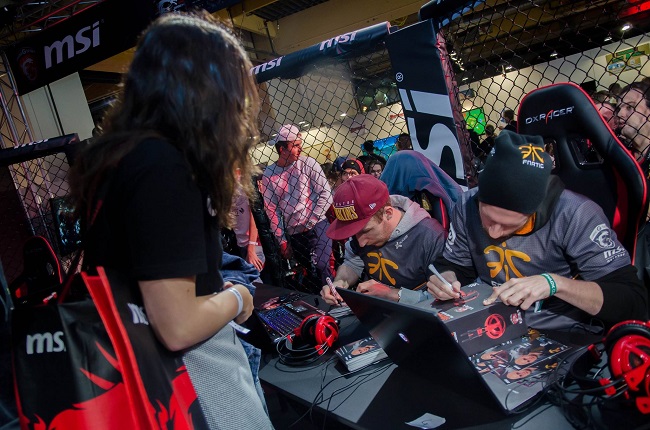
DreamHack Winter 2014 Fnatic CSGO Signage

DreamHack Winter 2014 Signage

DreamHack Winter 2014 Team

DreamHack Winter 2014 Freebies

MSI & XSplit at DreamHack Main Stage

The biggest activity for us happened at around 5:30pm when we went to the DreamHack main stage! The amount of people was enormous and the overall atmosphere while in the main stage was breathtaking!

We know it’ll be hard for us to describe it in words so we’ll let the photos below do the talking.

![](https://cdn4.xsplit.com/blog/513
/mainarena.jpg)

DreamHack Winter 2014 MSI and XSplit Main Stage

DreamHack Winter 2014 DreamHack Main Stage

DreamHack Winter 2014 Main Stage with Crowd

DreamHack Winter 2014 Crowd 1

DreamHack Winter 2014 Crowd 2

DreamHack Winter 2014 Paticipants

DreamHack Winter 2014 Paticipants Play Game

DreamHack Winter 2014 Amazing Crowd

So those are the first two days right there! We were tired but very happy with the turnout. Stay tuned for our next blog post which is Day 3 and a quick recap of DreamHack Winter 2014.

Be sure to check out our Facebook page for more photos of Day 1 & Day 2 of the event.
XSplit Supports the YouTube Smash Bash 2 Tournament

We are happy to announce that we’re one of the sponsors for the YouTube Smash Bash 2 tournament organized by our very own PKSparkxx. As some of you know, the game Super Smash Bros. was just recently released for Wii U in North America and the idea behind this tournament is to celebrate the said release.

Here’s the promo video for the tournament:

The tournament begins on December 6 2014 at around 2pm EST and will run for the entire day. It will be live streamed on their YouTube channel here so you should definitely check it out.

Like any other events that we’ve supported, there will be XSplit V2 license giveaways before and during the event to watch out for. Be sure you’re following @XSplit and @PKSparkxx on Twitter so you don’t miss out on the license codes and other giveaways.

DreamHack Winter 2014 – Day 3 & Wrap Up

Having survived the first two fully-packed days of the event, we knew that having a strong final day is crucial if we want to make a good impression as a first time exhibitor at DreamHack.

The day started out fast and we went straight with CS:GO death matches pitting the attendees with pro players from Team Epsilon named Gina and Scream.

Just like day 2, THREAT from Fnatic was generous enough to help us commentate the CS:GO matches and his experience with the game really showed up. He alternated with our very own Miguel Molina, who is one of the XSplit product managers, in making sure the Octagon was always alive and pumped up.

This time, the main draw of our booth was the giveaways and throwouts where we started emptying the swags by throwing them out to users outside of the Octagon. We also started giving high ticket items such as a graphics card and a couple of Steelseries headsets! Very nice!

Of course they had to work hard to win the prizes and that included doing pushups, balancing themselves on one foot, drinking a can of coke as fast as humanly possible, you name it!

Wrap Up

As we wrapped things up, we realized how crazy our entire stint was for DreamHack Winter 2014. As crazy and tiring as it might seem, we were all very happy with how the three days turned out. A lot of excitement from the CS:GO matches and throw-aways, a lot of star power from the pro players, Team Fnatic CSGO and GamerBee, and to top things off, we appeared on the main stage to get our message across to everyone!

Of course none of this would be possible if not for our awesome hardworking friends from MSI who put in a lot of work into making everything happen. Shout-out to Jerry, Cindy, Anna, Tanja, Martijn, Christiaan and Rona. It was a pleasure for the entire XSplit team to work with you and we really enjoyed our time collaborating with you.

We want to also give a shout-out to other people and companies that we’ve bumped into during the event. The cool folks from Twitch who had their own lounge. Azubu who were also there as an exhibitor. Then we also met the great guys from Hitbox, Intel and a whole lot more that we couldn’t begin to mention them all.

And to all attendees, we hope you enjoyed your time in our booth and at DreamHack Winter. We hope to see you again next year! 🙂

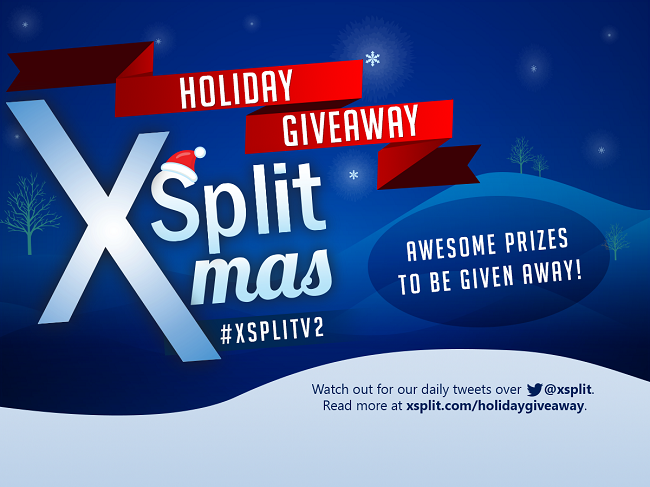
The Amazing XSplit Holiday Giveaway

It’s the season of giving and we here at XSplit are not new to the idea of giving back to the community. Through the years, we have always been doing something for the holiday season. We’ve done irresistible product sales since our product went out of Beta in 2012 and we’re also quite known for timely and exciting product updates during the same period (like XSplit V2!).

This year is no different but there’s a twist! As some of you may already know, we still have the amazing Christmas Sale ongoing where you can get 50% more time with 1 year and 3 year license purchases but for this holiday, we also have a fun and exciting giveaway where everyone can participate. Introducing:

XSplit Xmas Holiday Giveaway

Mechanics

This is one of the easiest giveaways that you’ll ever join. All you need to do is follow us on Twitter & Facebook, then wait for a tweet from us each day starting December 27 2014 UTC. The tweet will contain a graphic that has the giveaway prize plus requirements on how to enter and win. Winners will be picked the same day at around 9-11 pm UTC. Finally, the number of winners to be picked may vary per giveaway.

The best part about the giveaway is it will be running for more than a day so you get more chance of winning. We will not say how many days it will run because we want you to stay tuned daily. 🙂

Prizes

What about the prizes you might be asking? What are the prizes?

The exciting part is we have plenty to give away. Just like the length of the giveaway, we don’t want to disclose the prizes here. Following us closely on our social media channels will ensure that you’re up-to-date in this regard.

As we draw winners during the same day of the giveaway, we will be communicating with them through Twitter DM so it’s crucial that you are following us or else we won’t be able to DM you (Twitter won’t allow us) and we will have to pick another winner.

We hope you’re excited because we most definitely are! 2014 has been a tough year but we enjoyed it as we’re able to do a lot of good things to the community and we know we’re not done yet! The year also hasn’t ended yet and we certainly want to add this holiday giveaway to that list. 😉

Good luck to all!

XSplit Sponsors The Master’s Series

As we ramp up our effort in supporting more gaming events for 2015, we are excited to announce that we’re on board and in full support of The Master’s Series by Canada Cup Gaming. The tournament takes place this coming January 9-11 2015 at the Grey Eagle Resort and Casino in Alberta, Canada.

Here’s the trailer video:

The Master’s Series is an invitation-only, highly competitive fighting game tournament featuring Canada Cup’s previous champions, carefully chosen guests and players to be decided through an on-site qualifier during the first day of the event. You can read more details on their announcement post here.

The 3-day tournament will be live-streamed over at twitch.tv/canadacup. It will be pay per view on Saturday and Sunday while free to view on Friday (January 9 2015). As you may have guessed already, the production team will use XSplit Broadcaster V2 to carry out the event. Our very own Louis ‘Offcast” Vigil is also in attendance to help out with the production of the stream and to also provide assistance whenever needed. Be sure to also stay tuned as XSplit licenses will be given away during the event.

With the caliber of the competition, you can truly say that this is fighting game tournament at its finest!

XSplit 2014 Year in Review Infographics

2014 was an exceptional year for XSplit, with the introduction of a brand new application and new features for free, personal and premium users thanks to our Version 2 update.

Alongside that, we’ve had the privilege to work alongside some of the world’s top gaming and eSports personalities, partner with a world class PC Gaming hardware manufacturer and work with some amazing charities and organizations.

We’re aiming to do even more for 2015, but for take a look at some of our highlights for 2014 with this handy infographic.

xsplit year in review 2014

We tried to put as many as we can however we can only fit in so much in the image. If you think other items should have been included in the infographics above, then let us know in the comments.

It’s time to raise the bar even higher for 2015!

Twitch Notifications in XSplit Gamecaster

Add Twitch Follower and Subscriber Notifications with XSplit Gamecaster!

One of the best ways to build an audience and/or subscriber base is to use notifications that appear on your Twitch stream!

While traditional notifications can be difficult to setup for novices, XSplit Gamecaster makes extremely simple. You can watch the short video below to see how to setup Twitch notifications, or read the short guide below. Please note that Twitch notifications are only available to users with at least a Personal license.

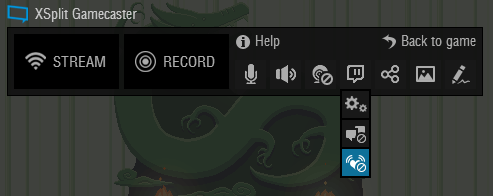
First, make sure you have authorized your Twitch account in XSplit Gamecaster. Once you are in game open the XSplit Gamecaster HUD, move over to the Twitch icon and click on the notifications icon at the bottom to open the notifications menu.
XSplit Gamecaster HUD

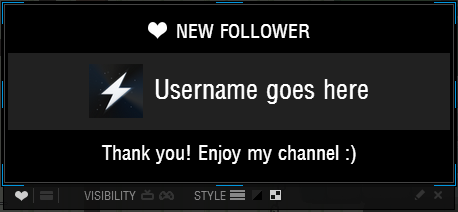
In the notifications menu you have a variety of options to customize your notification. First you can switch between customizing the follower notification or the subscriber notification. Subscriber notifications are only available to certain Twitch partners. The next option is the visibility of the notifications. You can set the notifications to only appear in game, on stream, or a combination of both. Your audience will definitely appreciate your acknowledgement of their follow and/or subscription. The style section will let you customize the look of your notification. Finally the Pencil icon will let you write a special message that will appear on your notification.
XSplit Gamecaster Twitch Notifications

That covers the Twitch notifications, if you have any other questions, be sure to post in our forums or reach out to us on our social media. Happy streaming!

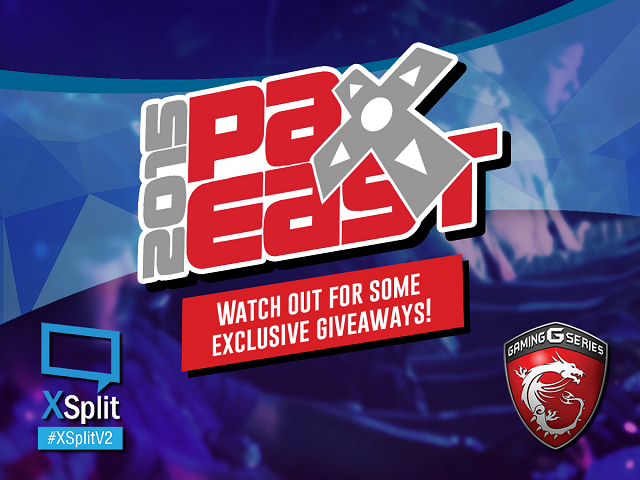
We’re Going to PAX East 2015!

We are happy to announce that we will be having a presence at one of the most popular gaming conventions ever in PAX East this coming March 6 to March 8 2015. We will be co-exhibiting with MSI US who will be having their booth (booth number is #4188) at the event.

Pax East XSplit

We are ecstatic to demonstrate XSplit V2 at PAX East but we’re also excited to meet you all in person so please drop by our booth and let’s exchange “hello’s”. We don’t bite people so there’s absolutely nothing to worry about. We will also be bringing lots of swag to be given away throughout the duration of the event. A lot of fun and exciting activities are awaiting you so be there!

If you’re not coming to PAX East, then please tune-in on our social media  for some equally exciting activities and giveaways tailor-made to those who are not present at the event. Rest assure too that we will share you any interesting updates as they happen in the event to make you feel like you’re present. To not miss any of these goodies, make sure you’re following us on Twitter, Facebook & Instagram.

See you there!

Windows 7 Screen Capture Issues

Different Types of Screen Capture

Window capture: This is when you select and capture a desktop window or a region of a window.

Desktop capture: This is when you click and select the entire desktop or a region of the desktop.

After adding a screen capture source to XSplit Broadcaster, you can right click the source and look at the properties page. In this example, I have selected a region from a window which is referred to as Window Capture as denoted in the title.

xsplit screen capture

Exclusive Window Capture

Only window capture can be exclusive, which means the window or region of window that you capture will still show in its original form no matter if other windows are on top. If you disable the exclusive window capture mode, you will notice that the windows on top of your captured window will show instead.

Generally window capture with exclusive mode turned off and desktop capture use the same underlying technical capture method which is completely different between Window 7 and Windows 8.

Common problem you may experience with screen capture

Desktop capture or non-exclusive windows capture on Windows 7

This simply does not work properly. Windows 7 with Aero mode cripples desktop capture and it is for a good reason that Microsoft themselves switches to basic theme when using remote desktop for example.

Ignoring the warning can lead to a slowdown of the entire graphics system.

What you can do about it

If you need to use desktop capture on Windows 7, then your best choice is to switch to basic theme (or upgrade to win 8.1+). If you remain on Aero theme, then you need to stick to window capture only and make sure the exclusive property is enabled.

If multiple monitors are connected to different GPU’s on a desktop system, exclusive window capture does not work and the system will be forced to use non exclusive window capture. In this case, your best option is to make sure all your monitors are connected to the same GPU (Radeon or NVIDIA class GPU).