Recommendation for Primary Monitor Setup

On desktop machines which has a monitor connected to both Nvidia/AMD discrete graphics and Intel on board Graphics card, it is recommended to always connect the Primary monitor directly to the Discrete GPU.

To review which GPU is currently connected to the primary monitor (Win 8.1 or Win 10), right-click desktop and select “Screen Resolution”. View which monitor is the primary by looking at which screen has the added icon group. You will also find a text telling if the selected display is your main monitor. Check to see if that monitor is connected to the Nvidia/AMD GPU, if not then you can change this in two ways:

1. If you wish to keep the position of the actual monitor assigned as the primary monitor, then go ahead and simply change the wiring so that the DVI or HDMI input on that screen is connected to the Nvidia GPU.
2. Alternatively, you can click on the secondary monitor, make that primary by checking the checkbox to make it your main display and ‘apply’ settings. But doing it in this way will switch your main view monitor.

XSplit Broadcaster Software Information

Your stream or recording was limited by performance or affected by network issues. This following sections will help you understand what and how to change to ensure your stream is uninterrupted and set to the best possible quality.

We are currently working on gathering baseline data to establish the guidelines. This page will be updated regularly – please check back soon.

The XSplit Team

Deleting faulty DirectShowSpy registry key

Some users that use a 3rd party tool called DirectShowSpy may encounter errors when logging in to XSplit.

This can be caused by a fault registry key that is introduced when DirectShowSpy is registered to intercept Filter Graph initialisation — Filter Graph is used by XSplit. The faulty DirectShowSpy registry key is usually caused by DirectShowSpy program begin relocated after registration.

To workaround this situation, XSplit1 detects the presence of HKEY_CLASSES_ROOT\CLSID\{E436EBB3-524F-11CE-9F53-0020AF0BA770}\TreatAs registry key2 when it fails to initialise Filter Graph and exits when it is found. In this case, user must manually correct the DirectShowSpy registration or delete3 the registry key. Only after either is done can XSplit be restarted.


  1. Implemented in XSplit Broadcaster v2.2. In XSplit Gamecaster, this workaround will be implemented in v2.3.
  2. For 64 bit Windows, the registry key is HKEY_CLASSES_ROOT\Wow6432Node\CLSID{E436EBB3-524F-11CE-9F53-0020AF0BA770}\TreatAs
  3. Deleting this registry may require special/full permissions. Read here on how to do it.

Eric Baudour & Garrett Hunter Interview Part 2

Welcome to the second part of our interview with Mega64. If you haven’t already, make sure to check out Part One here. In this segment we find out a little about how the guys use XSplit and working with some of gaming’s biggest names:
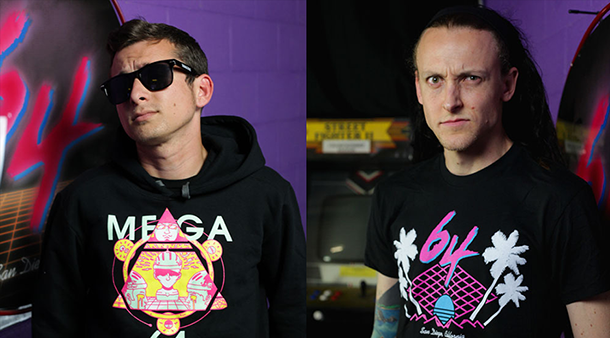
Eric Baudour and Garrett Hunter

Were there any interesting lessons you picked up from working alongside publishers, events and notable figures in the gaming industry?

Eric: Yeah, you know what – I think the biggest lesson that I walked away with is “hey, these are just normal dudes”. Treat everyone like they’re your buddy, when you meet someone face-to-face in person, that impression of “hey man hows it going?” and just having that conversation puts them at ease and from there you can get whatever kind of footage you want

Garrett: I think one of the first guys, to help us realize that was Tommy Tallarico (Composer)

Eric: Oh, for sure.

Garrett: He kind of ran into us a long time ago, early when we started doing this stuff and became really good friends with us and has helped us film stuff and has just taught us that these guys you look up to, these creators and these pioneers of the gaming industry, they’re just like regular dudes who like playing games like we do. They can be just as nerdy and just as cool in whichever setting.

Eric: I don’t know if we have ever really talked about this, but a moment I always think of where we’re just hanging out is during a comic-con one year, after we filmed with Hideo Kojima. He and his kind of like crew or buddies that he goes around with wanted to get lunch with us. So we went out to a pizza place where we just got a couple of slices in the back of this little run down pizzeria and when we were sitting there, they all started fawning over Garrett’s tattoos

Garrett bursts out laughing

Eric: And we realised that this is just like hanging out with regular guys, who are just going “oh, look at these cool tattoos” or “oh, this is good pizza”

Garrett: Yeah, they really are like super down to earth, the entourage that was there just for the experience of being able to say “yo, we’re in america we wanna go get some badass pizza and hang out”  It was just a lot of fun.

Eric: I think my advice from working with all these people would be; don’t be so wary when you meet these people that you’ve grown to respect and revere because honestly they’re just dudes at the end of the day. They like video games the way you do, so just talk to them like normal people.

Now that the barrier of entry for streaming and broadcasting is lower than ever before, do you think it will be harder for up-and-comers to make a name for themselves given the influx in competition?

Eric: I do. You can really really liken it to YouTube. When YouTube started there were a lot of people that came in and made waves and there were personalities and they were interesting, and those kinds of people fade away and new people come in and now its gotten to a point where its all quantity versus quality. People are putting out the most because, the internet, if we’re looking at it as this one large amalgamation of people, is so hungry and ready for more that your quality stuff is kind of getting lost.

Garrett: Thats true.

Eric: So if you’re a streamer and you’re going “man, no one is really watching my stuff” find your hook and really have a voice and do something that’s gonna be different than what your run of the mill type stuff is. I know that the run of the mill type stuff and your “Starcraft people!” and the “heyyy! we play League of Legends people” gets big viewership and a lot of people really live on that stuff, but I think if you have a unique voice and I think that if you put out quality content and just kind of keep at it, you’ll make a name for yourself. It might not be the biggest thing in the world, but you’ll get followers because you’re doing something that you’re passionate about

Garrett: Yeah, I agree 100% and I think that there is that niche out there that you can carve out for yourself if you have a creativity that’s gonna set you aside from what everyone else is doing. That’s the thing, the barrier of entry is so low everyone is doing it, so you’ve gotta do something that sets yourself aside from everything else.

Eric: You just have to be passionate about it, you can’t go into it and go “well, today I’m gonna get a hundred viewers”. You can’t ever have the mentality and set goals that rely on other people that way. What you have to go on is “I’m gonna make the best show I can and here are the things I’m gonna do and I’m really going to try and promote it and make this something I really enjoy”.

I think if you start making content you really like, people will latch onto it because thats all we are doing with Mega64 – we’re sitting in our room trying to make each other laugh and when something happens naturally we’re like “alright, let’s do it, let’s film that”

Garrett:  And I feel like that’s something our fanbase shares, they are of the same sense of humor that we are, so that us sitting in a room trying to make each other laugh is just by proxy something that people will connect with. I think that definitely is how we have carved out our niche, by having a live action show and not really a video game stream

After initially discovering XSplit, what made you decide to use this product for your live streams?

Eric:  I noticed that our podcast had kind of, I don’t want to say plateaued but I don’t know if there’s a better word for it. Our viewership had kind of reached a level and remained consistent for a while. We were live streaming and I went to the guys and said, “hey, let me try and take this over and let me see what I can do to make it more dynamic”, because all I thought was, do I wanna watch this? It’s a single camera pointed at four people and I just think that for an hour of no cuts, no nothing and yeah maybe they get wacky but just on a flat surface it gets boring, visually, its boring.

So I actually went and researched programs that Twitch recommended or went on forums to see what people were saying, I tried a few different programs. I probably tried like 3 or 4 different programs and landed on XSplit and really kept coming back to it even after trying other alternatives. XSplit gives me the ability to have reset scenes like we have for camera one, camera two and our little webcam for camera three. Our fourth scene is our Podcast theme song and our sixth scene is our videos and our ninth scene is our Will.I.Am little intro thing for when we make fun of him.

Garrett: And its all one click away

Eric: Exactly! Having that ability is really enticing. I have a degree in radio, tv and film and have worked within that broadcast television industry so I was looking for something that was going to be as close as a regular switcher that I can use for our show. Something where I can imagine myself going “ok ready camera two, take two”. If I can picture myself doing that with a program, I was ready to use it and XSplit was ready to be that thing for me that its perfect. Now with the advent of preview windows I can always see what other cameras are doing so I can cut to it. Having those kinds of features, and being able to have everything preloaded really drew me into to XSplit just for our live podcast and I know Garrett has started using it for his own stream also

Garrett: Based off the research Eric did and what we were already using on the podcast and the way Twitch has a tutorial to stream, helped me learn about how to do it. After watching YouTube videos, XSplit was just unanimously popular and the most stable program to use.

Eric: I think its head and shoulders above everything else I’ve tried

Garrett: I did use one program before on the Mac operating system and I can’t even remember what it was, but it was really limited to where I didn’t have all of the multiple scenes I could click on, because I like to cut between stuff. Typically because I make a mistake.

Both the guys burst out laughing   

Our readers are always interested in learning about the set-ups used by well known broadcasters, Do you mind walking us through your hardware and software setup?

Eric: Sure! For the Mega64 podcast we’re running with two prosumer grade cameras that we used to use for our actual skits and everything. We have those running through firewire to our PC and those are taken straight into XSplit, those are the only two cameras. Other than that its pre-edited videos that are set to scenes like our theme song and our videos, different things like that. We have pre-edited videos I keep within a folder and have them already to go and we prep before we go live by saying “hey, what are the things you think we’re gonna hit” and then I put them all up in our pre-loaded scenes. So we’re running two cameras; a Sony and a Panasonic through Firewire and then a little USB Logitech camera that’s on our computer for a third camera for me.

Garrett: That’s for when we cut to Eric to show him mastering the stream.

Eric: Really, its gotten so easy to get all of these things into one program and to have them all sorted so I’m ready to use them.

Garrett: The only real complexity is that we’ve upgraded the audio on the set a few times but it’s always analog equipment going through a mixer with a single 35mm headphone jack input into the PC we stream with.

Eric: We use an external sound card to cut out on any kind of external fuzz, and we have a regular mixing board.

Garrett: Do you remember what PC we use? It was one of our old editing PCs right?

Eric: Yeah, and thats one of the great things, XSplit doesn’t need something to crazy to run. As Garrett was saying, our audio is all analog going through a mixing board and then a compressor running to a single 35mm into a little external sound card for our audio.

Our audio setup is just two booms and two shotgun mics hanging above the set to capture all of the audio and then I have one little dynamic microphone thats sitting on my desk if we ever need to cut to me. What about your stream Garrett? You’re actually playing video games on your “Poorly Played Stream”

Garrett: Yeah that’s right, so I’m actually using the program in more of a traditional way, where I have a game that’s being captured on a old Hauppauge with the composite inputs, the old big green and grey box. So I capture the video game through that and then I have a little picture in picture window. I have a couple of different scenes where I will cut to a quad cam with multiple things showing all run through an onboard laptop camera. We use a 17 inch Razer Blade, one off the first generation ones. The other camera is a Logitech mounted on a Mic stand. So I’ll cut between different shots and I also have a lot of audio equipment  in a rack to my left and I like to play a lot of sound effects and samples and music and stuff. So I will route all of that audio through little mixers and such and then I just play it through speakers that my vocal mic picks up. I have one of those Yeti’s, the blue microphone that’s pretty badass. It picks up my voice and any other voice in the room and the music and all of the sound effects and stuff.

Finally, any cool projects coming up this year you would like to share with our readers?

Eric: Right after we’re done with E3 we have a Split Squad fourth of July weekend convention extravaganza

Garrett: Thats what we’re calling it.

Eric: Yep thats what we’re calling it, all of the words that I just said, so I hope we remember them tomorrow. Half of the crew being Rocco Botte, Garrett Hunter, Bryan Abou Charcra and Frank Howley they’re gonna be at the Anime Expo, you guys can check them out fourth of July weekend, we’re gonna have a panel there – hey guess what? A special guest: Derrick Acosta!

Garrett: Boom!

Eric: He’ll be there also! But wait, there’s more! A Split Squad Hype Split Squad at RTX Convention on the same weekend! you can come out and meet the one and only Shawn Chatfield, myself Eric Baudour, Kevin Bushong and also what!? Split Squad special guest Derrick Acosta, he’s double time, double team supreme – he’s going coast to coast (we’re counting the gulf coast as a coast)

Garrett: Austin, Texas and Los Angeles, California, we’re gonna be in two places at once baby!

Eric: If you love skinny jeans you’re gonna love this weekend of conventions that Mega64 is gonna have! It may be hot outside this summer but its gonna be a cool cool convention time indoors.

(telephone rings in the background)

Eric: Whose phone was that!? WHOSE PHONE INTERRUPTED!?

Garrett: We’re doing this for a text interview, no one is gonna hear this! …but yeah, that’s our next plan.

Eric: Yep and we are confirmed for PAX (Prime), that will be a Single Squad of the no limit soldiers, all of us will be at PAX.

But hey, maybe conventions aren’t for you, and I understand that because they’re not for me either. I go there so I can meet you guys. You know what you should do if you’re a Mega64 fan? you should come to the Mega64 Game Days Weekend November 1st and 2nd at where!? Disneyland! Have you even ever been to Disneyland!? We’re gonna have a fun filled extravaganza November 1st, where? Lovely Anaheim!  We’re gonna have a meet and greet and have some fun panels and guests. This is the fourth year in a row!

We’re here to say, it’s ok to be a gamer! You can be a gamer and you can go to Disneyland and hopefully we will see you there at Mega64 Game Days.

That was the end of the interview, or at least the final point where things were still coherent. The closing minutes of our conversation included Eric proclaiming the triumphs of Master P’s “Make em say Uhh” and how after our conversation they were going to “get Mexican food and do kickflips on our skateboards”

Twitch: www.twitch.tv/mega64podcast

YouTube: www.youtube.com/mega64

Website: www.mega64.com
Matt Sevadus Zagursky Interview Part 1

A force to be reckoned within the Minecraft community, Matt “Sevadus” Zagursky has quickly garnered a dedicated audience spanning the globe thanks to his highly interactive streams and jovial presentation skills.

Sevadus

In the midst of the Mining for Charity live streaming event, we had a chance to catch up with Sevadus for an in-depth interview spanning his broadcasting activities, pioneering upcoming musicians and how he uses XSplit to produce his own streams.

In our first installment of this three part interview we chat with Sevadus about his day-to-day streaming activities, his involvement with Mining for Charity, pleasing his most dedicated fans and whether the Minecraft community really is the best gaming community around.

Matt Sevadus

For readers unfamiliar with your channel, could you tell us a little about yourself and how you got started with live streaming?

Sevadus: About two and half years ago I was really bored one afternoon, I was living in Texas and it was cold outside so I just sat on the computer and then happened to find Justin.tv. I saw that a lot of people were playing video games and decided to check it out.

It was that boredom that drove me to watch it for a few days and i was like “You know what? I could play video games and talk to people, I could do this” so thats what I did. At the time i had gotten bored playing video games but through streaming I was able to play in a whole new way because there’s always people to keep me company.

So I know you’re currently involved in Mining for Charity, could you tell us a little about your involvement and what viewers that have never seen it can expect from it?

Sevadus: Mining for Charity is a really really big event funded partially by Twitch and partially by auction to support charities of our choice. There’s something like forty-two different broadcasters involved and all of us play Minecraft on a regular basis.

Essentially, we were broken up into four teams. I think it was eight people that compete each week on each team, some of them sort of switch in and out and it’s four weeks of competitions with the winning team taking home five thousand dollars, whereas the alternate winning teams (see, I keep a positive spin to it) have charity auctions divvied up amongst them, which interestingly enough right now is actually giving more money than 5000 dollars to second place, but it’s a little detail (laughs)

Did you make that change happen? It wasn’t like that initially right?

Sevadus: Yeah, I think it wasn’t communicated if that was the case originally, but we sort of got it out there and made it public and made sure that every charity was getting treated well.

I understand that part of the way the event is structured at the moment, is that there are some organized mini games, a few of them have been quite brutal so far. Could you tell me some of your personal highlights?

Hmmm, highlights? There are a few (laughs). I am no expert at Minecraft mini games and Minecraft PvP, I usually build things and build really big complicated things. I guess the whole highlight of the event for me is just having fun. It’s not all that often that all of the broadcasters get together and are able to chat and play, it’s very very rare in fact. So the fact that we can all get together on an organized event and just have fun together has really been the highlight for me.

But the mini-games? (sighs) they’re ok. They’re Minecraft mini games so they’re fun and people that have a lot more experience in the games obviously do a lot better than my team, but we’re not there for that, we’re there to hang out with each other and raise some money for charity

In your opinion what do you think it is that makes Minecraft such a great game for streaming?

Sevadus: It is such an expression of creativity or it can be about going out and murdering people in PvP, or it can be building big super impossible logic structure circuits. The fact that Minecraft is so diverse in what you can do in it, it’s a sandbox in the truest sense. It really lends itself to any type of broadcaster to really do anything they want to in it. If you’re the type of broadcaster that doesn’t necessarily like to interact with chat and like to be really involved in the game, you can do hardcore PvP and zone into the game, or if you’re like me and you’re somebody who is incredibly interactive, it’s also the kind of game where i can just turn my head whenever I want to and I’m not going to explode and die too often in the game.

Would you actually say the Minecraft community is one of the better ones?

Sevadus: I would be possibly lynched, but I will say yes, I think the Minecraft community is the best single video game community that exists. It’s just in the nature of the people that are involved in it, as well as just how their business model reflected how much they care about their community and it’s really a fully community driven game at this point.

Are there any games you enjoy playing at the moment outside of Minecraft?

Sevadus: Yes! Right after this interview, I’m going to go play a mod for Arma III called Battle Royale which I’m definitely into. I’m really into hardcore survival games like Day Z, Battle Royale and Wasteland and all those sorts of games. That allows me to not just play games I really enjoy but also connect with a whole bunch of different communities. Not just the Minecraft community but a whole bunch of them. And it sort of allows me to connect with friends in that community as well. The way I connect with people is through video games, and the fact that I enjoy such a variety of video games and I have friends that also enjoy those video games as well is really nice. To just be able to switch off and play with other people I don’t necessarily get to talk to all of the time.

We noticed recently that you’ve been talking about a Studio Camera. Can you give us more details about that?

Sevadus: So last year in January 2012 I did a 24 hour broadcast for a month. It was sort of an experiment to see live casting. I live casted in college back in undergraduate as part of a project, but that wasn’t interactive at all. It was me just literally having a camera in my room and seeing how that went as I was doing it for a project. It was really creepy, I’ll admit, but then I did it again a little bit last year as sort of an experiment to see how it would go as I didn’t really have anything to do for a month. It was ok.

I have this thing where I like to give back to subscribers, because I feel like a thank you isn’t enough for people that are actually financially supporting me the way they do, and i always come up with perks and one of those perks is the studio camera where they can basically have an overview of what’s going on in my studio while I’m live. I’m not saying this will be a 24/7 thing but it will be up at least some of the the time when I’m in the office, as it gives my subscribers a little bit of insight into just what my daily life is like, because these are people who have chosen and they don’t just want to support me with a follow. They feel it’s important to financially support me, and so this is sort of a way to give them a real insight into who I am and the personality that I am. I’m not really different than I am on stream, I mean i’m the same person, but let’s face it. Everybody likes to be a voyeur sometimes and it gives (the followers) that voyeuristic perspective into what I do in my studio.

Once again it’s the connection that the viewer has with the personality. If it’s a personality based broadcast, a lot of viewers really want to know everything about what is happening in your life, “what kind of pizza did you get”, you know? everything! And you know, providing a little bit more of that will make them happy.

Can you tell us about any other events you have coming up later this year?

Sevadus: So Mining For Charity is the big thing still going on right now and I am sort of focused on a whole bunch of stuff that will be taking place in the fall which I can’t really talk about right now, but in the fall there will be a ton of stuff surrounding my channel.

Right now we are doing weekend and weekly promotions for different awesome MMO video games. We’re bringing developers on the show, stuff like that, which is working out really well and then throughout the summer there is a bunch of new music releases and the artists from a whole bunch of new albums are gonna come on the show. We are launching, I think, seven or eight new albums on my channel, this actually being the launch party, which will happen this summer, which is pretty intense and there’s lots of awesome music coming up.

Thanks to Sevadus for taking the time to speak with us. You can follow Sevadus on twitter @Sevadus. Make sure to also check out his stream via twitch.tv/sevadus and visit www.sevadus.tv to keep track of any upcoming events he is involved in.

Matt Sevadus Zagursky Interview Part 2

In our second installment of our three part interview with Sevadus (you can read part one here) we learn the tricks of the trade for building up a successful following, how to gradually build the perfect streaming set-up and the common pitfalls new broadcasters make.

Sevadus

Looking back to when you first started streaming on Justin.tv and Twitch, what would you say were your technical or creative obstacles that you had to overcome?

Sevadus: I think my first obstacle was sort of everybody’s obstacle which was “how do I even make this appear on Matt Sevadussomebody else’s computer?” Just trying to figure out “how do i get my screen to go through this Twitch service and just appear for somebody else?” I had no idea what i was doing and I basically just googled “broadcasting software” and that’s how I figured it out. There was a little guide, i think it was on Team Liquid’s forum about how to use XSplit and i was like “ah, ok that’s what I’ll do!” I use XSplit and then I push the button and it lets me do it and that’s as technical as I got back then.

So given that a lot of your channel is focused on playing Minecraft, how do you think a streamer can distinguish themselves in this kind of niche? What do you think makes a great Minecraft stream?

Sevadus: Having fun is really what sets the Minecraft streams that are at the top apart. It’s pretty obvious when you go into a stream if the broadcaster is really loving what they’re doing. It’s not hard to find something you love doing in Minecraft and if that person is really in love with what they’re doing, people will tend to stick around. People want to be around people that are positive and happy and love what they’re doing, not people that are just trying to play a video game to get viewers.

What are some tips you can give to casters looking on generating content for daily schedules? Are there any resources that you use to help you with your daily content?

Sevadus: The biggest thing to becoming a successful broadcaster, and i think everybody across the line can agree with this, is to be consistent. Consistency is key, not just in your schedule but in what you’re doing. Even if your stream is not the highest bit-rate, as long as it’s a consistent quality that you are temporarily happy with. Being consistent is by far the number one most important thing you can do as a broadcaster in all regards. Absolutely, be consistent.

What is your streaming output in resolution and FPS?

Sevadus: I used to go back and forth between 720p and 1080p but am now set on 720p at 60fps. For me 720p at 60fps looks better than 1080p at 30fps, that’s just a visual thing for me. This is a split topic as some people think that 1080p at 30fps looks better, whereas some people think 720p at 60fps looks better. It’s just a personal preference. For me, 720/60 is the way to go and my bit rate is output at about 4500, which is massive, but I’m using up every bit of my bandwidth that I can possibly squeeze out of it, just for that quality factor, as quality for me is one of the absolutely important things and any tiny bit of quality I can increase is great.

If I didn’t have transcoders on my show and the ability to do high medium and low, and this is what I recommend to all new broadcasters, if you don’t have those; do not broadcast at 4500 kbps. You should instead broadcast at what most people are going to be able to watch, which is more like 2000kbps. Even if Twitch has a terrible connection to your computer, you can still get out most of the data without buffering.

What common mistakes do you feel people make when purchasing new stream equipment?

Sevadus: I think one of the more common mistakes is for a small caster to feel like they need the absolute best of the best. For me I happen to have a lot of really good equipment, but it didn’t just appear overnight. I make very slow and progressive and noticeable upgrades. It’s actually a very interesting thing to do for a growing stream as rather than just instantly coming out with all of the absolute best equipment, if you just sort of slowly upgrade then your audience feels like they are taking part in this upgrading process with you and they see the stream get better and better and better. You can turn the process into a very interactive experience. Thats something i always do.

I always find ways to try to make literally everything i do an interactive experience somehow. Right now I’m talking to you guys, but I’m also live on Justin.TV with a webcam. They can’t hear us but there is music playing and they can watch and see me moving my hands right now, but it’s just making things more and more interactive. So for example with gear upgrades I started off with no mixer and I was using just a headset microphone, and it was probably one of the worst headset microphones I’ve ever used. I literally sounded like I was talking into a coconut, it was horrible. I used to work from a single computer, I had one monitor and I would actually broadcast the video game still with the top bar and it was just complete noobism. Then slowly I started to upgrade the computer and then I decided to get a second computer and then I upgraded my audio. It was a whole learning experience for me as well, which was awesome.

For a streamer who is no longer a novice, and is looking to make the first big step in improving their production, what are some techniques/items you could recommend?

Sevadus: It really depends on what your stream is focused on. Obviously If your stream is focused on competitive Counter-Strike or something then your focus should probably be on playing better (laughs).

You need to learn to network and connect with other major influencers in whatever realm you’re in. If you’re in the eSports realm like I was saying, you should connect with other broadcasters and try to play matches with them and have them appear on your show and vice-versa. That’s really important. One of the biggest things that a lot of broadcasters miss out on is they think they have to do everything alone and that is so completely untrue.

This is the reason why Twitch has such a fantastic community, because there are always people out there that are willing to go up with you and grow up with you and I think one of the best things you can do as a broadcaster who is looking to actually get into serious broadcasting is knowing that the community is not going to come find you. You have to learn to put yourself into the community. So learning to get out there and trying to meet other broadcasters does a world of good and networking networking networking. That is one of the things that you absolutely have to have if you want to be really successful in the long term, and if you want to be a long term success on Twitch. You need to know other people on Twitch and have a connection with them because there will be times where you will get completely burned out of just playing games but being able to just step in and just say “hey friends, lets just go and play Battle Royale right now and chill ” and just being able to do things like that with the people I’ve already connected with and be able to broadcast that and still provide valuable entertainment is pretty awesome.

Thanks to Sevadus for taking the time to speak with us. You can follow Sevadus on twitter @Sevadus. Make sure to also check out his stream via twitch.tv/sevadus and visit Sevadus.TV to keep track of any upcoming events he is involved in.

Matt Sevadus Zagursky Interview Part 3

In our final installment of our three part interview with Sevadus (you can read part one and part two here) we geek out about choosing the right hardware for streaming, and learn his opinion on the future of live streaming.

Sevadus

One of the unique aspects of your stream is that you currently use two PCs for streaming, one for gameplay and one for broadcasting and aside for the extra processing power for encoding what are the other benefits you feel this setup offers?

Sevadus: Well, currently I have two capture cards and the current computer i am using already has it’s PCI slots filled, so having a second PC offers additional slots. The second computer also helps out with offloading a lot of extra stuff. I have to plug in two different HDMI cables; one for my camcorder and one for my computer and just the ability to offload everything I can over there. I use the second computer as my music player. It also acts as the server for my bot in my channel. I just offload as much as i can on to the second PC so that the gameplay is not hindered at all.

Looking through your streaming gear list www.sevadus.tv/gear one of the most interesting items is the Novation Launchpad. Can you describe how you use this with XSplit?

Sevadus: The Launchpad itself has software you can download with it, and i just have a button on my second computer where I double click it, and it just loads everything and moves all of the windows where it needs to go. It helps because I can’t be bothered to open ten things at once. Then i use a program that allows me to convert the signal from the launchpad into just keystrokes on my keyboard, and so I just have that running in the background and then I have XSplit setup with the different hotkeys. Basically Launchpad allows me to emulate pushing buttons on a keyboard but does it in a nice elegant way where things are lit up in colors and I can just look over and change what I need to change. It also controls my media player, my bot and a whole bunch of things that i have running on that computer. I think i have something like 87 different keybinds on that computer right now (laughs)

Matt SevadusAre there any specific XSplit features you use it for despite changing scenes?

Sevadus: I used to use it to start and stop my broadcasts, then I got too scared that I would accidentally hit it. So just for safety’s sake I pretty much only use it only for switching scenes. When I was on a single computer setup I did use it for mute and unmute functionality, but I don’t do that anymore, because everything is controlled by a mixer so I don’t worry about that. Right now, I just basically have the upper left hand quadrant dedicated to all the different scenes in XSplit and it works out really well. I would definitely recommend doing that for people because it’s one of the best and cheapest investments that I’ve made to make the flow of the cast easier, rather than having to fiddle around with my mouse and everything else. I just have to push a button and done. Easy.

You chose to use XSplit for your live streams, could you tell us why it is you settled on using this software?

Sevadus: So for me, when I started with XSplit but then found out there was other software out there which i didn’t even know about. I quickly ignored the idea of FFSplit just because it seemed too difficult and there was one for Mac at the time which I forget what it was called, but it’s still out there and very expensive though and then OBS popped up. You sort of look at these three softwares and the one that fits the bill for me is one that is easy to use. Second and probably more important than anything else is quality and stability. That is by far the most important thing in software. I clearly remember the beginning days of OBS when I tried that out and it just wasn’t stable as expected with any new product.

For me it has always been quality quality quality and stability stability stability and then on top of that, if there is software that brings those things, which I think all of these software now have, then it is “which one has the feature set that I need to do everything i want to do in my show”, and for me XSplit has the features needed for me to put on my show. Something as simple as just making a video stream black and white is actually a very difficult thing to do, except in XSplit. In XSplit you just right click and drag the slider, done!

Can you tell us a few other XSplit features that you like?

Sevadus: Right now I have two capture cards sources and do screen capture and chroma keys. I used to use XSplit for the audio mixing the two channels, but I don’t do that anymore, as everything is offloaded on to my mixer and XSplit just listens to my mixer basically.

The audio is now less complicated on the XSplit side but much more complicated out here (laughs). Now I just have my system sounds muted and my microphone sounds unmuted and that’s it. Lately, I’ve been playing around with the chroma key and am very glad you guys added the old chroma key stuff back in, thank you! It’s very important just to have that ability to fine tune things, as allowing any more controls is a good thing. At this point I have everything so customized and set up the way I want it, that nothing really changes too often. I can throw in my GIFs if I want to and do a lot of fun things with that and do a lot of fun things with the 3D rotation features on elements, colors and clips which is all fun, and I do that from time to time. Really, I’m just so comfortable with XSplit that it’s just second nature now.

Given that one of the most popular trends on Twitch is having subscriber/follower/donator notifications appear, do you feel these will continue to evolve or will there be another type of development that helps with streamer/audience interaction?

This is sort of a contentious issue on Twitch, though nobody really talks about it, but rather everyone is ok with each other doing their own thing. There are some broadcasters that want to share their donations and subscribers because it does generate hype and can also generate more donations and subscribers, which if you’re trying to make this your job is sort of an end goal. For me, I don’t really play into that too much and have a different outlook on things.

I am one of the very few broadcasters that does not take donations at all which is incredibly rare, because for me it is just an uncomfortable thing to do, but for other people it is totally fine and i support everybody that does it, but it’s just not something I would do. I do think that notifications and showing your donations on stream and those sorts of things are going to become more and more popular. I would say 90% of Twitch channels already have it and the rest of the 10% is just a matter of time before it’s completely everywhere on Twitch.

Music is an important part of your show and you are very pro-active in promoting the artists. Given the pervasiveness of music on Twitch, how do you feel this could be developed in the future?

Sevadus: I am fortunate enough to be very good friends with some absolutely outstanding artists. This is just another community I have become a part of, and every time one of them comes out with a new album it absolutely stuns me. Zircon is about to drop a new album here in a couple of weeks. I’ve already heard it and it’s just absolutely fantastic. For me music is just a very big part of my show and that’s because this music is a very big part of my life. I think that’s what people should really get out of that. Obviously, I am not doing a skilled based broadcast here, ok! (laughs) Thats pretty obvious – I do a personality based broadcast and because of that I let whatever is important in my life shine through and music I really enjoy is very important to me and my life and so I make it important in my show.

I think, going forwards, a lot of these artists that I’ve brought on to Twitch, allow anybody to use their music, letting it spread like wild fire. It’s already spread throughout the Minecraft community. They’ve now started using a ton of music that I’ve brought into Twitch and it’s now starting to spread out into a whole bunch of communities. Just yesterday, I was watching a massive League of Legends streamer for the first time playing an artist that I am very good friends with, which was awesome to see. So now it’s starting to spread across Twitch, and this idea that music can be a very interesting backdrop to a personality is sort of picking up and catching on.

Five years from now, where do you see the gaming streams? Not necessarily eSports, but more general gaming streams.

Sevadus: It’s only going to grow as it’s nowhere near any sort of decline. I think right now, it’s almost growing exponentially and i don’t see that stopping any time soon as more and more people get involved. This community lends itself to entering it but not leaving it. It’s such a magnetic community that people are drawn here creating such a variety of broadcasters and shows. If you’re into eSports, boy do we have a lot of that, if you’re not into eSports we have a ton of everything else. We have such a variety that there will always be something to pull you in, and because of that it’s something that is very difficult to let go of for a lot of people.

You rarely hear about people saying “oh i’ve been at Twitch for 6 months, now I’m going to leave” – that just doesn’t happen because it’s such a different experience. It’s much more of an immersive experience than I think personally a YouTube experience. Whereas on YouTube you’re watching a video, there will always be a slight disconnect there. It’s not live, it’s a pre-recorded and edited thing, but on Twitch it’s real and raw. On a video broadcast, what you see is what happens and what you get and that is much more of a powerful connection, and I think right now thats what the gaming community is looking for.

They’re looking to share their broadcast and gaming experiences even if they’re not the ones doing it. Way more people watch than broadcast, yet they can still share their gaming experiences through the interactivity of Twitch chat, and a lot of them do. Every day my chat is full of people who are discussing their own video games and what they are playing right now while they’re watching the show and I think that is what drives people to Twitch, and that the future of Twitch is a massive community rather than just passive entertainment.

Thanks to Sevadus for taking the time to speak with us. You can follow Sevadus on twitter @Sevadus. Make sure to also check out his stream via twitch.tv/sevadus and visit Sevadus.TV to keep track of any upcoming events he is involved in.

XSplit Supports The Big House 4 Tournament

If you are an avid Smash Bros fan, then we are pleased to announce that we are one of the sponsors for The Big House 4 tournament that will be held this weekend, October 4 and 5 2014.

In case you’re not too familiar, The Big House is the largest Super Smash Bros. Melee and Project M tournament series in the Midwest. Started in 2011, it has become an annual go-to event for both Smashers and spectators as it features the best Smash Bros players around.

Make sure to check out their event schedule and tune in to the event through the following channels in case you’re not able to attend in person:

2014 Extra Life Charity Event

For the third straight year, XSplit is once again supporting the Extra-Life Charity Drive by providing XSplit licenses to the participants.

For those not familiar with Extra-Life, it is a charity that celebrates gaming culture where entrants host a variety of events with everything from gaming marathons to LAN parties, all in an effort to raise money and awareness for children’s hospitals. Since 2012, XSplit has always been on board to support the event. And we’re back for round 3 this year.

Extra Life 2014

How is XSplit supporting the event?

Anyone that registers for this year’s Extra-Life charity event and raises at least $25 in sponsorship will receive a 1 Month XSplit Premium License completely for free.

How can i get involved?

The easiest way is to visit Extra-Life’s official website, whereby users can register for free and begin gathering support from their friends and families.

Are you organizing an event for Extra-Life?

If you’re organizing an event for Extra-Life, we want to hear about it! Send us a tweet via @xsplit telling us about your event and we will be happy to help you promote it. 🙂

#XSpooky Halloween Contest Winners

Happy Halloween to everyone! We hope you’re enjoying the day with the activities that you have. We are now announcing the lucky winners of our #XSpooky Halloween contest that we started last week.

We got so many good entries and it was hard for us to pick just 5 winners. But we still did and here are the 4 consolation prize winners of a 3-month XSplit Personal License:

XSpooky Halloween consolation prize winner

XSpooky Halloween consolation prize winner

And for the deserving grand winner of our #XSpooky Halloween contest, congratulations to:

Congratulations to the winners. With the upcoming launch of #XSplitV2, you will certainly be able to take a great advantage of the license that you won in this contest. 🙂

We will be sending you a private message (depending on where you’ve submitted your entry) on how to claim your prizes. Thank you to all who participated in our mini Halloween activity and we hope you enjoyed it as much as we did.