Arthur Arends, Our Newest Community Manager

We started off with UK, then Latin America (specifically Brazil), then Korea and Australia, and now Japan! Yes, we are taking community management seriously and we want to cater not just to English-speaking countries but also to countries that use our products a lot but don’t speak English too well.

Without further ado, let’s all welcome Arthur Arends, our Japanese community manager.

Arthur Arends aka ‘Hightension Gaijin’ (‘HighGai’ in short)

Arthur Arends XSplitArthur has extensive experience with translations and gaming, both of which crucial to what we were looking for in the position. He worked as a product coordinator with GungHo Online Entertainment America and also had experience traveling and attending various events and trade shows.

He speaks English very well as he’s been residing in the US for about 8 years already. Of course, he’s still a true blue Japanese evidenced by his Twitter and Twitch channels.

Get to know more about him in our mini interview below

Tell us what you’ve been doing prior to joining the XSplit team

Arthur: Before joining the XSplit Team, I was working for GungHo Online Entertainment America as a product coordinator. Before that I was a freelance translator/reporter and travel around various events.

How do you feel about becoming a part of the XSplit Team?

Arthur: I am very honored to be part of the XSplit Team. I started streaming 5 years ago and used various streaming programs, but when I started using XSplit, I loved it and kept on using it! I know there are many Japanese streamers who uses XSplit, and I am excited to get there feedback and grow the Japanese XSplit community.

What do you think is the most interesting part about the video production and streaming community?

Arthur: The visualization of their creativity. I love to come up with interesting concepts of streaming/video and being able to visualize them to show it to the world. I also love to see every individual’s product because they are always different. I remember when I was a child, I used to use draw on my notebook to come with an epic story, or use my father’s video camera to make a short skit. Now we live in a age where we can stream live feed to everyone around the world. 

What do you think you can bring to the table (in terms of reaching out to Japanese community)?

Arthur: I been streaming for quite some times now. I started streaming on NicoNico and now I stream on Twitch as well. I learned from reading Japanese forums about XSplit, and are fond with the Japanese streaming community as well. Especially now, streaming and content creation’s popularity is growing rapidly, and more people are wanting to get in this industry. However there are a lot of people who doesn’t know where to start. I would love to use my experience to guide people to start their own stream/videos.

Here are some videos that showcase Arthur’s work in the past. Enjoy (even if you don’t understand Japanese)!
We’re Going to PAX South 2016!

We are proud to announce the first event we are going to attend in 2016 will be one of the fast growing video game conventions, PAX South! The convention will be on January 29 – 31 2016, and we will be having our own booth (Booth 13069) so make sure to check us out.

XSplit at PAX South 2016

We will be demonstrating and live streaming various games with Devolver Digital for all three days at the convention! Once again, we will be having Chris Slight as our main host who will be talking with the developers of these awesome games that we will be showcasing! So come to our booth to check out these video games, or just say hi to get some XSplit goodies that will surely be in abundance.

Chris Slight is a U.K based Video games TV Presenter who frequently makes appearances on a variety of TV broadcasts as the resident video games expert and journalist for channels such as CNBC, Sky News & Video Game Nation, as well as also presenting on live broadcasts from the show floor at London Comic Con, and being regular on Ginx TV.

If you’re not coming to PAX South, you can tune in to twitch.tv/xsplit to check out the games we are going to be showcasing live. We will also be having a massive, and we really mean massive giveaway on social media during the event week so make sure to follow us on Twitter, Facebook and Instagram so you don’t miss it out.

See you there!

XSplit 2.7 is Now Available for Download

We are pleased to announce that XSplit 2.7 is now available, and there are plenty to be excited about in this update. It contains major new features, exciting improvements, and lots of bug fixes for both XSplit Gamecaster and XSplit Broadcaster. Some of these new features and improvements are briefly discussed in our summary below.

XSplit 2.7

Screenshot Support (XGC)

Support for in-game screenshot has been a highly requested feature for quite some time now, so we decided to finally add this feature to XSplit Gamecaster. Not only are you able to take screenshots in-game, but you also have the option to upload those memorable snaps to your social media accounts on-the-fly! How cool is that? 🙂

screenshot support xsplit

Social Login (XGC, XBC)

Registering users no longer need to fill out our signup form with this feature. All they need to do is login with a social media account of their choice and that will automatically be linked to an XSplit account that will be created for them. This streamlines the process for new users making it easier for them to get started.

xsplit social login

Intel® RealSense™ Support (XGC, XBC)

Intel® RealSense™ cameras enable users to do pseudo-green screen, chroma key type of background removal without actually needing a chroma backdrop. Version 2.7 of both XSplit products will have support for this type of camera. Aside from basic support, it also includes new options to perform background removal with lower CPU usage.

We are very happy to offer you this integration and we think you’ll love it! A big shout-out to Intel for being very supportive and helpful throughout the process.

Tobii Eye Tracker Support (XGC, XBC)

We announced our partnership with Tobii sometime last year, and the Tobii Eye Tracker can now be officially used in XSplit 2.7! To those not familiar, this eye tracker tool allows users to broadcast their content while displaying a visual representation of their real time eye movements on the live stream itself. This makes it easier for viewers to connect with the broadcaster as they are seeing exactly where broadcasters are looking  when playing a game.

Masking Support (XBC)

This exciting enhancement allows users to use image masks to crop out different shapes and sizes from various scene sources in XSplit Broadcaster. Masking options can be readily accessed from the source properties window of a scene source. We encourage you to give it a try because we think you’ll like it. 🙂

Other awesome features & improvements

Aside from the items above, we also have the following that are as equally worth-mentioning:

  • Improved support for Dailymotion
  • Support for Yuan capture devices
  • Support for Hauppauge HD PVR 60 capture device
  • and more!

For complete details about the 2.7 update, here’s the respective release notes for XSplit Broadcaster, and XSplit Gamecaster.

As always, you can update either via the application or by downloading the new version from our download page and installing it on top of your current version. Whichever is more convenient to you.

Enjoy version 2.7 and more importantly, let us know what you think! 🙂

Support Forum to be Replaced by Desk

Beginning January 20 2016, we will be implementing a new support system from Desk. From this date, support will be handled through the new system which means you will no longer be able to create, reply or view forum threads in the old forum. Here’s a sneak-peek of how the new support page will look like:

XSplit Support Page by Desk

The new support system by Desk allows you to get in touch with XSplit supporters faster, as a dedicated person gets assigned to you in helping you solve your issue, however we still allow community members to interact with your issue as well. Here are some other information that might be helpful in case you’re still having any doubts:

Q: How do I get support with this new support system in place?
A: Pretty much still the same. You go to our website, click the support navigation menu, and then you have two options. Product support is if you have any issues with our applications and basically setups a Q&A style thread within our support site. License support will direct you to a contact form for email based support on any issues you may have with your XSplit license. If you decide to log in on the support site, you can track your open support tickets/issues.

Q: What about the ever-so useful guides and tutorials written on the forum, will they be extinct soon?
A: Of course not! We have transferred the most useful guides to Desk and will continue to add content as time goes on. In case we run into any useful tips or guides submitted by our users, we will also share these as well.

Q: What will happen to my forum profile including all my old threads and posts?
A: The old forum will be archived until eventual deletion, so all forum profiles including threads and posts will likewise be deleted. If you have any outstanding issues in the forum, our support team will ensure your transition to Desk is as smooth as possible. You don’t need to worry about your issue getting lost in the process.

If you have any other questions, feel free to ask them through the comments section below.

YouTube Live Chat Viewer in XSplit Broadcaster

Having a chat overlay when live streaming has become a must, as interaction with viewers is one of the key elements in order to be a successful broadcaster. Our team has been working hard in order to improve your live streaming experience, which is why today, we’re thrilled to announce that XSplit Broadcaster now supports YouTube Live chat  thanks to our newly available plugin!

How to install the plugin in XSplit Broadcaster

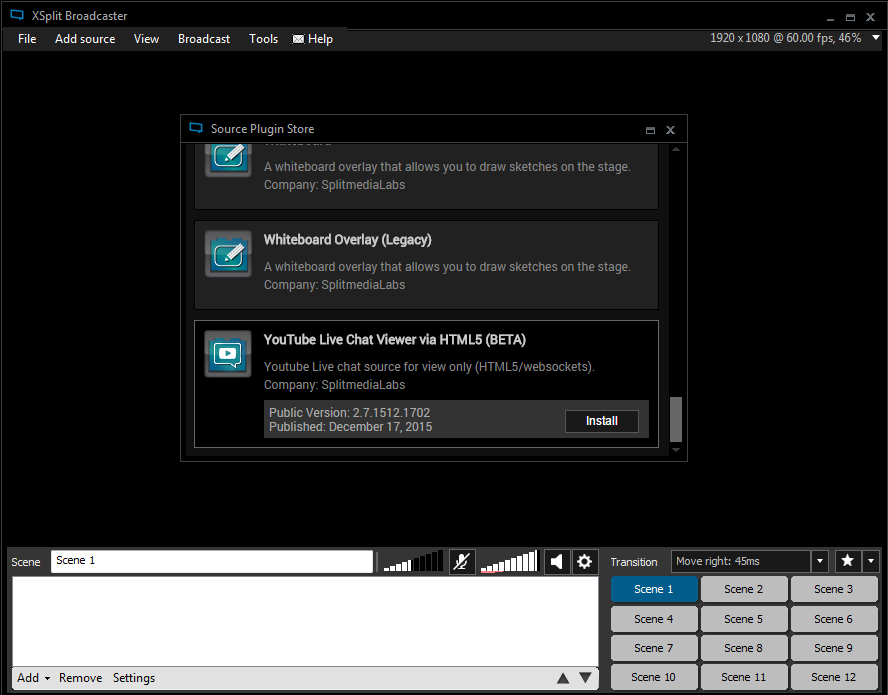
Before you install the YouTube Live chat viewer plugin, make sure you’re using the latest version of XSplit Broadcaster. To install, click on ‘Add Source’ >> ‘Get more plugins from the plugin store’. Find the plugin and hit the Install button.

XSplit Broadcaster source plugin store

Adding the YouTube Live chat viewer plugin to your scene

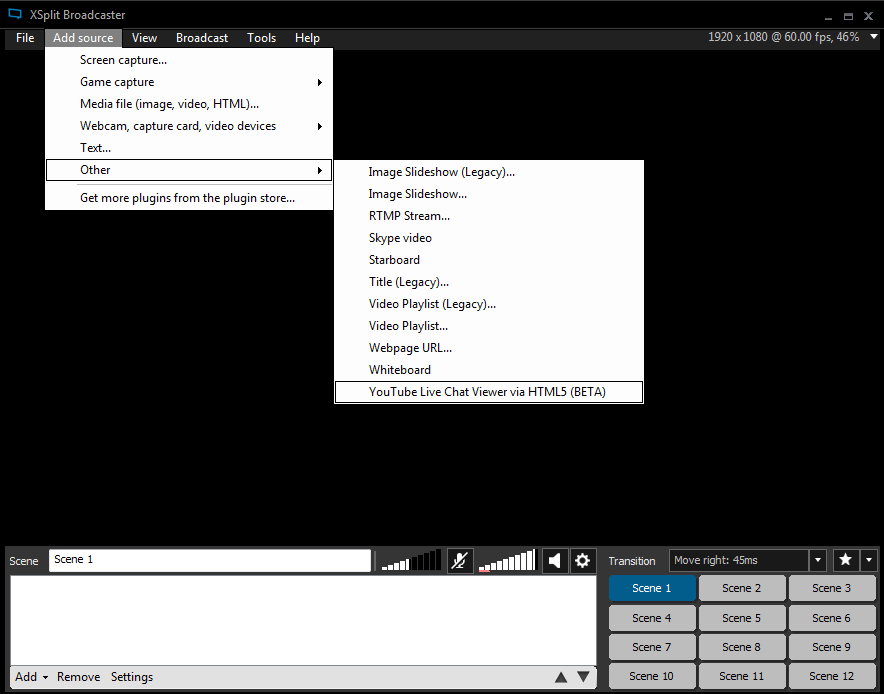
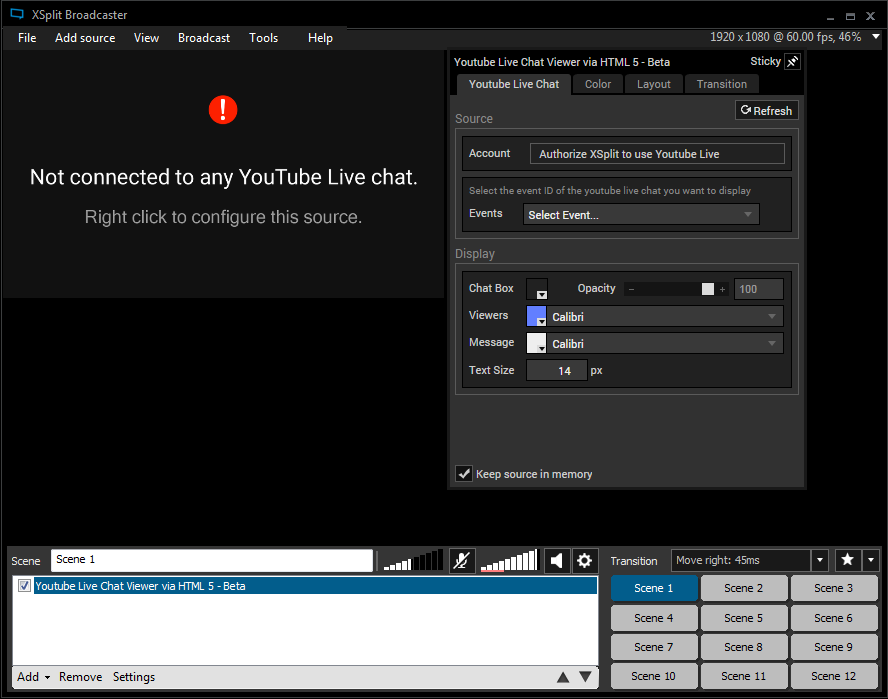
Now that you’ve installed the plugin, it’s time to add the source on your scene. To add, simply click on ‘Add Sources’ >> ‘Other’ >> YouTube Live Chat Viewer. After adding it, right click the source and authorize it first. When done authorizing your account, hit the ‘Connect’ button and you’re done!

XSplit Broadcaster add source on scene

XSplit Broadcaster YouTube Live Chat Viewer

Try out the new YouTube Live chat viewer plugin and tell us what you think in the comments below!

Issues with Latest Active X Version of Flash

Update (1/5/2015): Microsoft has issued a fix for this issue for both Windows 7 and Windows 10.

For Windows 10
The issue can be fixed via Windows update that users can select to install
https://support.microsoft.com/en-us/kb/3133431

This update will install Flash Active X 20.0.0.270

For Windows 7
1. Open Internet Explorer (It must be Internet Explorer)
2. Go to https://www.adobe.com/software/flash/about/

Look for this box:

Flash Player Version Information

3. Press “Update Now” to update flash Active X version to 20.0.0.270 or later

For Windows 8, 8.x
Flash update for Windows 8.x can be now downloaded through Windows Updates. Please check this link for more details: https://support.microsoft.com/en-us/kb/3133431

Update (1/3/2015): The issue seems to be caused by a nasty bug in the latest flash player, which affects most embedding applications. The issue seems to be a high priority for both Adobe and Microsoft. Adobe will release a new flash player for Win 7 that users must download via the flash player update. For Win 8/10 users, Microsoft will push a windows update to solve the issue. You can read more details – https://forums.adobe.com/thread/2053723?start=0&tstart=0

Hello All!

We strive to ensure our users don’t suffer from any issues that would prevent them from using XSplit. Sadly that time has struck upon us for a select group of users while we are all trying to enjoy the holidays.

To get straight to the point, the latest Adobe Flash Active X plugin update (20.0.0.267) is not compatible with the latest versions of XSplit. In Windows 7 this is an optional update, however security updates in Windows 8 and 10 have manually applied this update. Basically this update breaks all flash functionality in XSplit, which means SWF sources won’t work properly and legacy XSplit plugins like the text plugin will no longer work. In order to fix this, we will need to release an update for XSplit, however in the meantime we’ve prepared guides to ensure your flash is compatible with XSplit.

Windows 8.1/10

The security update KB3132372 which was rolled out by Microsoft during the last 24 hours automatically updates flash for Internet explorer (Flash Active X) to version 20.0.0.267.

Uninstalling the security update results in a flash downgrade and is at your own risk. It is not a recommended action, but it is currently the only temporary solution we could find to get flash moving again.

1. Goto windows update and verify that you see the following entry:

Windows 10: Security Update for Internet Explorer Flash Player for Windows 10 Version 1511 for x64-based Systems (KB3132372) or

Windows 8/8.1 :Security Update for Internet Explorer Flash Player for Windows 8.1 for x64-based Systems (KB3132372)

2. Press the link to uninstall updates and locate the same KB (KB3132372) (the name may be a little different from above)

3. Proceed to uninstall the security update:

4. Flash in XSplit should now be working again.

Windows 7

Windows Update in Win 7 does not update Internet Explorer Flash (the Flash Active X component), but your central Adobe Flash update settings might be set to auto update or you may have manually installed the latest version of flash..

1. Run Internet Explorer and go to the this page.

If you see current flash version is 20.0.0.267 then you are likely affected (result is only valid if you view the page in Internet Explorer and NOT another browser).

2. Run the Adobe Flash uninstaller.

3. Install this version of Active X Adobe Flash.

XSplit Year in Review 2015

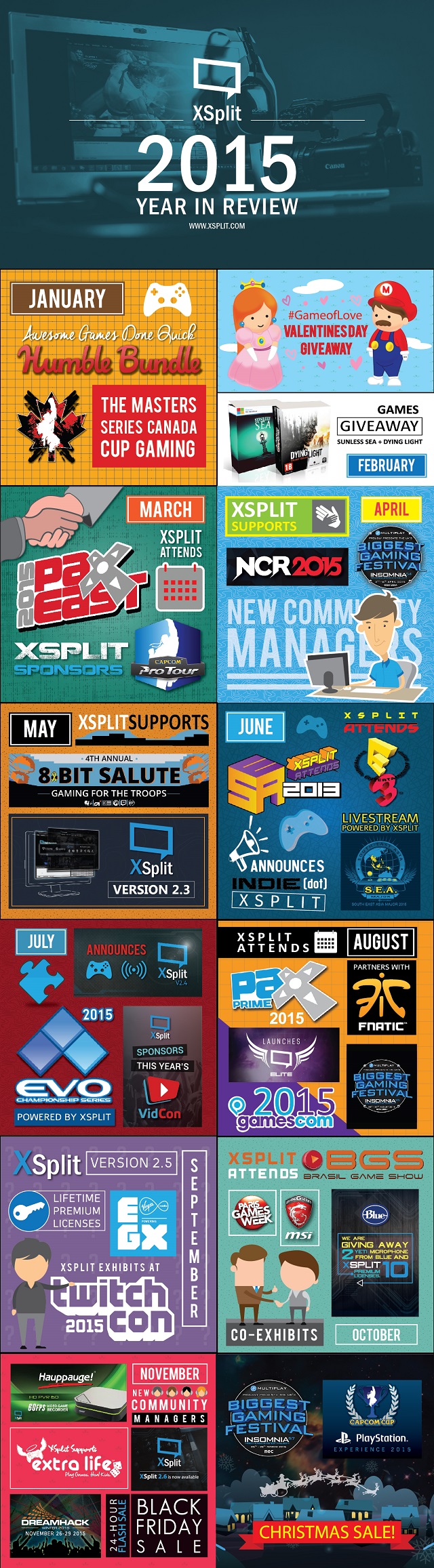
The past year has been brilliant for us here at XSplit and we’re starting to really enjoy what we’re doing whether it’s releasing product updates, providing technical support, attending tradeshows and expos, running giveaways, supporting charity, you name them!

Looking back on 2015 has just made us more excited for this year knowing that we can do a lot more for 2016. But before that, let’s all have a glimpse of what year 2015 was like here at XSplit.

XSplit Year in Review 2015 Infographic

Thank you for being part of an awesome 2015! Cheers for an even more awesome 2016 and we wish you the best!

XSplit V2 Powers GameStart Asia 2015

We are happy to announce that our media team will be helping out with the production of GameStart Asia 2015 in Singapore this coming November 13-15 2015.

XSplit at Game Start 2015

Gamestart Asia is the largest English speaking gaming convention in Southeast Asia and is getting bigger and better in it’s second year!

Our media production team lead by Offcast and Farp will produce the live streaming setup for the main stage of Gamestart Asia, as well as the Capcom Pro Tour Asia Finals. That makes the event completely powered by XSplit V2 demonstrating how powerful and flexible XSplit is for live event productions.

If you’re not going to be in attendance, you can watch the live streams at twitch.tv/gamestartasia and twitch.tv/capcomfighters. We will also be posting occasional updates on our social media channels throughout the event to make sure you’re up to date.

Let us know if you’re coming! Please don’t hesitate to say hi when you meet us there. 🙂

XSplit Community Streams for October 2015

Are you a part of the XSplitFamily

It’s that time again where we randomly visit members of the #XSplitFamily who are live streaming, pick those that we like the most and feature them on a blog post like this. If your name is not here, it doesn’t mean we don’t like you. It just means that your time to be showcased is not now yet. Maybe it’s in the next XSplit Community Streams blog post. Who knows!

Here are members of the #XSplitFamily that we found to be the most interesting when we visited their channel while they’re live.

CoffeenCorgis

We stopped by CoffeenCorgis Twitch channel as Kimberly was streaming Riven, a puzzle based game which is the 2nd game in a line of 6 games that Kim is marathoning.

She is mainly a puzzle based gamer/streamer as she prefers the slower based games at the moment. And in her own words “Games here include obscure, whimsical, indie, nostalgic, puzzle and mystery, and the occasional AAA title” so there really is something for everyone.

You can find Kimberly on a weekday schedule at 10am – 2-4pm central time.

PocketClint

Dropped into Clint’s Twitch channel at twitch.tv/pocketclint after being tweeted twice by different people. Upon entering we were greeted warmly and Clint himself was very quick to praise XSplit.

A variety streamer who also likes to play new games, but would rather wait to play/stream those until a few days after they’ve been released. Also looks to play certain games that go on sale so it can help people decide whether to buy them, or not.

You can find Clint live at these times: Monday – Friday: 11AM CST

RiptidePow

We stopped by RipTides stream at twitch.tv/riptidepow after being tweeted by his wife. He was playing Elite Dangerous was using XSplit Broadcaster to live stream.

A Twitch partnered streamer that streams games across PS3, PS4, PC and some old school, retro games, truly a variety streamer. He streams Monday – Friday 9AM- 5PM Eastern and 9AM – 3PM eastern on Saturdays.

Riptide also has one of the best Mario themed scenes we have ever seen, so be sure to go and check him out, even if just for that. 😉

Griff439

We met Griff at EGX when he met our community manager and grabbed a trial of XSplit and has used it ever since. We responded to Griffs Tweet and decided to check it out as he was streaming the brand new Fallout 4 at twitch.tv/griff439 on the game’s release day.

Griff has committed himself to two days a week of live streaming because of the time constraints with some other streams when possible throughout the week.

His schedule is Monday 7pm-10pm and Friday 7pm-Late

What about you?

Are you also live streaming consistently and would love to get a shout-out from us or get featured in this blog post? Tell us either here or via Twitter when we begin our announcement of the daily rounds.

Make sure to also check out these loyal XSplit users and live streamers, and perhaps there is something that you can learn from watching them. 🙂

Till next time!

XSplit at DreamHack Winter 2015

Last year was our first time attending DreamHack Winter co-exhibiting with MSI. It was a wonderful experience for us as we had fun interacting and also learned a lot. That being said, it was easy for us to decide that we want to go again this year.

XSplit at DreamHack Winter 2015

Just like last year, we will be co-exhibiting with MSI Nordic and will share a booth space (B01:08) with them. There will be a lot of CS:GO gaming action with pro-players and attendees for the event so if you’re going to be in attendance, drop by the booth and see how you fare with other gamers!

All these actions will be livestreamed using XSplit V2 to Azubu over at Azubu.tv/MSIGaming. We will be producing this live stream and as usual, ensure that the quality is top-notch. You can watch the live action at home for the entire duration of the event.

Aside from live streaming CS:GO, we will also be demonstrating XSplit Gamecaster V2 on all of the MSI gaming machines as well as  showcase the newest features that gamers and livestreamers alike can use to their advantage. Just like any expos that we’ve attended, expect fun activities and giveaways not just from us but also from MSI. This goes not just to those who will be at the event but also to those following us social media for updates. 🙂

See you there!