The Best Graphics Cards For Your Streaming Setup

Crypto miners and pandemic-related disruptions to supply chains have led to a noticeable shortage in the number of chips and graphics cards available. This is a real nuisance for streamers looking to upgrade their setups in 2021. Unfortunately, there’s nothing you can do about what’s currently on the market. So, let’s run through the best of what you can actually get right now.

In some cases, these might not be the very first cards we’d recommend for the best streaming setup. They do, however, have one massive advantage over others in each category: you can actually get your hands on them!

The best graphics card for getting started

The effects of a decreased supply and increased demand have trickled down even into the entry-level tier of graphics cards. This has created scarcity and driven up prices. However, there is one card that’s actually both available from retailers and delivers a pretty good value for your money: the Nvidia GeForce GTX 1650 Super.

Overlooked perhaps because the original 1650 was something of a flop for Nvidia. The Super constitutes a slight upgrade on the architecture of the original card but makes a massive leap forward in the memory speed. Replacing the GDDR5 (Graphics Double Data Rate memory – the RAM of a graphics card) of the 1650 with ultra-fast GDDR6. This makes it a worthwhile investment for streamers looking to get started. As with any of the cards on this list, you’ll probably need to hunt around a bit to track them down. But, we’ve had the best luck with the ASUS version released under their ‘TUF Gaming’ line.

The best card to upgrade your rig

If you’re looking to make the jump to 4K gaming or higher-resolution streaming, the Nvidia RTX 2060 gives you all that, plus real-time ray-tracing (a high-tech method for rendering light and shadow within games) of the RTX series of cards. It also features the latest-gen GDDR6 in its onboard memory. Even if the markets were wide open, the RTX 2060 would be a good mid-level card, but it’s become even better value thanks to a drop in the retail price following the release of Nvidia’s RTX 3000 line in late 2020. The ASUS and Gigabyte versions are fairly easy to locate without much digging, but, as always, just consider the markups – it’s always worth checking the retail price of any of these cards before buying.

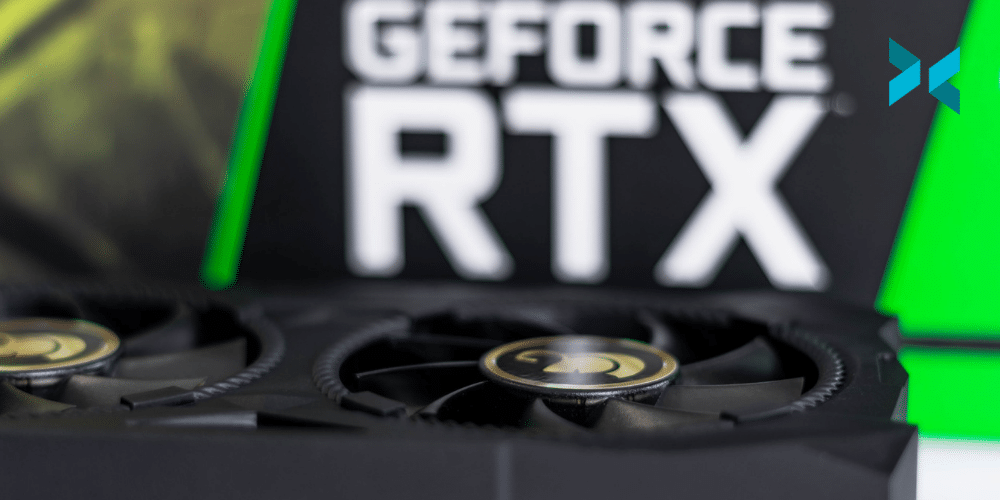
A Geforce RTX in a PC is one of the best graphics cards for streaming.
Photo by Christian Wiediger on Unsplash

The best high-end card

Demand for top-tier cards is crashing hard against that chip shortage mentioned earlier, creating historic scarcity. If you’re planning to go all-in here, your best bet is to pick up the AMD 6900 XT. It’s one of the most powerful cards on the market and there’s a window of availability right now if this is your time to upgrade. Although, it’s likely to be at a significant markup. It’s worth noting that AMD cards do seem to be lagging behind in the high-end GPU arms race, at the moment at least. They lack Nvidia’s Deep Learning Super Sampling (DLSS) technology that uses AI and machine learning to enhance performance. So, if you can hold out until the much cheaper RTX 3080 returns to retailers, we’d recommend you do so. 

Realistically, building and upgrading your streaming PC in 2022 will require patience and careful searching. Fortunately, hardware isn’t the only way to improve your stream! Check out our guide to improving your viewership for more ways to grow as a creator.
How To Create The Perfect Pitch For Potential Streaming Sponsors

One of the simplest ways to get sponsors for Twitch or YouTube is to use a connection service to introduce you to companies that match your brand or level of influence. However, if you want to target specific companies to work with, then you’ll need to impress them with an attractive, informative pitch deck. Let’s have a look at what you should include when you pitch streaming sponsors to your channel and brand.

What key points should you include to get sponsors on Twitch?

It’s likely that these companies receive many pitches and proposals, so it’s a good idea to keep the introduction short and sweet. Tell them about yourself, the content of your stream, and why you have approached them. Also, detail how the proposal will benefit them.

Next, give them the important figures from your channel, including subscribers, average viewer numbers, and social media channel followers. Include your broadcast schedule, as it will give the company an idea of how often you stream and roughly how long each session is. If you have any positive reviews or comments from other companies, you could look into adding these as well.

Two people sat on a stage environment streaming looking to find out how to get sponsors on Twitch.
Photo by Alena Darmel from Pexels

What should you leave out?

While you want to show your channel figures to get sponsors for Twitch, try to avoid referring to Twitch’s own statistics as a company. These include general overviews of Twitch’s audience, including age, and how often viewers are watching Twitch streams. These apply to all channels, and, if the company you are reaching out to is aware of Twitch, they’re likely already aware of the growing influence it has.

It’s worth considering the tone you use as well. Over on your channel, you’ll be used to adopting a particular tone, language, and humor to attract viewers. With this pitch document, leave the jokes at the door and keep it formal. After all, when you pitch streaming sponsors, you’re entering into a business negotiation. However, keeping some of your own flavor is important so don’t go too dry, just maybe skip the memes.

How should you present your brand to get sponsors on Twitch?

Ideally, try to convey that your brand reflects the company you’re pitching to. Take time to do research and find out what the company’s mission is, what qualities it embodies and what type of culture it promotes.

Use this to create links between their brand and yours, in order to illustrate that there’s already an existing level of synergy. If you’ve used their products or services, include this and say why you liked them, but equally, don’t be dishonest. Rather than rely on third-party reviews, consider trialing at least one of the company’s products before approaching them. This will give your pitch authenticity.

Creating a live pitch deck

Instead of a simple letter, consider transforming your pitch into a live pitch deck using XSplit Presenter. This can make your proposal more engaging and more visually appealing by allowing you to include logos, screenshots, and graphs of your statistics. Rather than crash someone’s inbox with a graphics-heavy PDF pack, Presenter lets you record your presentation as you give it, you could also just record it, then upload it to YouTube and send the link over for even less hassle. You can appear in the video so they get an immediate sense of who you are and what you’re about. It’s also a good idea to add video and any web links in the video as well, again, you can appear in the video on top of them!

Before you consider sending out your proposal, complete a check on your channel to see what further improvements you could make to increase its appeal to both viewers and sponsors. Think about ways you could improve your viewership in order to increase your chances of landing a sponsorship deal.

How to Run a Charity Stream: Using Your Channel for Good

Whether it happens to be around the holidays, a significant event, or just because you feel inspired, using your channel can be a great way to raise money for causes you care about. Charity streaming has been a mainstay of fundraising efforts for a while now with some great results. Aside from the benefit of raising money it can also be a great way to inspire your community in general. Here are our top tips on how to set up a charity stream and how to run a charity stream!

How to run a charity stream, getting set up right!

You want your charity stream to feel special to your viewers, it is important to prepare well. If it’s your first time, we recommend you check out some more seasoned streamers to see if they do anything that inspires you. Before you start moving your own plans forward, make sure you’ve got all the details locked down. Deciding on the charity you’ll support, setting your financial goal, and figuring out how you’ll take donations are all things that need to be settled. On that last point, it’s highly recommended if you’re relatively new to the streaming game that you use an established donation platform like JustGiving, Extra Life, or Tiltify. Partnering up with one of these will help people donate with confidence.

Another important consideration is the length of the stream. Most charity streams are significantly longer than a creator’s normal stream, but it’s important to know your limits. Don’t commit to a 16-hour stream if you’re not going to be able to manage it or fill the time. 8-10 hours is more typical. 24 hour streams might seem like a good idea but can be bad for your health. They’re best avoided unless you’re very prepared.

Two people sat a desk streaming a video game on a stage knowing how to run a charity stream.
Photo by RODNAE Productions from Pexels

Create visual elements to engage and inform

Adding visual elements is next in finding out how to run a charity stream! Just as you acknowledge your viewers when they donate and subscribe to your stream, so you should when they donate to your charity. The best way to do this is to set up notifications for donations, and a fundraising ‘thermometer’ to track your progress. Many of the platforms mentioned have features you can use, but they can lack customization. XSplit Broadcaster has built-in widgets for JustGiving and Extra Life. You can tweak size, colour, and other aspects to match your own channel’s design. To access them, just head to the Plugin Store which is found under the ‘Tools’ menu on the main Broadcaster screen.

Bring some friends

Because it is likely that your charity stream is going to be longer than your normal streams, you’ll probably need to mix up the content a little bit to keep viewers engaged and entertained. A great way to help with this is to invite some of your friends to join you to help break things up. This could be in-game, to chat between sessions, or perhaps by allowing them to demonstrate a unique talent. Whatever you decide, remember to test how you’re going to bring them in before you start. This saves you time trying to troubleshoot while you’re live. 

Charity streams are a great way to reach new viewers and try something new, all for a good cause. We hope this helped you find out how to run a charity stream! Need some help figuring out how to schedule a stream that’s a little different from the usual? Check out our guide on deciding when to stream for some useful tips.

How to Find the Next Big Thing in Streaming

Even if you’re not planning on changing up your content any time soon, it can be good to know where to look for the new trends and metas as you try to grow on Twitch. It may seem like these movements come out of nowhere (and sometimes they genuinely do!), but if you want to avoid FOMO, here are a few places to keep an eye on for the next big thing.

Grow on Twitch using top game lists?

You can access a huge amount of data about Twitch from places like Twitchmetrics, Twitchtracker and Sullygnome. It’s a little intimidating at first, but here are two tips to help you get started figuring out what might be ready to pop off. 

Firstly, when looking at ‘trending games’ on any of those platforms, toggle between 90 days, 30 days, and 7 days for the search ranges. This lets you start with a list that has a lot of data attached to it (90 days), and then get narrower and narrower with your view. Keep an eye on what games pop on and off the list. If something jumps up in the rankings when you switch to ’30 days’ and it’s still there when you switch to ‘7 days, you’ve found something that people are getting interested in, and it’s probably worth taking a closer look.

Secondly, don’t forget to look at the change in the number of channels streaming the game as well as the hours watched. If you see a massive jump in the number of people streaming something over the last thirty days or week, you might have found a game that’s ready to see explosive growth. And this can be a key to helping you grow on Twitch!

A person streaming using a PC with headphones on a microphone in front of them at a PC desk looking to grow on Twitch.
Photo by ConvertKit on Unsplash

Following the leader

It seems strange to pull one name out of a platform that has eight million active channels as of writing, but the influence that Félix ‘xQc’ Lengyel has on Twitch is undeniable. He’s the person most responsible for GTA V’s ascension to one of the most-watched games on Twitch, and he had a notable effect on the rise of both Among Us and Fall Guys as well. The choices he makes with content ripple through the rest of the platform.

This advice also applies to many of the top creators on Twitch. It can even apply to the circles you’re in of other streamers. If someone who frequently raids you is playing a certain game and you think you might enjoy it, it wouldn’t hurt to try it out! This is because the audience coming over already knows or likes seeing that game. When it comes to growing on Twitch, keeping an eye on what is being played is important!

Become a master of the release calendar

Our last tip probably sounds the most boring, but knowing the release calendar like the back of your hand can give you a leg up on understanding what the next meta could be. What games are coming out that could refresh a genre the way Valorant juiced the team-based shooter and became a top-10 watched game overnight? Maybe an older title is getting an update, DLC, or even a re-master that could pull it back into the mainstream. Knowing what’s on the horizon is a good way to see the next wave coming, and be ready to catch a ride.

Games and metas rise and fall: if you keep your eyes open, you’ll be ready to take advantage of opportunities when they arise. If you’re having trouble figuring out what to stream, check out our guide to streaming things that aren’t games to help get your creative juices flowing! Learning how to grow on twitch isn’t easy, but it can be rewarding!

Balancing Streaming and Working as a Part-Time Streamer

When you’re first starting out as a part-time streamer, you’ll need to fit your streaming schedule around your day job and around the rest of your life as well. This doesn’t have to be difficult, but it does take discipline and consistency to get the work-life balance right and to give your channel the chance it deserves.

Consistency as a part-time streamer

Streaming regularly and at the same time, every week, is vital for keeping an audience when streaming part-time. They want to know when they’re going to be able to find you – if one week you stream on a Sunday afternoon, then next it’s a Tuesday evening and so on, any fans you picked up in the first stream who want to come back will probably miss the next one. Additionally, people tend to look for something to watch at similar times based on their schedule, so sticking with a specific time and day means that the same people will come back repeatedly, building up their loyalty to your channel and the likelihood of them continuing to watch. 

Frequency helps too. If you can stream several times a week you’ll obviously get more total views than if it’s only once a week. It will probably also help your channel to grow more quickly as there are more chances for people to find you and follow or subscribe.

A streaming PC setup on a desk with a mic, monitor, keyboard, mouse and mood lighting for a part-time streamer.
Photo by Jack B on Unsplash

Don’t burn out

When you first start, it’s easy to think “I’ll stream every night – I’m always gaming, so why not do it on stream?” However, this isn’t always feasible especially if you work full time. Streaming involves putting on a show as well as just playing games, and even if you’re naturally eloquent and amusing, it’s still an effort to stay chatty and involved. Nevertheless, this shouldn’t put you off streaming even if you only manage to do this for a few hours a week. Streaming can be just as fun as a part-time hobby.

Plus, if you’re streaming just when you can and want to, you’re likely to enjoy it more and have the energy to put on a good show. You’re also likely to still see growth on your channel, particularly if you are streaming things you genuinely like and want to share with others – this will come across. It’s important to give yourself time off to relax as well as keeping the channel going however often you stream. You’ll probably also find there are other background tasks associated with streaming that need to be dealt with, such as designing thumbnails, promoting your channel, and so on.

It’s still a commitment

If your friends aren’t gamers, they might not understand that your streams are a commitment and it’s important to keep to them. Just because it’s online doesn’t mean there aren’t real people at the other end waiting for you who would be let down if you canceled. This is more important with multi-player games, however, it still applies to streaming, especially if you want the channel to do well.

On the flip side, it’s important to make time to see friends. Your channel should not become your entire life! Ideally, you’ll be able to find a schedule that fits everything in – work, streaming, socializing, and some relaxing – but achieving a work-life balance as a part-time streamer can be difficult. Being organized can help you stay on top of it, so why not set a schedule and stick to it to keep things simple? Just remember to include some time for yourself!

Building an audience takes time and dedication but it’s important to care for yourself too. Balancing work, streaming, and life, in general, can be tricky, but, once you do, it will make everything go much more smoothly – well worth the effort!

How To Record Gameplay While You’re Streaming.

So you’re making a video review or video essay for YouTube but being the content-savvy person you are, you’re going to stream at the same time. Wouldn’t it be nice if you could record gameplay footage while you stream without your camera and overlays in the recording? Well, it would be pretty surprising if I now didn’t explain how to do that, right? Let’s find out how!

Record raw gameplay footage while you stream with XSplit Broadcaster

One of the easiest ways to record gameplay footage while you stream is to use XSplit Broadcaster’s Recording Profiles. First things first we’re going to need to download, install, and set up XSplit Broadcaster. It’s pretty simple but here’s a link to our getting started videos. Here’s the super quick version though, sign up at XSplit.com then head to your dashboard, download Broadcaster, install, log in with the account you just set up with and let the wizard do its thing. Simple, right?

Next, we’re going to need to set up some scenes. First of all, we want to set up our streaming scenes. This is all personal preference of course but having a Starting Soon scene, the main scene, a BRB scene, and a “thanks for watching” scene are the minimum you’ll find useful for streaming

In your main scene you can add your camera, gameplay if that’s coming from the PC you’re on or a console through a capture card and you can add in a link to your overlays or alerts. Quick pro tip from an old Broadcaster pro, you can paste in any link by just hitting ctrl+V. This works for text and images as well so keep that tip in your back pocket!

A home streaming set up with two monitors, lights, a mic and more which can help record gameplay footage while you stream.
Photo by Roberto Nickson on Unsplash

On to the recording…

Now, for our recording, we’re going to want to set up another scene. Call it recording and simply add in your game source. Make it full screen and you are done! Simple. The magic comes when we start using the recording profiles.

First, click record in the top menu, and in the drop-down menu press “set up a new recording output”. From here you can select the scene we just made for the raw gameplay footage in the drop-down menu labeled “Record Target”. I’d suggest setting the Codec to NVENC if you have a compatible NVIDIA graphics card, and setting your quality to Ultra High if you have the hard drive space. You’re recording this gameplay footage while you stream for a video after all, so why not make it look nice?

Getting the settings right

Be sure to bump up the audio quality to 192kbps so it all sounds crisp and be sure to have Force constant frame rate selected. This should be selected as standard but it never hurts to check! One box that won’t be ticked that you want to make sure is ticked is “Create multitrack recording of microphone and system audio”. This will, well, I mean, to quote an old British TV advert, it does what it says on the tin, right? It’s going to create multiple tracks of audio for the recording so, your microphone audio that is going out to the stream? When it comes time to edit your gameplay footage, you can just delete that!

Click “OK” and when you go live just select the new recording output we just set up and you are good to go! You’ll find the file in your recording folder, which if you can’t remember where that is you can click on File, my recordings, and right-click on the recording you just did, and select open file location!

Recording gameplay while you stream is easy, huh?

This feature has been incredibly useful for me a number of times, and back when I was creating more content or reviewing games this would have really come in useful! Recording gameplay footage while you stream and no longer needing to have a separate program running or a piece of separate hardware is great for content creators!

But what tips have you developed as a content creator that have made your life easier? Let us know in the comments below! We’re going to keep making more articles like this with tips to make your life easier so be sure to keep it locked on the XSplit Blog!

The Top 5 Things You Shouldn’t Do When You Start Streaming

The cameras and mics are checked, you’ve got your games picked out, and your weekly schedule locked in. You’re ready to go live for the first time! Your channel growth may take a while but it’s never too early to start forming the habits of a successful streamer. Here, we highlight some things you shouldn’t do when you start streaming.

Things you shouldn’t do when you start streaming? Not talking enough!

One of the things you shouldn’t do when you start streaming is sit in silence while you’re live. It’s not easy to keep up what can feel like a one-sided conversation, but ­­­­­­­your audience will be in your channel to hear from you! Extended dead air is one of the top streaming mistakes you can make and may lose you viewers. It can be helpful to remember that your conversation doesn’t need to stay focused on the game you’re playing. Chatting generally about music for a few minutes, for example, can be just as engaging for your audience as analyzing the new Fortnite meta.

Someone playing Fortnite on a gaming PC with a headset on things you shouldn't do when you start streaming.
Photo by Priyam Raj on Unsplash

Not checking your audio before you start streaming

Another common mistake streamers make when they’re starting out is not double-checking their audio before they go live. Remember, that means checking the audio inputs on each scene as well as general mic checks. Nothing looks worse on stream than switching to a new shot and losing your audio mid-sentence. In XSplit Broadcaster, you can do this when you’re preparing to go live by switching between scenes within the main window and ensuring that you can see the levels moving up and down as you speak on the meter. This is located directly to the left of the microphone.

Things you shouldn't do when you start streaming would include buying all the gear you can see in this picture, a sound card, a microphone, a capture card, a webcam, a stand, headphones and a phone.
Photo by Stanley Li on Unsplash

Not shaping your audience from the jump

Another thing you shouldn’t do when you start streaming is not consider what kind of audience you want to have. Starting out, it can be really hard to kick one toxic viewer when you only have six viewers total. But your chat is inevitably going to follow your lead with how they treat you, and, maybe more importantly, how they treat each other. The best way to build a great community is to play the long game and make it your goal from the first time you go live to have an audience you really enjoy spending time with, and that will grow with you as a creator.

Going crazy on gear!

It can be very tempting to see streaming as an arms race, where if you don’t have the latest camera, the best monitor, or the fastest computer, you’ll never be successful. The truth is that the most important thing to upgrade when you’re just starting out is your own performance. So, take some time to really think before you sink cash into your stream, do two things: First, ask yourself “what am I going to get in return for this investment?” And second, check out our thoughts on good gear options for new streamers here to get you on the right track.

Not asking your viewers for feedback

Your stream is ultimately in your hands, but you listening to feedback with an open mind is a great way to grow as a creator. Massive international companies spend incredible amounts of money to get user feedback all the time! You have an advantage in that your “users” are always right there in front of you, so ask them about your stream from time to time. You can start simply by using polls for basic questions, like “what game should I play?” Or use some of your time on stream to speak directly with viewers who seem invested in what you’re doing. 

If you pay attention to the little things now, you’ll be on the right track for growth as you start your streaming journey. Stick with it, and be sure to check out our guide to the stream prep habits that will level you up to pro in no time.

Content Creation Strategies for Brands to Build Audiences

There are many different ways to build a brand identity. Content creation for brands is an excellent method for generating visibility and interest, as well as finding new audiences. You can build a greater connection with your customers by making content that shows who you are, what you represent, and what your goals are. So, what are some of the best strategies to use for content creation?

Use content creation to tell a story

A well-presented brand story is a very effective marketing tool. Storytelling helps people to learn new information because narratives are easy to remember. Research shows that neural activity increases when listening to a story, as the brain’s sensory cortex is stimulated. This enables the listener to feel, hear, taste, and even smell the story – and you can harness this for your brand.

A compelling and authentic narrative can build connections, loyalty, and interest. For example, for its 2016 ‘Live There‘ campaign, Airbnb developed content that told the stories of its customers rather than its business, to create the idea that Airbnb was not just about property rental, but about its global community. Their storytelling encouraged potential customers to see themselves as part of this community. 

Framing your story in an original way can help to differentiate your brand. Take software company Zendesk, which created an “anti-content” video featuring a fictional rock band called Zendesk Alternative. By poking fun at themselves, Zendesk seemed more relatable, and in turn, this humorous angle made the content very sharable. Content creation for brands will allow you to show your target audience that you share their values.

A person using a laptop to make a podcast, something that could be great content creation for brands.
Photo by Soundtrap on Unsplash

Stand out from the crowd

While stories provide a way to relay facts using an entertaining narrative, there are a lot of stories out there – hundreds of millions of Twitter, Facebook, and Instagram posts are published daily. That’s a lot of content.

In order to differentiate yourself, you could consider creating branded content that stands out from regular social media posts. You could start by using XSplit Broadcaster to create compelling videos, podcasts, and live-streaming events. This software lets you create rich content, broadcasting it as it happens with handy features like professional scene switching and multiple audio tracks. You can emphasize community development by creating content around your customers and their needs. For example, if you are a travel company, you could post video journals from the point of view of your holidaying customers.

Or, you could consider incorporating augmented reality features into your content marketing. These could be simple – AMC Theatres allows users of their app to scan movie posters to receive information like cast lists and trailers; or more complex – Sephora created an AR experience that lets customers virtually “try on” their makeup products. Anything that builds a connection between you your customers will help grow your brand.

Someone sat at a desk with a laptop in front of them, pouring coffee and thinking about content creation for brands.

Use content creation to define your values

It is no longer enough to have a great product – consumers also want brands to reflect their own values and identity. Developing content that reflects your values will help you to keep customers engaged and excited about your brand. Your content, and the channels you use to push that content, should align with the interests and concerns of your target audience.

This may mean going where your customers are and publishing content where they will be most likely to see it. It also means being realistic with what you produce – anything that looks too idealized and “perfect” will come across as inauthentic. You could consider including imperfections in your content, such as pairing untouched photos with humorous copy, to demonstrate that your brand is genuine or that it doesn’t take itself too seriously.

You can also use content to engage in conversations with your customers by sharing news, seeking feedback, asking questions, and demonstrating that you are listening by answering.
From telling your unique brand story to defining your values to differentiating yourself from the crowd, you can grow your customer base by creating unique videos, podcasts and live streams.

How to Add Remote Guests to your Streams

If you’re producing a stream with guests, be that a podcast, running a tournament, or just putting on a show, doing this remotely has become the norm. This might seem simple on paper, load up Zoom or Discord and get streaming, working with remote talent actually brings in a unique set of challenges! So we’re going to discuss how to do it right with some tips I’ve developed over the years.

Using Discord to have Remote Guests on your Stream

My personal favorite for bringing in remote guests to a stream is Discord. It’s easy to use and if you have the budget, you can get really high audio quality by boosting your server. However, since you’re likely going to be having both yourself and guests in the same voice server you may run into issues adjusting audio levels.

Now one way to manage this is to have multiple PCs join the calls and capture the individual voices, but not everyone has that many computers laying around! For this, Discord actually has an audio mixer built into the call! Pretty handy for getting levels in right in a pinch.

Also in Discord, and generally any other call program (VOIP), you’ll want to disable things like noise reduction and any type of input limit, so both sides are getting the cleanest audio possible.

A streaming setup with a PC, dual monitors a camera and microphone which could be used to add remote guests to a stream.
Photo by ELLA DON on Unsplash

Working with Streamer Setups

A lot of time you’ll be working with guests who have their own live streaming setup. Now, while this might seem like the ideal scenario, the problem is if there’s an issue it’s going to be hard to troubleshoot because everyone has a different audio setup.

The most common problems adding a remote guest to your stream like this are echo and/or getting a loop from whatever audio you’re sending the guest. This is most prevalent with 2-pc setups or when the guest is using a mixing desk. For simplicity just ask the guest to only send you microphone audio rather than a loopback mix from their PC.

This may require reconfiguring their stream set up a bit, but this is why you definitely want to have a tech rehearsal with your guests before the event. Make sure you’re getting all your video and audio routed correctly on both ends, for you and the guests. 

A lot of streamers like to add audio effects and enhancements via VSTs to their live stream output. This won’t usually work in VOIP software unless they use software like XSplit Broadcaster to add VSTs directly to their audio output via its Virtual Microphone feature.

Finally, once you’re getting audio from your remote guest on your stream computer, you need to make sure it’s coming in at a manageable level. Most people who are streaming set their audio levels for a “final mix” which basically means at the highest level before clipping.

Now if you’re mixing this isn’t going to leave you with much headroom, so you’re going to want to see if the remote talent can lower the audio until you’re receiving at about 12-18 DB.

Giving your guests a preview scene

One of the most important things your guests need, especially if they are commentators on an event or it’s a visual show reacting to things, is a good preview scene. This is where they can see what is live, the different cameras, and perhaps a notepad with a run of show and general notes. There are two ways to do this!

The first is using the Virtual Camera output in XSplit Broadcaster. You can select whichever scene you wish to output, so just create and then pick the dedicated preview for your remote talent. Make sure to put this scene somewhere in your scene list where you won’t accidentally switch to it. Then just set the camera as the video input on your VOIP software.

Now usually this works just fine, but VOIP software will automatically adjust the bitrate to keep the video call stable, so if your remote talent is far away, they may receive a pixelated video. A workaround for this is using screen sharing. Make a project window for your preview scene and then use screen sharing in your VOIP software. Many times priority will be given to the screen share, which will give the highest video quality possible. Software like Discord will also let you set the quality of your screen sharing as well.

These are all things I have learned over years of hosting remote events so hopefully, this saves you a lot of time in trial and error! Be sure to let us know in the comments if you have your own tips that have helped get streams with guests going! Also, be sure to let us know in the comments what other topics you would like us to discuss in the future!

Is Multistreaming Worth It? Why You Should Multistream Your Content!

The definition of multistreaming has become a little bit elastic over the last couple of years. Traditionally, restreaming was a synonym for multistreaming to different platforms simultaneously but it has also come to mean a variation on rebroadcasting. Here, we will discuss the different types of restreaming, how to do it, and why you should multistream your content.

Multistreaming your content

You may or may not have heard of sites like restream.io, a service we have seamlessly integrated into XSplit Broadcaster, which will take in a single stream feed and then multistream it to multiple sites. This is handy if you’re working for a client or brand that wants to get their live stream to as many platforms as possible. Or, if you’re a new streamer looking to multistream your content by trying to figure out what platform works best for your audience or even where you can find an audience.

This also helps with encoding and bandwidth resources as it’s a single feed instead of requiring your encoding PC to do multiple encoding processes and the bitrate required for each encoding. XSplit Broadcaster can actually do multistreaming as well, but each channel you go live to will require an additional encoding process which is great if you have a more recent PC as it saves paying extra for another service.

A person sat in front of their mic with headphones on wondering if you should multistream your content.
Photo by Higor Hanschen on Unsplash

Rebroadcasting other content

The next type of multistreaming of your content has risen in popularity over the last couple of years which is rebroadcasting of content.  Basically, special events like E3 or press conferences give broadcasters permission to rebroadcast their content on their channel as long as they add their own commentary on top of the rebroadcast and usually follow some guidelines.

Many esports events will even offer clean feeds without original commentary for broadcasters to commentate over. Usually, there are two ways to add these feeds to your broadcast. The first method is the easiest and most straightforward, you just screen capture the original stream or you add the streaming site as a web source URL. This web source method is usually pretty useful if you have limited screen real estate. 

Now for taking in special feeds without the original commentary, usually you will be given an RTMP URL. This will have the RTMP stream source and a stream name or key. You can use the RTMP stream source in XSplit Broadcaster to receive this feed. Usually, this is a private URL, but sometimes you’ll be given an unlisted youtube stream that you can screen capture as well.

Why should you multistream?

So why should you multistream your content? Or why should you allow restreams of your content? If you’re going to rebroadcast, be sure you have approval, copyright strikes are something you don’t want to get on your channel. Now if you have permission, rebroadcasting is just good, easy content.

If your channel is focused on a certain industry, like gaming, or camera hardware, it’s highly likely that people follow your content for your opinions and thoughts on big industry events, and most platform’s algorithms reward posting videos with the latest stories and trending topics. 

Now for those producing the content, especially esports events, it’s a great practice to allow people to multistream your content. It’s a great way to open up access to new audiences if people restream your event in different languages since localization can become quite expensive. Just try to get the streamers to share their analytics after the broadcast to help with your post-event report. 

A streaming PC setup with speakers, a monitor, and moody lighting setup. Should you multistream your content?
Photo by Omar Prestwich on Unsplash

When it comes to multistreaming, as we mentioned it is a great way to find out where your content is going to get the most traction. It is worth mentioning, however, that a lot of sites like Twitch will have in any affiliate level contract that you are sometimes not allowed to do this. So, be sure to check before you sign up for anything. However, as we mentioned, if you’re just starting out, multistreaming your content is a great idea.

But to summarize, multi-streaming is great for client work and to find your audience as a streamer, and rebroadcasting is a great tool for growing the audience for your content or having a good source for your own content. Have you tried multistreaming? Did you get good results? Be sure to let us know in the comments section below!